WooCommerce returns for fashion and apparel stores
WooCommerce returns for fashion stores work best when the wrong size turns into the right one. WPReturns lets customers swap for another size or color and offers store credit before a refund. It also flags wear-and-return patterns and keeps final-sale items off the return form.
What makes returns hard here
- 01
The wrong size becomes a refund
Most clothing returns in WooCommerce stores are about fit. A customer orders a medium and needs a large. If the only option is a refund, you lose the sale and still pay for the parcel coming back.
- 02
Worn once and sent back
Some shoppers wear an item to an event and return it near the end of the window. Spotting that pattern by hand across many requests is slow.
- 03
Clearance stock comes back too
Items you priced to clear can land back in your stockroom. Shoppers also need to know before they buy that an item is final sale.
- 04
No reason data per product
Without reasons per product you can't see which dress runs small. The same fit complaint repeats season after season.
How to set up WooCommerce returns for fashion
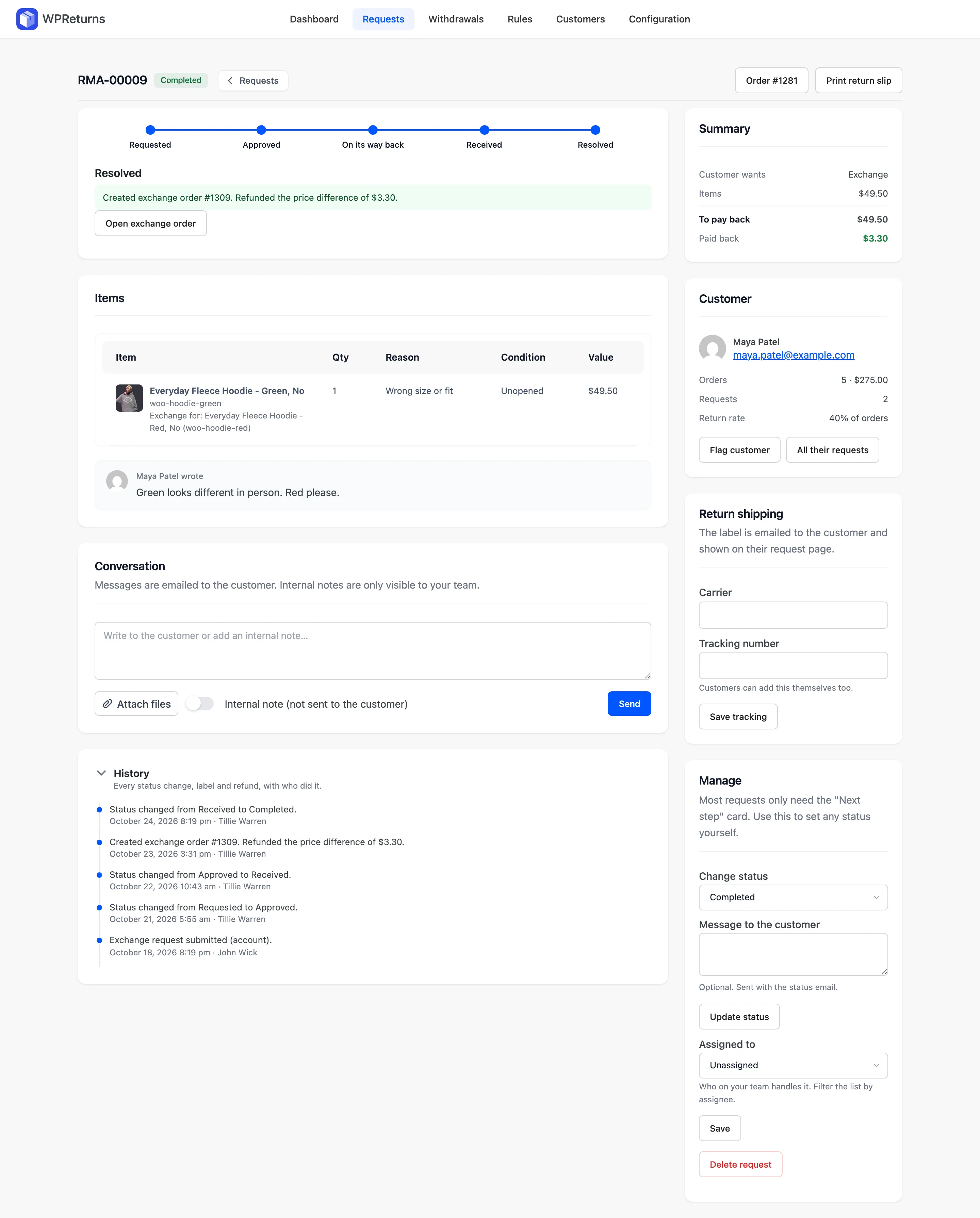
Swap for another size or color
Customers pick another variation of the item they are sending back. WPReturns creates a linked WooCommerce order and marks the original as returned. A higher price is paid through a pay-for-order link.
ExchangesPut store credit before the refund
Credit first lists store credit above the refund on the request form. Add a bonus percentage to make it the better deal. Credit is paid as a coupon or a DevDiggers Wallet balance.
Store creditMark final-sale items
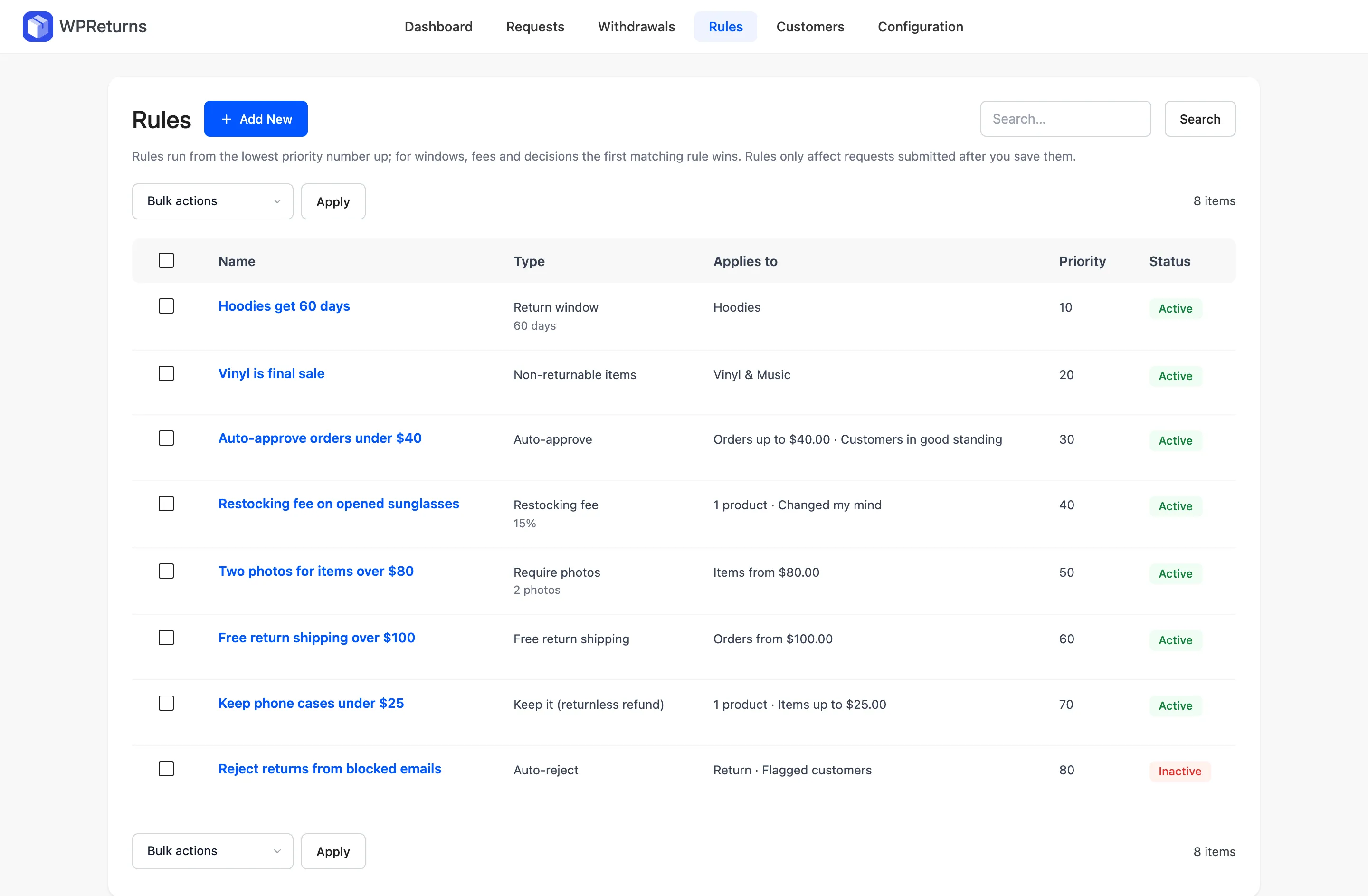
Tick Final sale on a product or pick final-sale categories. Those items can't be chosen on the return form and the product page says so. EU withdrawals still apply unless the item is exempt under Article 16.
Return rulesFlag wear-and-return
Fraud checks flag items marked used or worn and requests made late in the window. They also catch the same product returned before. Serial returners can be held for review.
Fraud protectionSee which products come back
The dashboard shows reasons by product and the most returned products. Export every request to CSV when you review sizing with your supplier.
Analytics
The real screens
Screens from the WPReturns demo store, an apparel shop with real orders and requests.


Configure it in this order
- 1
Turn on size exchanges
Go to DevDiggers Plugins > WPReturns > Configuration > General and tick Offer exchanges. On the Resolutions tab tick Offer other sizes, colors and options of the same product.
- 2
Show store credit first
On the Resolutions tab tick Show store credit before refund on the request form. Set Bonus credit (%) to the extra you are willing to give.
- 3
Pick final-sale categories
Open Configuration > Return Policy and choose your Final-sale categories. For a single product tick Final sale on its General tab.
- 4
Turn on fraud checks
Under Configuration > Fraud Protection tick Score requests and flag serial returners. Set Late in window at (%) and choose what happens to serial returners.
- 5
Ask for photos on damage reasons
Under Configuration > Reasons tick Photo required for reasons such as damaged or wrong item.
Fashion and apparel questions
Ask the team or read the docs if your question is not here.
Can customers exchange for a different size?
Yes. They pick another size or color of the same product on the return form. You can also let them choose any product in your store.
What happens if the new item costs more?
The customer pays the difference through a pay-for-order link on the exchange order. If it costs less, the difference is refunded.
Can I stop returns on sale items?
Yes. Mark products or whole categories as final sale and they drop off the return form. The product page tells shoppers before they buy.
How does WPReturns spot wardrobing?
It flags items marked used or worn, returns late in the window and products returned before. Flags show on the request. Flagged customers' requests wait for a person.
Are returned clothes put back in stock?
Yes, when you mark the return received with Restock ticked. Items marked damaged or defective are never restocked.
Is there a free version?
Yes. The free plugin covers the returns portal, photos, final-sale items and refunds. Exchanges, store credit, fraud flags and analytics are part of WPReturns Pro.
Other store types
Free plugin on wordpress.org
Set up WPReturns for fashion and apparel
Start with the free plugin and the EU withdrawal button. Move to Pro from $99 a year when you want credit, exchanges and rules.