Migrate your WooCommerce returns plugin and keep your history
To migrate your WooCommerce returns plugin, open Configuration > Import in WPReturns and press Import on your old plugin's card. Your requests come over with their items, status, dates and messages. The old plugin's data is only read, and nothing is imported twice.
1wp-admin Configuration / Import
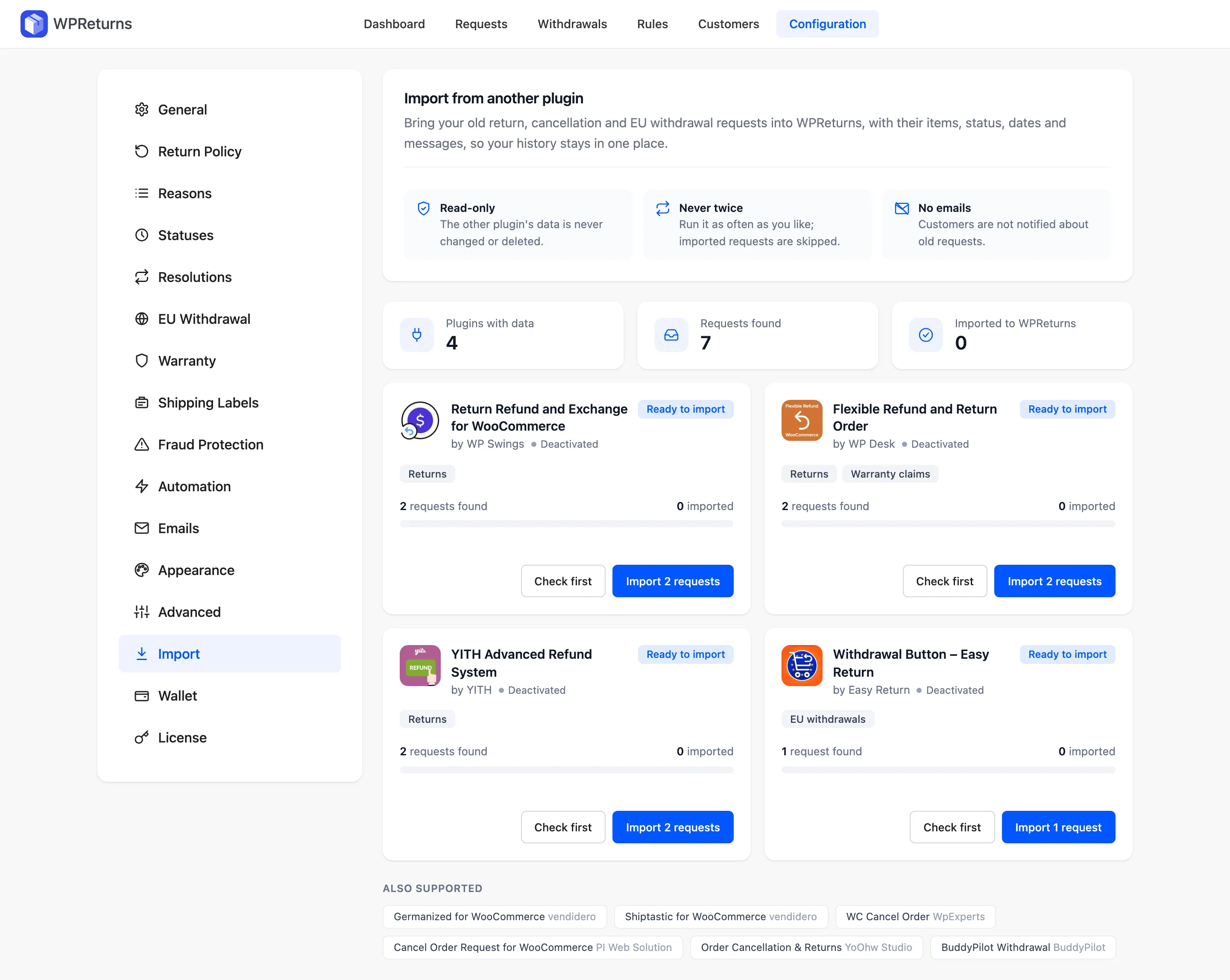
What comes over when you import
Every request is rebuilt in WPReturns from the old plugin's own records. It reads like any other request on its screen.
Order and items
Each request stays on its WooCommerce order, with the same items and quantities.
Status and type
Returns, cancellations, EU withdrawals and warranty claims keep their place in the process.
Dates
The day the customer asked and the day it was decided both come over.
Messages and notes
The conversation stays in order. Private shop notes stay private.
Reasons
Matched to your WPReturns reasons by name. Any other wording is kept in the note.
Refunded amounts
Completed requests show what was paid back. Your history adds up.
Plugins you can switch from 10 and counting
Free and paid editions are both read. WPReturns finds their data whether the plugin is active or deactivated.
| Plugin | Made by | What is imported |
|---|---|---|
| Return Refund and Exchange for WooCommerce | WP Swings | Returns |
| Flexible Refund and Return Order | WP Desk | Returns and warranty claims |
| YITH Advanced Refund System | YITH | Returns |
| Germanized for WooCommerce | vendidero | EU withdrawals |
| Shiptastic for WooCommerce | vendidero | Returns |
| WC Cancel Order | WpExperts | Cancellations |
| Cancel Order Request for WooCommerce | PI Web Solution | Cancellations |
| Order Cancellation & Returns | YoOhw Studio | Cancellations and returns |
| Withdrawal Button – Easy Return | Easy Return | EU withdrawals |
| BuddyPilot Withdrawal | BuddyPilot | EU withdrawals |
How to migrate in three steps
- 1
Install WPReturns next to the old plugin
Both can run at once. The setup wizard sets your return window, resolutions and the EU withdrawal button in about three minutes.
- 2
Check first and import
Check first counts what is ready without writing anything. Import copies the requests in batches and shows the count as it goes.
- 3
Switch off the old plugin
Handle the open imported requests in WPReturns. Deactivate the old plugin and customers see one returns form.
The import is in the free plugin. WPReturns Pro adds exchanges, store credit, warranty claims and rules from $99 a year.
Migration questions
Ask the team or read the docs if your question is not here.
Is the import in the free plugin?
Yes. Configuration > Import is part of the free WPReturns plugin and works the same in Pro. You do not need a license to bring your history over.
Do I have to keep the old plugin active?
No. WPReturns reads the old plugin's tables and order data directly. The import also works after you deactivate it. Do not delete the old plugin first if it removes its data on uninstall.
Will customers get emails about their old requests?
No. The import sends no emails and fires no request hooks or webhooks. Customers only hear from WPReturns about requests they start after the move.
What if I run the import twice?
Nothing is copied twice. Each imported request remembers where it came from. A second run only brings over requests made since the first one.
What happens to orders the old plugin gave its own status?
They keep it. Statuses such as "Return Requested" stay listed in WooCommerce after the old plugin is switched off. Those orders do not disappear from the orders screen.
Are wallet balances or store credit moved?
No. The import moves requests. Coupons the old plugin created stay in WooCommerce, and a wallet balance stays with the plugin that holds it.
Free plugin on wordpress.org
Run WooCommerce returns from one dashboard
Start with the free plugin and the EU withdrawal button. Move to Pro from $99 a year when you want credit, exchanges and rules.