The EU withdrawal button explained for online stores
The EU withdrawal button is the online "withdraw from contract here" function that Directive (EU) 2023/2673 added as Article 11a of the Consumer Rights Directive. It applies from June 19, 2026 to distance contracts made through a website or app. Consumers use it to cancel in two steps and get a dated acknowledgement.
Each requirement below cites the article it comes from. A checklist and a WooCommerce setup follow at the end.
Each legal statement is checked against the EUR-Lex texts. This page explains the law and is not legal advice.
- Applies from
- June 19, 2026Member States had to adopt the rules by December 19, 2025.
- Legal basis
- Article 11a of Directive 2011/83/EUInserted by Directive (EU) 2023/2673.
- Step 1 label
- withdraw from contract hereOr an unambiguous corresponding formulation.
- Step 2 label
- confirm withdrawalOnly these words or an unambiguous corresponding formulation.
- Withdrawal period
- 14 daysUp to 12 months longer if withdrawal information was missing.
- Refund deadline
- 14 daysCounted from the day you are told of the withdrawal (Article 13).
The withdrawal flow in WPReturns
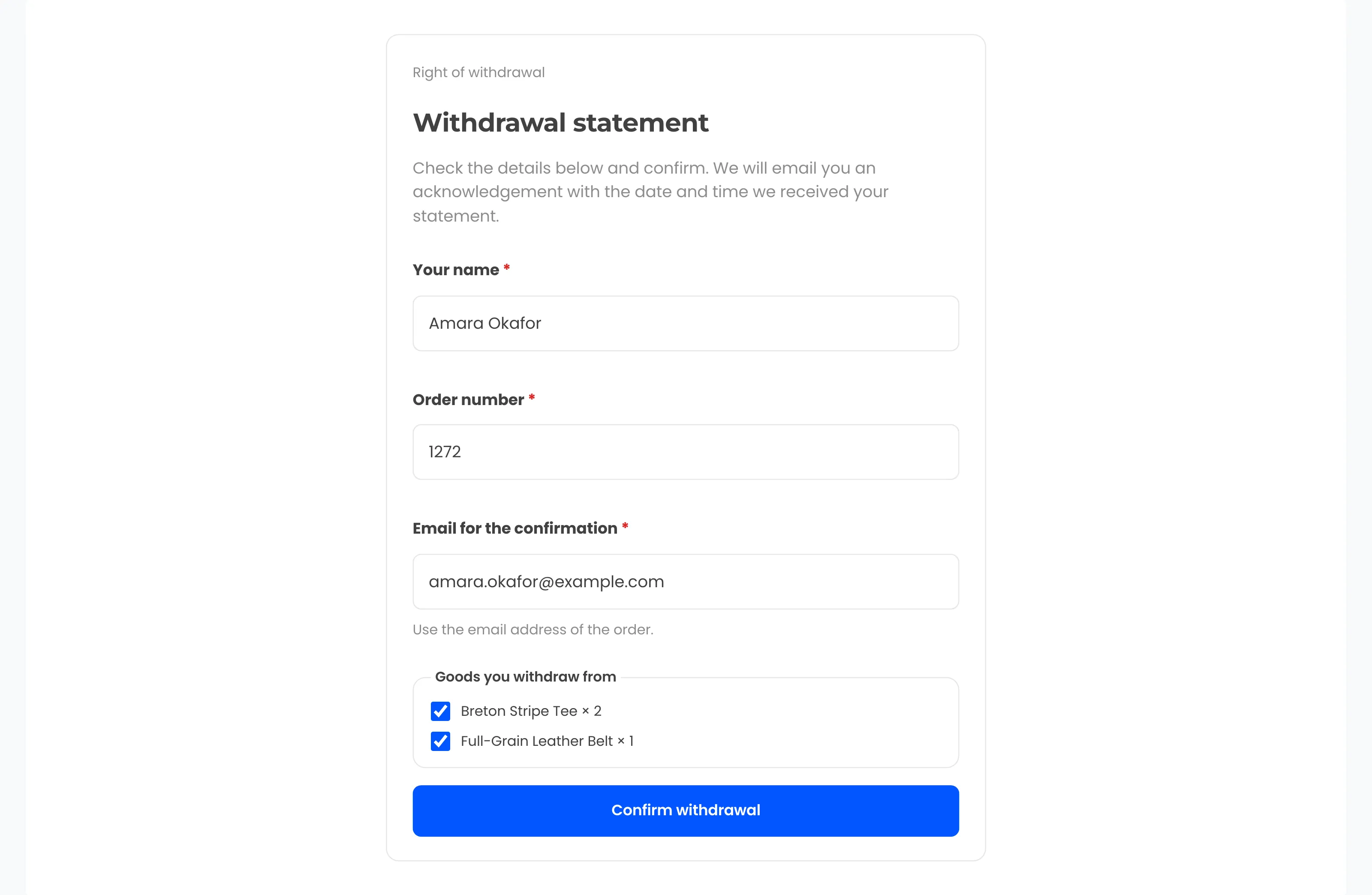
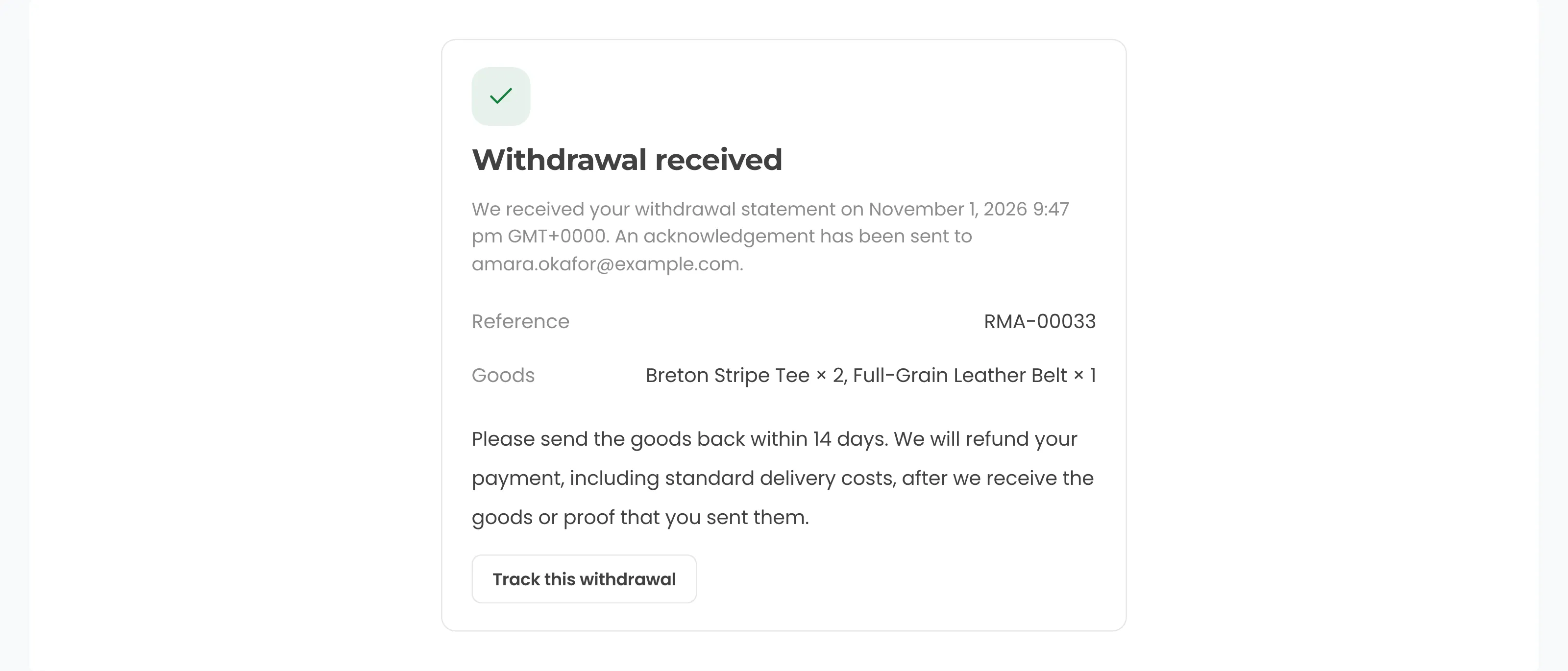
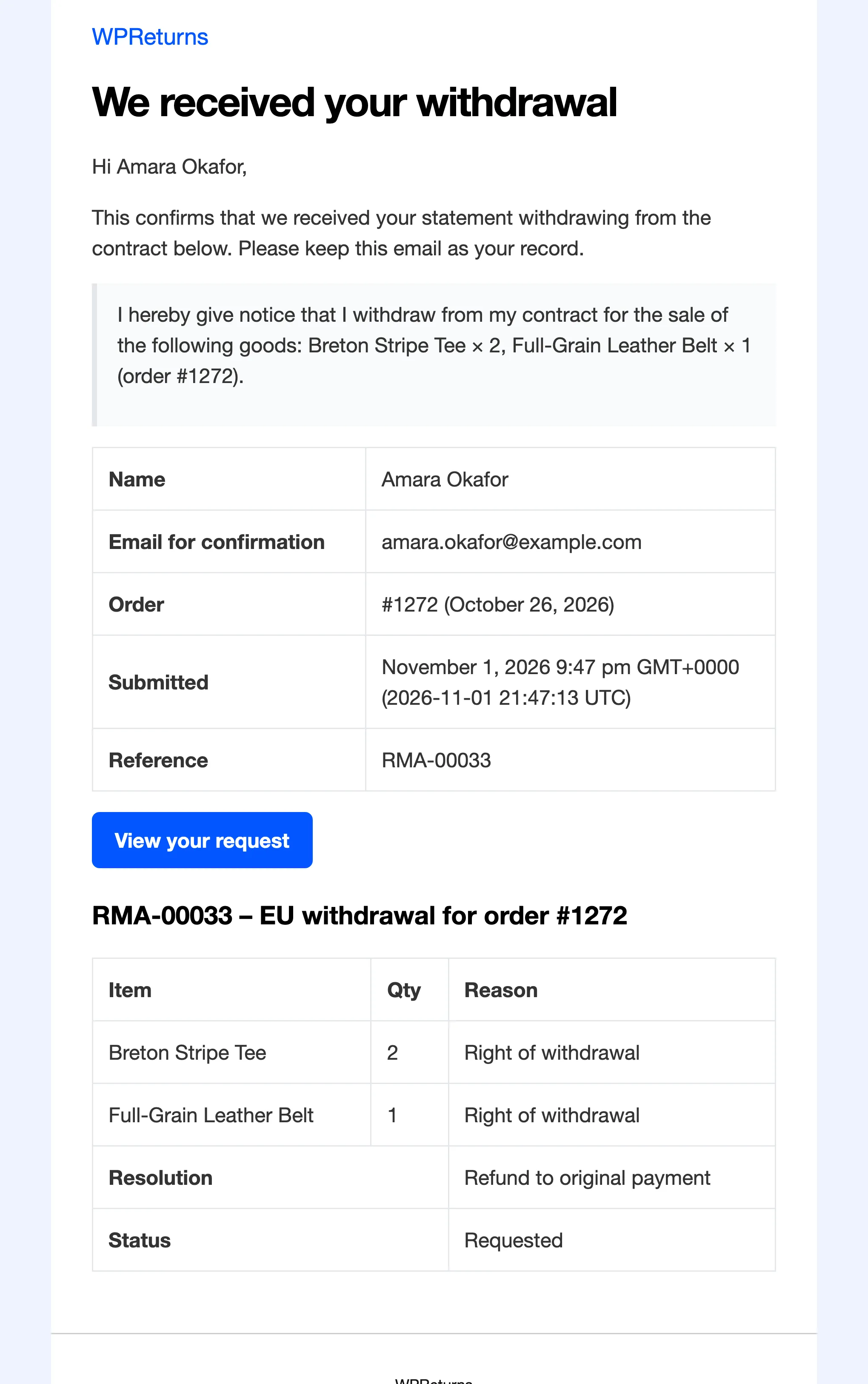
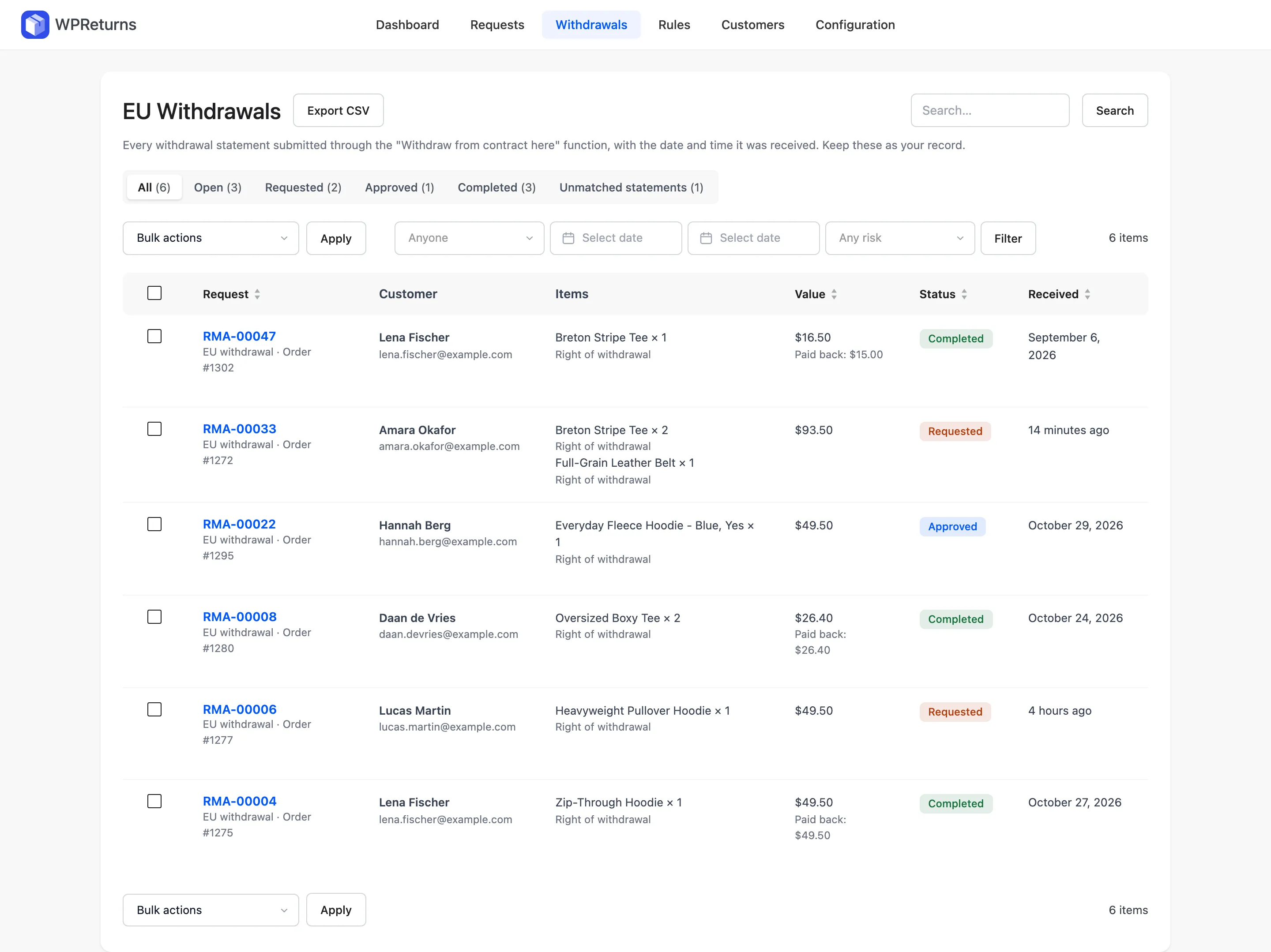
Real screens from the WPReturns demo store follow one withdrawal from the statement to the log.
 Yash KapoorFounder of DevDiggers and developer of WPReturns
- Updated
- Legal text
- Checked against EUR-Lex
What is the EU withdrawal button?
The EU withdrawal button is a function on an online shop that lets a consumer withdraw from a distance contract. It is labeled "withdraw from contract here" and leads to a short statement. The consumer confirms with a "confirm withdrawal" button and gets an acknowledgement on a durable medium.
Recital 37 of Directive (EU) 2023/2673 gives the aim. Consumers should be able to withdraw from a contract just as easily as they concluded it.
The function sits next to the existing ways to withdraw. Consumers can still use the model withdrawal form in Annex I(B) or any other unequivocal statement, such as an email (Article 11(1)).
In German the function is often called the Widerrufsbutton. Shop owners also search for it as the withdraw from contract button.
Who has to offer a withdrawal button?
Traders who conclude distance contracts with consumers through an online interface must offer the withdrawal function. A website or an app counts as an online interface. It applies wherever the consumer has a right of withdrawal under Directive 2011/83/EU, for goods, services and digital content alike.
Article 11a(1) covers distance contracts concluded by means of an online interface. Recital 37 extends the duty beyond financial services to all distance contracts subject to the right of withdrawal.
Sales to businesses are outside the directive, which protects consumers. Goods exempt under Article 16 carry no right of withdrawal. The function does not have to cover them.
Stores based outside the EU that sell to EU consumers should check with a lawyer how the national rules apply to them.
When did the withdrawal button become mandatory?
Member States had to adopt and publish their national rules by December 19, 2025. They must apply those rules from June 19, 2026. From that date a shop selling online to EU consumers needs the withdrawal function on every order where the right of withdrawal exists.
Both dates come from Article 2(1) of Directive (EU) 2023/2673. The directive itself was signed on November 22, 2023.
The directive works through national law. Your obligations come from your country's transposing act, which can add detail on wording and enforcement.
What does the two-step withdrawal flow require?
The flow has two buttons with a short statement in between. The first button reads "withdraw from contract here" and the second reads only "confirm withdrawal". The statement asks for the consumer's name, the contract and an email or other electronic address.
1Article 11a(1)
Show the withdrawal function
Label it "withdraw from contract here" or an unambiguous equivalent in an easily legible way. Keep it prominently displayed and available for the whole withdrawal period.
2Article 11a(2)
Collect the withdrawal statement
Let the consumer easily give or confirm their name, details of the contract and the electronic means for the confirmation.
3Article 11a(3)
Confirm the withdrawal
Submit the statement through a function labeled only "confirm withdrawal" or an unambiguous equivalent.
4Article 11a(4)
Send the acknowledgement
Send an acknowledgement of receipt on a durable medium without undue delay. Include its content and the date and time of submission.
Both labels allow an unambiguous corresponding formulation. The confirmation button may carry only those words. In other languages use the official wording of your national law.
Avoid vague labels such as Submit or Continue on the confirmation button. They do not tell the consumer that pressing it ends the contract.
Recital 37 adds that the trader can let the consumer withdraw from part of a contract with several items.
Recital 37 says a logged-in consumer should not have to identify themselves or the contract again. Prefilling the statement meets that.
What must the acknowledgement contain and when is a withdrawal on time?
After the consumer confirms, the trader must send an acknowledgement of receipt on a durable medium without undue delay. It must include the content of the statement and the date and time of submission. The withdrawal counts as on time if the statement was submitted before the period expired.
Email is the usual durable medium. The amended model instructions in Annex I(A) give email as the example.
Timeliness is set by Article 11a(5). What counts is when the consumer submitted the statement.
Keep your own record of each statement with the date and time. It is your evidence if a customer disputes the timing.
What must you tell customers before they buy?
Article 6(1)(h) now asks traders to explain the right of withdrawal before the contract. That means the conditions, time limit and procedures, plus the model withdrawal form. Where the withdrawal function applies, you must also say that it exists and where to find it.
Directive (EU) 2023/2673 added the reference to the withdrawal function to Article 6(1)(h).
If this information is missing, Article 10 extends the withdrawal period by 12 months.
How long is the withdrawal period?
Consumers have 14 days to withdraw without giving a reason (Article 9). For goods it runs from physical possession, or from the last item when one order arrives in parts. Missing withdrawal information extends the period by 12 months (Article 10).
- Goods: 14 days from physical possession by the consumer or a third party they name (Article 9(2)(b)).
- Several goods delivered separately: 14 days from the last item.
- Services and digital content not on a tangible medium: 14 days from the conclusion of the contract.
- No withdrawal information: the period ends 12 months after the normal one (Article 10(1)).
- Information given late within those 12 months: the period ends 14 days after the consumer receives it (Article 10(2)).
How must you refund a withdrawal?
Refund all payments, including standard delivery, within 14 days of being told of the withdrawal (Article 13). Use the same means of payment unless the consumer expressly agrees otherwise at no cost to them. You may wait until the goods arrive or the consumer shows proof of sending.
Store credit can't be the default refund for a withdrawal. Only the consumer's express agreement allows another means of payment.
Extra delivery costs are not refunded when the consumer chose a delivery more expensive than your cheapest standard option (Article 13(2)).
The consumer sends the goods back within 14 days of withdrawing (Article 14(1)). They pay the direct return cost only if you told them so in advance.
The consumer is liable only for loss of value from handling beyond what is needed to check the goods (Article 14(2)). Article 14(5) rules out any other liability, which leaves no room for a restocking fee.
Which products are exempt from withdrawal?
Article 16 lists contracts with no right of withdrawal. Exempt goods include made-to-order or personalized goods, goods that spoil quickly and sealed hygiene goods opened after delivery. Digital downloads are exempt only once the consumer has consented to immediate supply and accepted losing the right.
- (c) Goods made to the consumer's specifications or personalized for them.
- (d) Goods liable to deteriorate or expire rapidly.
- (e) Sealed goods unsuitable for return for health or hygiene reasons once unsealed.
- (f) Goods inseparably mixed with other items after delivery.
- (i) Sealed audio, video or software unsealed after delivery.
- (j) Newspapers, periodicals and magazines other than subscriptions.
- (k) Contracts concluded at a public auction.
- (m) Digital content not on a tangible medium, once supply has begun with the consumer's prior express consent and acknowledgment.
Article 16 removes the right of withdrawal. It does not stop you from accepting returns on those goods under your own policy.
Do UK and US stores need a withdrawal button?
Directive (EU) 2023/2673 is EU law, and we found no withdrawal button requirement in the UK's Consumer Contracts Regulations 2013. Those regulations still give a 14-day cancellation right. In the US there is no general federal right to return goods, but California requires a limited return policy to be displayed.
UK: the cancellation period for goods ends 14 days after the consumer takes possession (regulation 30). It runs up to 12 months longer if cancellation information was missing (regulation 31).
Refunds are due within 14 days of getting the goods back or proof of sending. They go back by the same means of payment unless agreed otherwise (regulation 34).
California: a retailer that does not give a full refund, credit or exchange within seven days must display its policy. If it does not, the buyer can return the item with proof of purchase for a full refund within 30 days (Civil Code section 1723).
If you sell to the UK or US as well, limit the withdrawal button to EU and EEA orders. Show your own return policy to every customer.
EU withdrawal button checklist
Use this checklist to review your store against Article 11a and the rules around it. Each item maps to an article in Directive 2011/83/EU as amended. Tick every line before you rely on your setup, and have a lawyer review your terms and translations.
- A function labeled "withdraw from contract here" is visible on the site for the whole withdrawal period.
- Guests can reach it without logging in or downloading an app.
- The statement asks only for name, order details and an email for the confirmation.
- Logged-in customers find those details filled in.
- The final button reads "confirm withdrawal" and nothing else.
- An acknowledgement email goes out at once with the statement and the date and time.
- You keep a dated record of every statement.
- Pre-contract information says the function exists and where it is.
- The period counts from delivery and covers the last item of split orders.
- Withdrawals are refunded to the original payment method within 14 days.
- No restocking fee is charged on a withdrawal.
- Products exempt under Article 16 are marked.
- Downloads ask for express consent at checkout.
How does WPReturns add the EU withdrawal button to WooCommerce?
WPReturns is a WooCommerce plugin whose free version covers every step of Article 11a. It adds the "Withdraw from contract here" link, a prefilled statement and a "Confirm withdrawal" button. An acknowledgement email with the statement and time follows, and a Withdrawals screen keeps the record.
- Article 11a(1): the link shows in the footer, in My Account, on orders still in the withdrawal period and in order emails.
- Article 11a(2): the statement asks for name, order number and email. Logged-in customers find them prefilled and no reason is asked for.
- Article 11a(3): the second step uses a Confirm withdrawal button.
- Article 11a(4): the acknowledgement email carries the full statement and the date and time it was received.
- Article 11a(5): the Withdrawals screen logs every statement with its time and exports to CSV.
- Article 13: every withdrawal is resolved as a refund through WooCommerce.
- Article 14: restocking and return shipping fees are never charged on a withdrawal.
- Article 16: products and categories can be marked exempt, and downloads get a consent checkbox at checkout.
Order and email matching, a honeypot and a limit on attempts per hour stop the form being used to email strangers. Statements that match no order are still kept.
Sources
- Directive (EU) 2023/2673 (EUR-Lex)
- Directive 2011/83/EU on consumer rights (EUR-Lex)
- Consumer Contracts Regulations 2013 (legislation.gov.uk)
- California refund policies (Office of the Attorney General)
- Order Withdrawal in WooCommerce 11.1 (WooCommerce Developer Blog)
This page explains the law for store owners. It is not legal advice. Check your national transposition or ask a lawyer for your situation.
EU withdrawal button questions
Ask the team or read the docs if your question is not here.
Is the withdrawal button mandatory for every online shop?
It is required for distance contracts with consumers made through a website or app where a right of withdrawal exists. B2B sales and goods exempt under Article 16 fall outside it.
Can I show the button only in My Account?
That is risky. Article 11a(1) asks for a function that is prominently displayed and easily accessible. Guests who bought without an account also need to reach it.
Can I ask the customer for a reason?
Article 9 says no reason is needed to withdraw. The statement only has to cover name, contract details and the electronic means for the confirmation. Keep any reason field out of the withdrawal flow.
Do customers still have other ways to withdraw?
Yes. Article 11a adds the function alongside the model withdrawal form and any other clear statement such as an email. You must accept all of them.
Can a customer withdraw from part of an order?
Recital 37 says the trader can offer withdrawal from part of a contract with several items. The statement then names the items concerned.
What counts as a durable medium?
Email is the common choice. The amended model instructions in Annex I(A) use email as the example for the acknowledgement.
Does the button apply to digital downloads?
Yes, until supply starts with the consumer's prior express consent and acknowledgment that they lose the right (Article 16(m)). Ask for that consent at checkout.
Does WooCommerce have a withdrawal button built in?
WooCommerce 11.1 added an optional Order Withdrawal form at /my-account/withdraw-order/. It adds no link to the store and does not change the order or refund it. Run one withdrawal form only and switch the core feature off if you use WPReturns.
Is the WPReturns withdrawal button free?
Yes. The whole flow is in the free plugin. That covers the acknowledgement email, the model form, the withdrawal log with CSV export and digital consent.
Free plugin on wordpress.org
Add the withdrawal button with the free plugin
WPReturns Free adds the two-step withdrawal flow, the acknowledgement email, the model form and the withdrawal log to WooCommerce. Pro adds store credit, exchanges and rules for your ordinary returns.