WooCommerce store credit for returns that keeps the money in your shop
WooCommerce store credit for returns is a refund paid as balance the customer spends in your shop. WPReturns issues it as a single-use coupon tied to the customer's email or as DevDiggers Wallet balance. An optional bonus and a credit-first form make it the option shoppers pick before cash.
The problem
Every cash refund walks out of your catalog
A refund sends the money back to the card it came from. Nothing in that refund brings the customer back to browse again.
Shopify returns apps such as Loop and ReturnGO sell bonus credit as a headline feature. Their pricing adds a monthly plan and sometimes a fee per return (compared on October 30, 2026).
How WPReturns solves it
WooCommerce store credit for returns in two forms
Pick how credit is paid. A coupon is single use and restricted to the customer's email with an expiry you set. Wallet balance goes to account holders through the DevDiggers Wallet plugin.
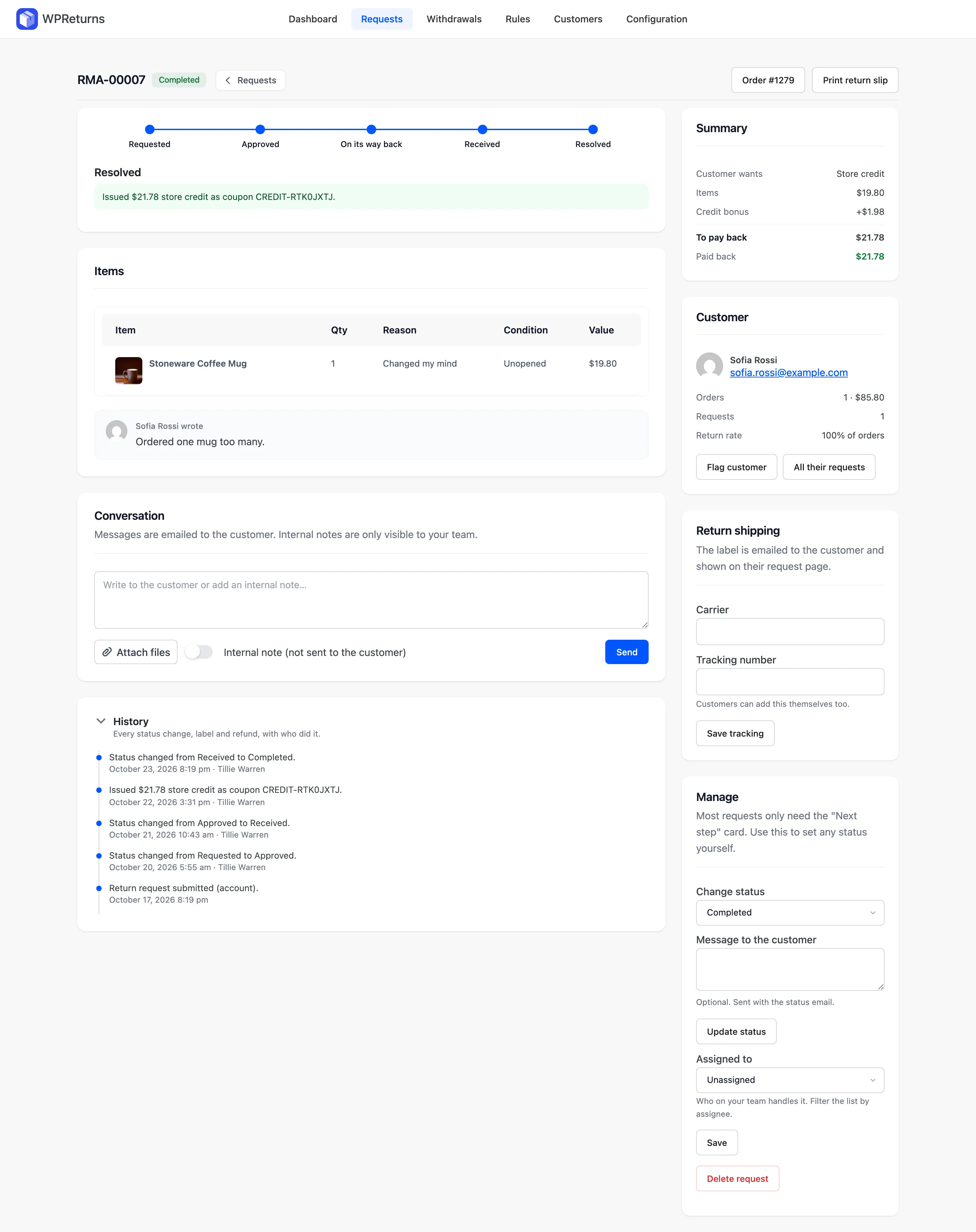
Set a bonus such as 10% on top of the item value. With Credit first on, the request form lists store credit above the refund with the bonus already added.
EU withdrawals and order cancellations always refund to the original payment method. Store credit is offered on ordinary returns only.
- Single-use credit coupons
- DevDiggers Wallet balance
- Bonus credit percentage
- Credit listed before refund
- Coupon tied to customer email
- Copyable code on request page
- Counted as revenue kept
The real screens

How it works
- 01
Show credit first
The request form lists store credit before the refund and shows the bonus amount. The customer picks one option per request.
- 02
Receive the items
You approve the request and mark the parcel received. Automatic resolution can issue the credit after an inspection delay you set.
- 03
Issue the credit
Resolving creates the coupon code or adds the Wallet balance. The code appears on the customer's request page with a copy button.
- 04
Spend it at checkout
The customer applies the coupon or pays from the Wallet. Your dashboard counts that credit under Revenue kept.
The settings involved
These settings control this feature. The plugin explains each one next to its field.
Free or Pro
- Refunds through WooCommerce to the gateway or recorded
- Store credit as a coupon or Wallet balance
- Bonus credit percentage
- Credit listed before the refund
- Coupon expiry in days
- Separate return fee for credit
Store credit questions
Ask the team or read the docs if your question is not here.
Can I add a bonus to steer customers away from refunds?
Yes. Set Bonus credit (%) and the request form shows the larger credit amount next to the refund. The bonus is added on top of the item value.
Can someone else use a customer's credit coupon?
No. Each coupon is single use and restricted to the email on the request. Set an expiry in days or use 0 to keep it valid.
Does it work with a wallet plugin?
Yes. Choose DevDiggers Wallet balance under Pay store credit as and the credit lands in the customer's wallet. It works with the WooCommerce Wallet plugin at devdiggers.com/product/woocommerce-wallet/.
Can I push store credit on an EU withdrawal?
No. A withdrawal is refunded to the original payment method as Article 13 of Directive 2011/83/EU expects. Store credit is offered on ordinary returns only.
Is store credit counted in my reports?
Yes. The Revenue kept card on the dashboard adds credit issued and the value of exchanged items. Compare it with Refunded for the same period.
Is there a free version?
The free WPReturns plugin refunds through WooCommerce to the gateway or as a recorded refund. Store credit, the bonus and the Wallet payout are part of WPReturns Pro.
Related features
- ExchangesCustomers swap for another size or any product in your store and the price difference is charged or refunded.
- AnalyticsSee return rate and refunds next to revenue kept. Top reasons, the most returned products and a CSV export sit on the same screen.
- Return rulesSet return windows and final-sale items per product or customer and let rules approve or reject routine requests.
- PricingOne yearly license with every feature and no per-return fees.
Free plugin on wordpress.org
Store credit for your WooCommerce store
Start with the free plugin and the EU withdrawal button. Move to Pro from $99 a year when you want credit, exchanges and rules.