Stop WooCommerce return fraud before you approve the refund
WooCommerce return fraud covers serial returners, worn items sent back and repeat claims on the same product. WPReturns scores every request and shows the reasons as flags on the request screen. Serial returners can be held for review or rejected, while EU withdrawals are only flagged and never refused.
The problem
Return abuse hides inside ordinary requests
A dress worn once and returned on day 29 looks like any other return. So does a customer asking for their eighth refund this year.
WooCommerce returns plugins offer little here. The most we found was an email block and a per-user limit (compared on October 30, 2026).
How WPReturns solves it
How WPReturns flags WooCommerce return fraud
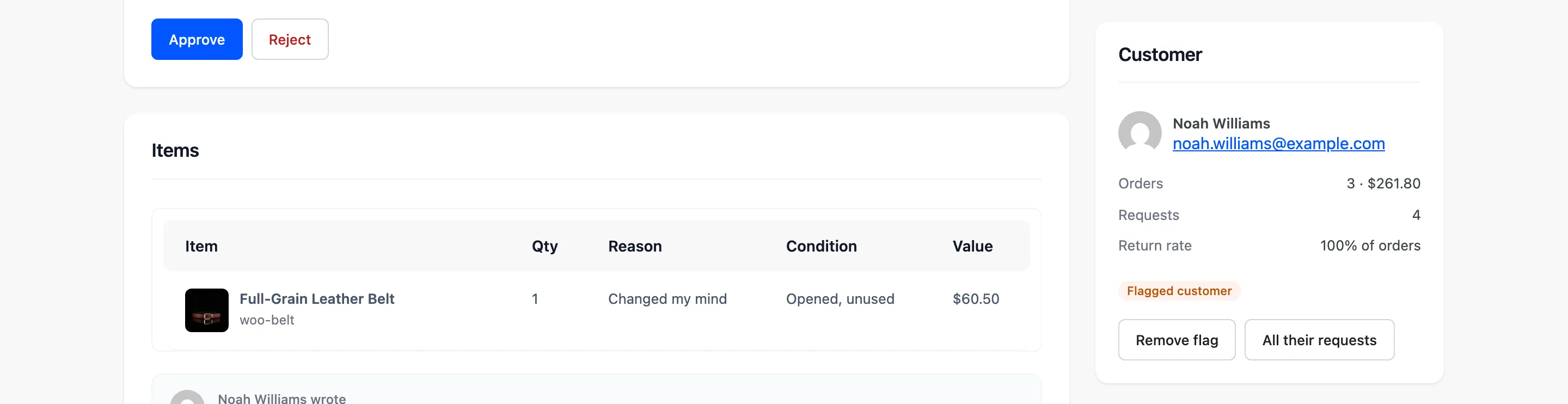
Each request gets a risk score from seven flags. They include Serial returner, Used or worn, Very quick return, Late in window, Same product returned before and High value.
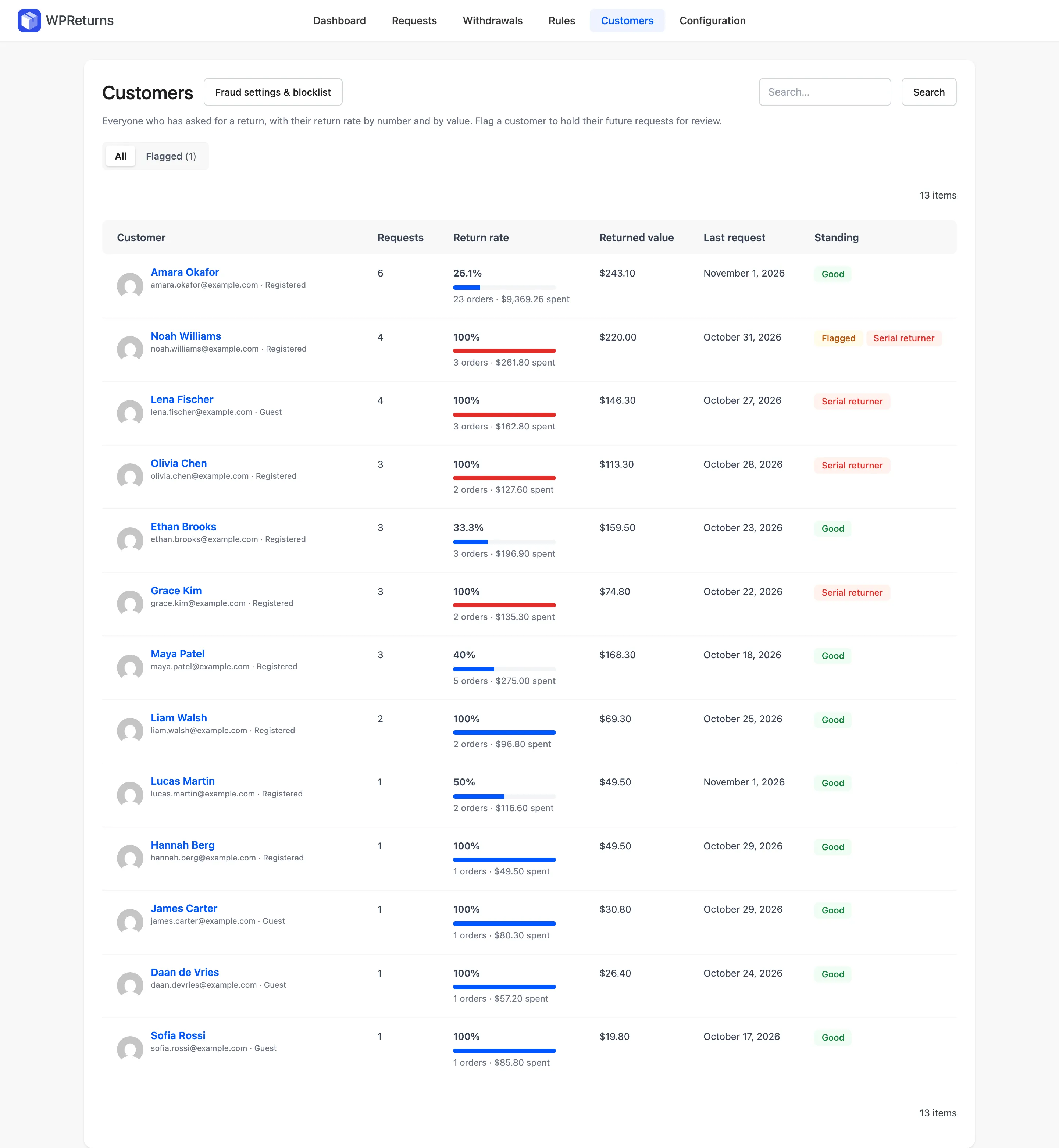
A serial returner is a customer above your return rate threshold by orders or by spend. You choose whether their requests wait for review or are rejected automatically.
The Customers screen lists every customer's return count and rate with a meter. Flag someone by hand and rules can target flagged customers only.
- Risk score per request
- Serial returner flag
- Used or worn flag
- Very quick return flag
- Late in window flag
- Repeat product returns
- Email and domain blocklist
- Customers screen
The real screens
How it works
- 01
Set your thresholds
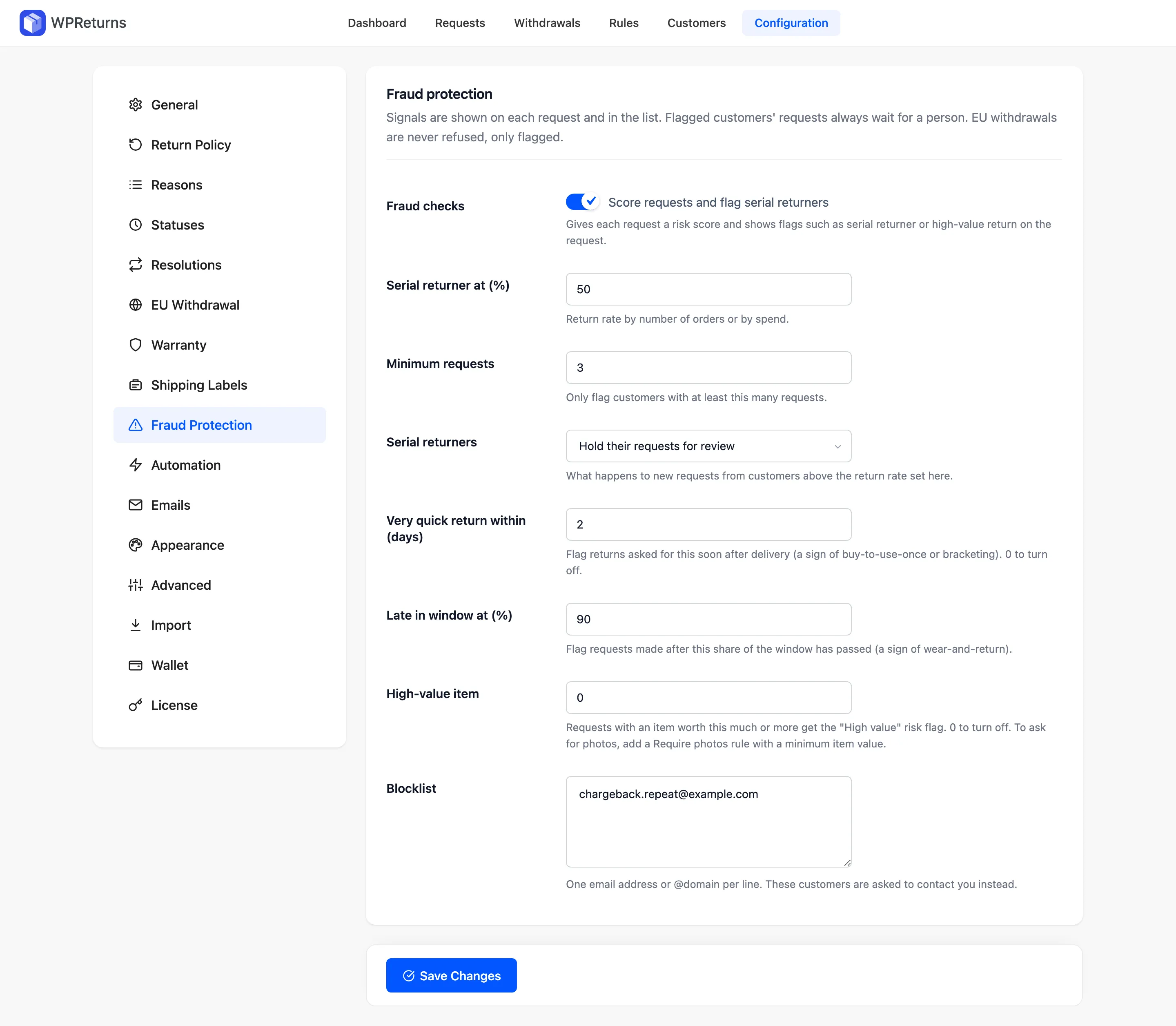
Choose the return rate that marks a serial returner and the minimum number of requests. Set the days that count as a very quick return.
- 02
Score each request
Every new request gets a score and its flags. They show as pills on the Requests list and on the request screen.
- 03
Review the customer
Open the Customers screen to see return counts and rates. Flag the customer or add their email or domain to the blocklist.
- 04
Decide with context
Approve or reject with the flags in view. EU withdrawals are flagged for your attention but never refused.
The settings involved
These settings control this feature. The plugin explains each one next to its field.
Free or Pro
Not part of the free plugin.
- Risk score and flags on every request
- Serial returner detection
- Wear-and-return and high-value flags
- Blocklist of emails and domains
- Customers screen with return rates
- Rules that target flagged customers
Fraud protection questions
Ask the team or read the docs if your question is not here.
What counts as a serial returner?
A customer whose return rate by orders or by spend passes your threshold. The defaults are a 50% rate with at least 3 requests. You can change both.
Can it reject requests automatically?
Yes. Set Serial returners to Reject their requests automatically. Auto-reject rules can also target flagged customers.
Are EU withdrawals blocked for flagged customers?
No. A withdrawal is a legal right. It gets flagged for your attention and is never refused.
What does the blocklist match?
Email addresses and whole @domains, one per line. Blocked customers see a message asking them to contact you.
Do customers see their risk flags?
No. Flags only appear to your team on the request screen, the Requests list and the Customers screen. The customer sees a normal request page.
Is there a free version?
The free WPReturns plugin handles returns, refunds and the EU withdrawal button. Risk scores, serial returner flags, the blocklist and the Customers screen are part of WPReturns Pro.
Related features
- Return rulesSet return windows and final-sale items per product or customer and let rules approve or reject routine requests.
- AnalyticsSee return rate and refunds next to revenue kept. Top reasons, the most returned products and a CSV export sit on the same screen.
- Returns portalA returns page in My Account and a guest portal where shoppers pick items and quantities and add photos.
- PricingOne yearly license with every feature and no per-return fees.
Free plugin on wordpress.org
Fraud protection for your WooCommerce store
Start with the free plugin and the EU withdrawal button. Move to Pro from $99 a year when you want credit, exchanges and rules.