WooCommerce cancel order requests before the parcel leaves
A WooCommerce cancel order request lets a customer ask to cancel an order before it ships. WPReturns adds a Request cancellation button to pending, on-hold and processing orders. Approving it cancels the order and refunds the payment in one step, and Instant cancellations do that as soon as the request arrives.
The problem
Cancel emails arrive after the label is printed
A customer who changed their mind writes to support. By the time someone reads it the order is packed and the cancellation turns into a return.
Even when you catch it in time, canceling takes three screens. You find the order, change its status and issue the refund by hand.
How WPReturns solves it
WooCommerce cancel order requests in the same queue as returns
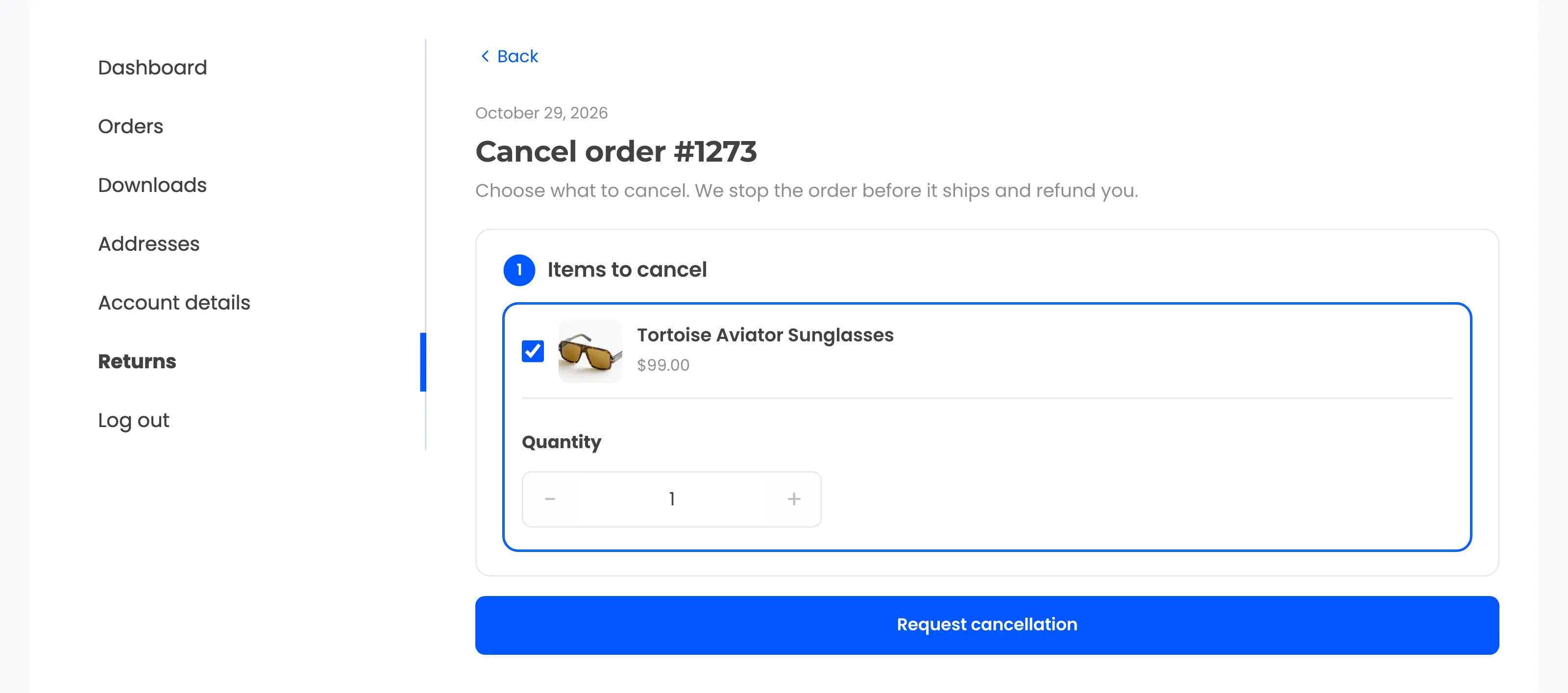
Customers see Request cancellation on orders in the statuses you choose. Guests reach the same button through the returns portal.
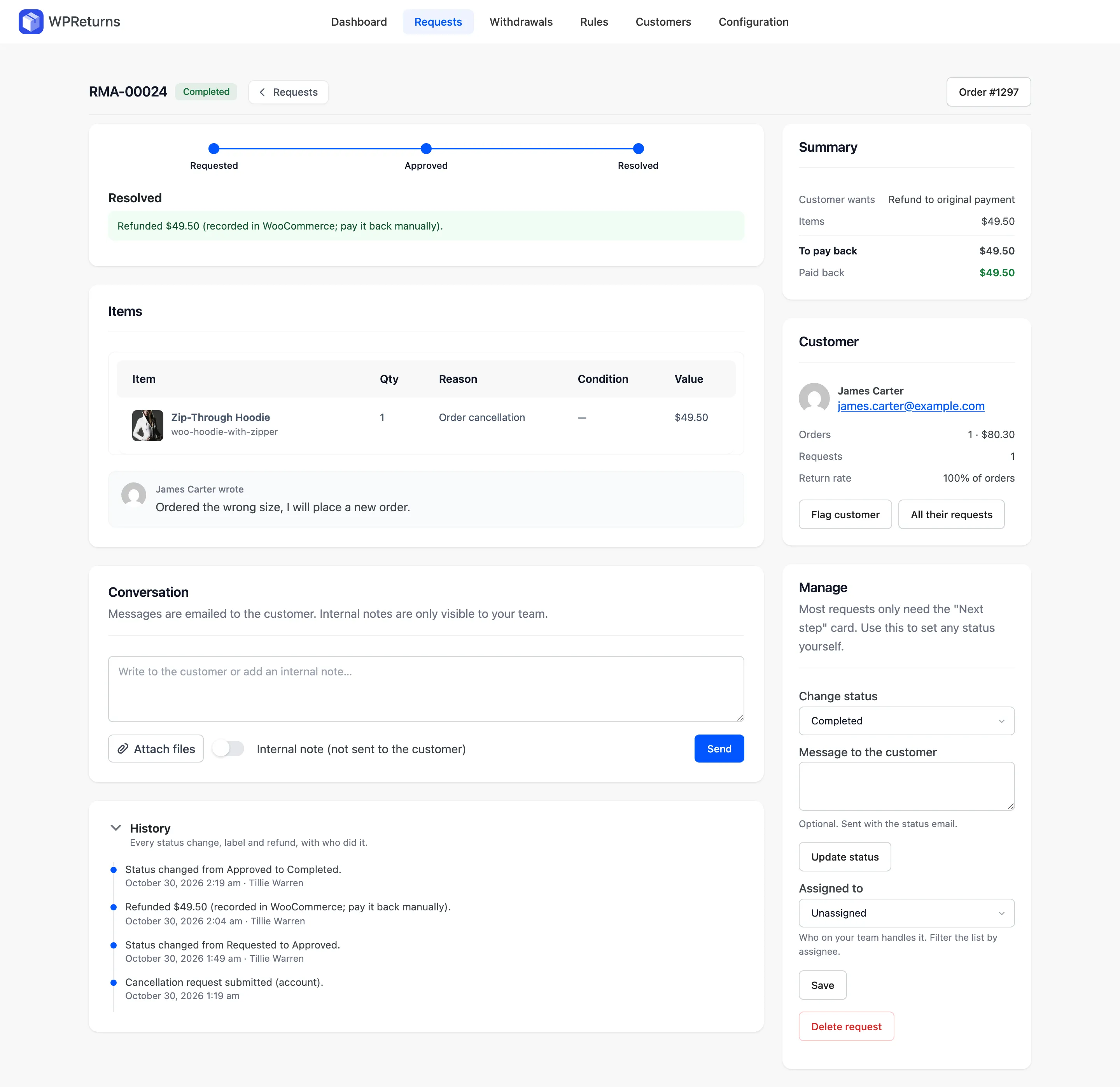
Each request lands in your Requests list as a cancellation with a shorter progress tracker. Approve it and WPReturns cancels the WooCommerce order and refunds it.
Turn on Instant cancellations and the plugin approves, cancels and refunds as soon as the request arrives. Cancellations always refund to the original payment method.
- Cancel before shipping
- Pending and processing orders
- Guest cancellation requests
- One-click cancel and refund
- Instant cancellations
- Refund through the gateway
- Customer email at each step
The real screens
How it works
- 01
Ask to cancel
The customer clicks Request cancellation on an order that has not shipped yet. Guests find the order on the portal first.
- 02
Review the request
The request shows the order and its items in your list. You approve or reject it with an optional message.
- 03
Cancel and refund
Approving cancels the order and refunds the payment through WooCommerce. The customer gets an email at each step.
The settings involved
These settings control this feature. The plugin explains each one next to its field.
Free or Pro
- Request cancellation button on unshipped orders
- Cancellations from the guest portal
- Cancellable order statuses you choose
- Approve to cancel and refund in one step
- Instant cancellations with no manual review
- Bulk actions on the Requests list
Order cancellations questions
Ask the team or read the docs if your question is not here.
Which orders can be canceled?
By default orders that are pending payment, on hold or processing. Change the list under Cancellable order statuses. Completed orders go through a return.
Does approving refund the customer?
Yes. Approval cancels the WooCommerce order and refunds it. The refund goes through your gateway when it supports refunds or is recorded for you to pay back.
Can cancellations be approved automatically?
Yes. Instant cancellations approves, cancels and refunds as soon as the request arrives. Leave it off to review each request yourself.
Can guests cancel without an account?
Yes. Guests find the order on the returns portal with the order number and billing email. The Request cancellation button shows there for orders in a cancellable status.
Is a cancellation request the same as an EU withdrawal?
No. A cancellation request follows your own statuses and waits for your approval. An EU withdrawal is a legal right that counts as exercised once the customer submits it.
Is there a free version?
Yes. Cancellation requests, guest cancellations and approve-to-refund are in the free WPReturns plugin. Instant cancellations and bulk actions are part of WPReturns Pro.
Related features
- Returns portalA returns page in My Account and a guest portal where shoppers pick items and quantities and add photos.
- EU withdrawal buttonAdds the Withdraw from contract here and Confirm withdrawal buttons with a dated acknowledgement email and a log you can export.
- Return rulesSet return windows and final-sale items per product or customer and let rules approve or reject routine requests.
- PricingOne yearly license with every feature and no per-return fees.
Free plugin on wordpress.org
Order cancellations for your WooCommerce store
Start with the free plugin and the EU withdrawal button. Move to Pro from $99 a year when you want credit, exchanges and rules.