
To reduce return fraud in WooCommerce, track each customer’s return rate and flag the patterns that point to abuse. Then send risky requests to a person before any money goes back. WooCommerce core does none of this, and a returns plugin has to add it.
The Appriss Retail 2026 Total Retail Loss Benchmark Report puts preventable fraud and abuse at 14.2% of $706 billion in 2025 returns, or $100 billion. This guide reads the fraud code and settings of WPReturns Pro 1.0.0, checked on our WooCommerce demo store in November 2026. We build WPReturns and use its screens as the worked example.
First comes what return fraud looks like in an online store and why WooCommerce leaves it to you. Then you get the 8 controls in priority order and how a risk score adds up. The guide closes with the EU withdrawal rule and how to stay fair to honest buyers.
What Is Return Fraud in WooCommerce?
Return fraud in WooCommerce is a return that breaks your policy on purpose, like a used item sent back as new. Return abuse, such as heavy bracketing, is the softer cousin and costs far more in total. Both cost you shipping, handling and stock you can no longer sell at full price.
Appriss Retail splits the two in its 2026 benchmark report, built on a survey of 1,000+ consumers and its retail clients’ data. Abuse means excessive but legitimate returns, worth $86 billion in 2025. Fraud means fake receipts, stolen goods or other malicious returns, worth $14 billion.
That split matters for a small store. Most of the money leaks through customers who return too much, and a fraud check that only hunts criminals misses it.
The retailer side looks similar. In the Appriss Retail 2024 Consumer Returns Report, 60% of 150 retail executives reported wardrobing and 47% reported bracketing. For online returns, an empty box was the most common fraud sign, named by 31%.
These are the patterns a WooCommerce store sees most:
- Wardrobing is an item worn or used once and returned as new, often late in the return window.
- Bracketing is ordering two or three sizes and keeping one.
- Serial returning is one customer sending back more than half of what they order, month after month.
- An empty box or swapped item is a parcel that arrives empty or with a cheaper item inside.
- Repeat product returns are the same customer returning the same product again and again.
Note: Not every pattern in that list is fraud. Bracketing and quick returns often have honest reasons. Treat them as signals to look at and keep blocking for the clear cases.
Why WooCommerce Has No Return Fraud Checks by Default
WooCommerce core handles refunds from the order screen and stops there. Its refunding orders guide covers automatic and manual refunds, with no return requests, return history or customer return rates. Anything that spots a pattern across orders has to come from a plugin.
The plugin options are thin too. In our review of WooCommerce returns plugins, compared on October 30, 2026, only WP Swings RMA listed abuse controls on its page. Those were blocking by email and per-user request limits.
None of the WooCommerce returns plugins we checked listed return scoring or a serial returner flag. On hosted Shopify apps, fraud tools sit in paid tiers, such as Loop’s blocklists and Return Prime’s Thrive AI.
That gap is why we built fraud scoring into WPReturns Pro. One honest limit: its score is a fixed sum of weights from your own store’s data. It has no shared fraud network.
You can copy the logic of each control below even with a different tool.
How to Reduce Return Fraud in WooCommerce
You reduce return fraud in WooCommerce with eight controls that work on every request. Two measure the customer, four check the request itself and two decide who looks at it or who is stopped. The order below follows where eCommerce return fraud costs the most.
Return rates come first because abuse by frequent returners is the largest share of the loss in the Appriss data. Empty boxes and wardrobing follow, because retailers name them most. The low-weight signals close the list:
- Track the return rate per customer.
- Flag serial returners whose rate passes your threshold.
- Ask for photos by reason or above an item value.
- Spot wardrobing signals: used items, late requests and repeat products.
- Hold flagged requests for a person and check the parcel before refunding.
- Keep a blocklist for known abusers.
- Flag high-value returns.
- Flag very quick returns.
Each control below names the WPReturns Pro setting and its default. All of them sit under DevDiggers Plugins > WPReturns, and the fraud protection settings docs explain each field.
1. Track the Return Rate per Customer
The return rate per customer is the share of a customer’s paid orders that came back as requests. It separates a one-off return from a habit, which no single request can show. WPReturns Pro works out two rates for every customer: one by count and one by value.
The count rate divides return requests by paid orders. Returns, exchanges and withdrawals count, and rejected or canceled requests do not. A customer with 2 requests across 10 orders has a 20% rate by count.
The value rate divides returned value by total spend. A customer who returns one $400 jacket out of $500 in total spend has an 80% rate by value, even with a low count. Both rates stop at 100%.
WPReturns > Customers
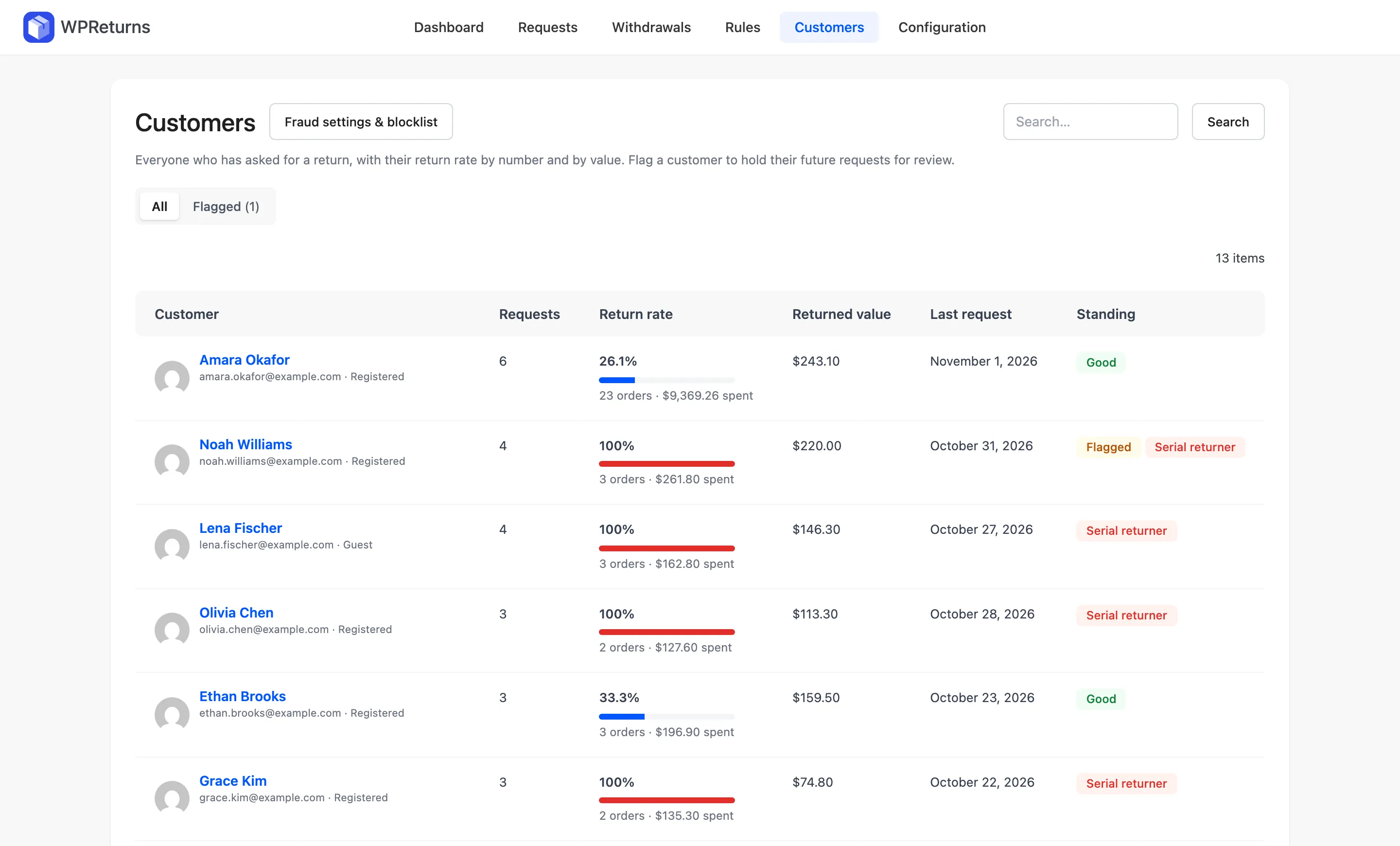
The Customers screen lists everyone who has asked for a return.
The Return rate column shows the higher of the two rates with a meter. The meter turns red for serial returners. The Standing column reads Good, Flagged, Serial returner or Blocked.
Start each review with the meter. The customers and fraud docs walk through every column and row action.
2. Flag Serial Returners Before They Cost More
A serial returner in WPReturns Pro is a customer whose return rate passes your threshold, with enough requests behind it to mean something. Both conditions must hold. The defaults are a 50% return rate and at least 3 requests, and both live on the Fraud Protection tab.
The two settings are “Serial returner at (%)” and “Minimum requests”. The plugin compares the higher of the count rate and the value rate with your threshold. Either habit can trigger the flag.
WPReturns > Configuration > Fraud Protection
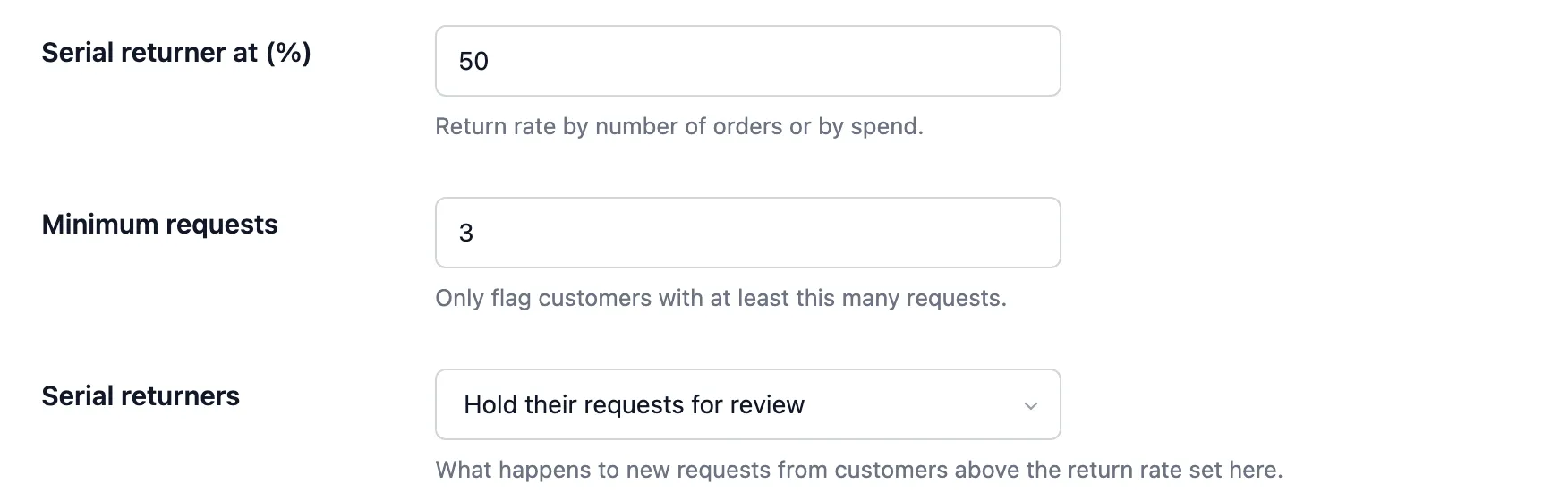
The check runs before the new request is saved. It counts earlier requests only. With the defaults, a customer’s fourth request is the first one that can carry the flag.
A first-time buyer with one order and one return looks like 100% and still gets no flag.
The “Serial returners” setting decides what happens next. “Hold their requests for review” is the default. “Reject their requests automatically” rejects new requests with a message asking the customer to contact you.
3. Ask for Photos Where They Settle the Question
Photos are the cheapest proof you can ask for, and they answer the empty box problem before a parcel ships. Ask for them by return reason and for items above a value you choose. WPReturns stores each file in a private folder with a random name, outside the media library.
Photo-required reasons are part of the free plugin. On the Reasons tab, switch on “Photo required” for any reason where a picture settles the question, such as a damaged item. The return reasons docs cover that table.
WPReturns > Configuration > Reasons
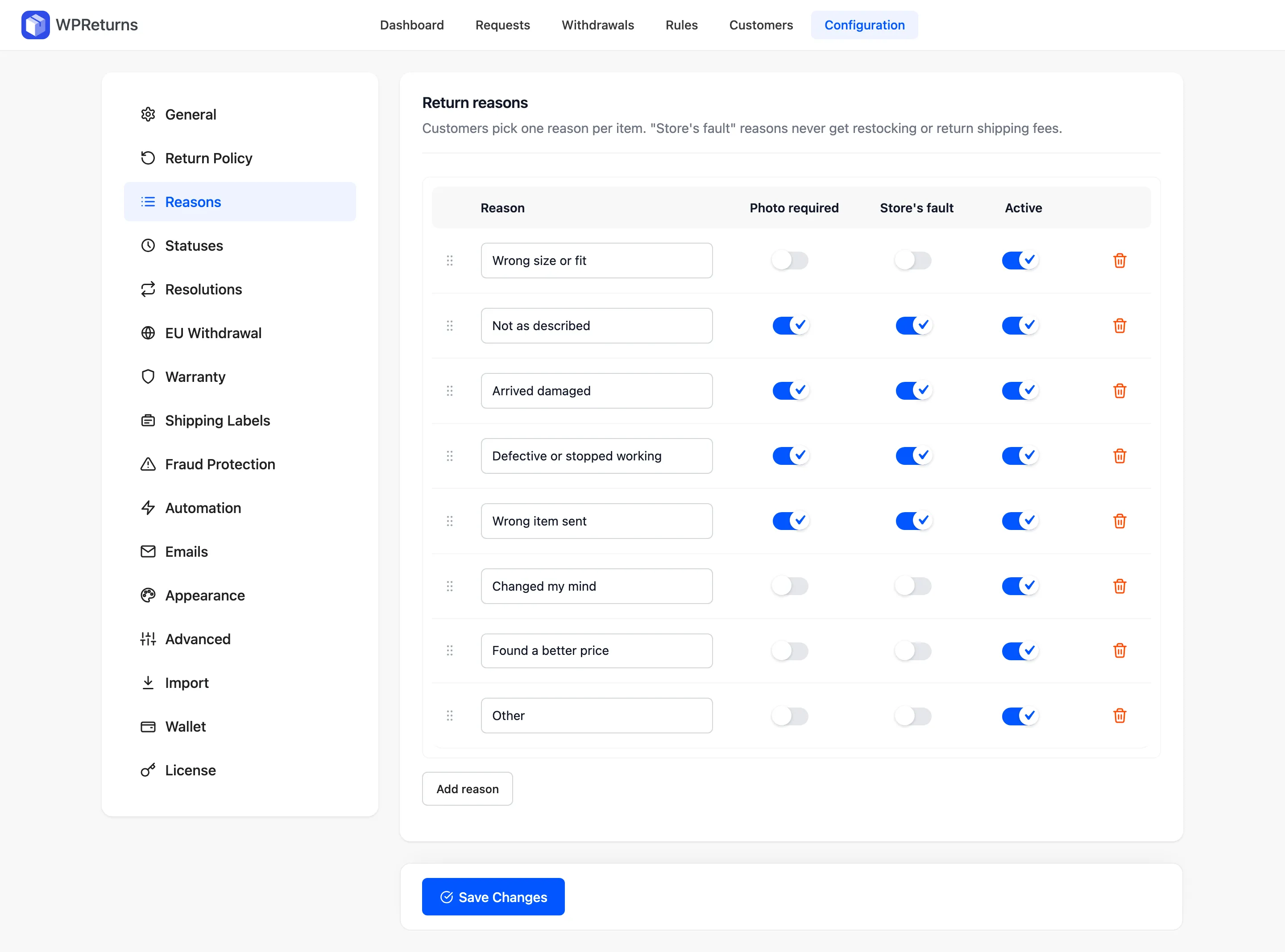
In WPReturns Pro, a Require photos rule asks for a minimum number of photos on matching items. Its conditions include a minimum item value plus products and categories. “Two photos for items over $80” is one rule.
The rules docs list every condition.
The photo check applies to returns, exchanges and warranty claims sent from the form. EU withdrawals and cancellations never ask for photos.
Tip: Ask for a photo of the item next to its tag or packaging. That one picture answers most “is it used” questions before the parcel ships.
4. Spot Wardrobing Signals in Each Request
Wardrobing shows up in a request as three signals: a used item, a late request and a product the customer returned before. WPReturns Pro raises a separate flag for each one.
The risk score adds their weights. A request that shows all three stands out in the list.
The condition comes from the customer. The request form asks for a condition per item: Unopened, Opened, unused, Used or worn, Damaged or Defective. Picking “Used or worn” raises the “Used or worn” flag.
My Account > Returns > Start a return
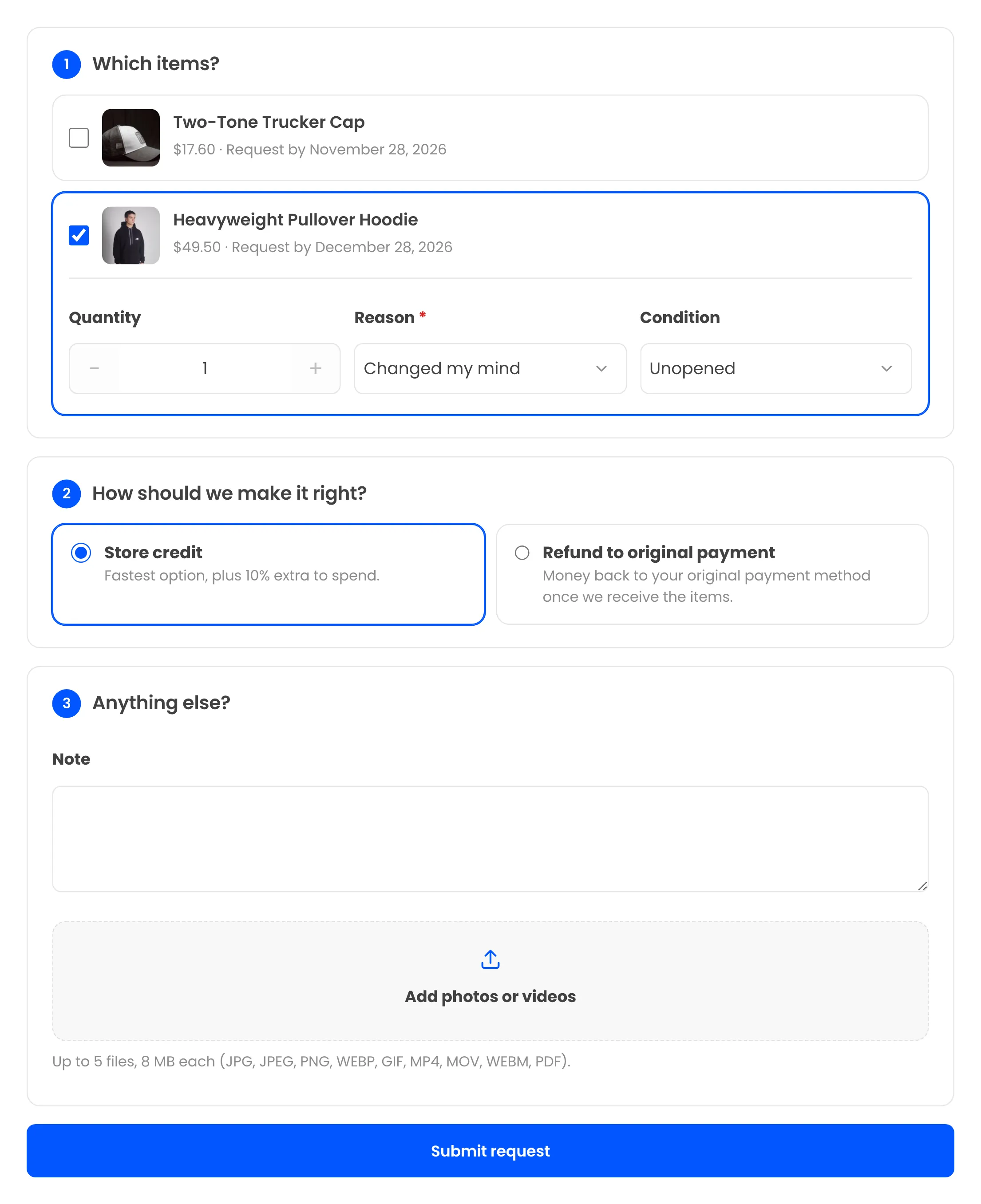
The late flag uses “Late in window at (%)”, which defaults to 90%. The window starts at the date the order was completed by default. On a 30-day window, a request on day 27 or later gets “Late in window”.
The repeat flag needs no setting. If any earlier request from the same customer included this product, the new request gets “Same product returned before”.
5. Hold Flagged Requests for a Person
With the default Hold setting, requests from a serial returner or a manually flagged customer wait at Requested for a person. Auto-approve and auto-reject rules skip them. Your team sees the order count, request count and return rate on the request screen before deciding.
You flag a customer by hand with “Flag customer” on the Customers screen or on a request. The request history then logs “Held for manual review because the customer is flagged.”
WPReturns > Requests > RMA-00018
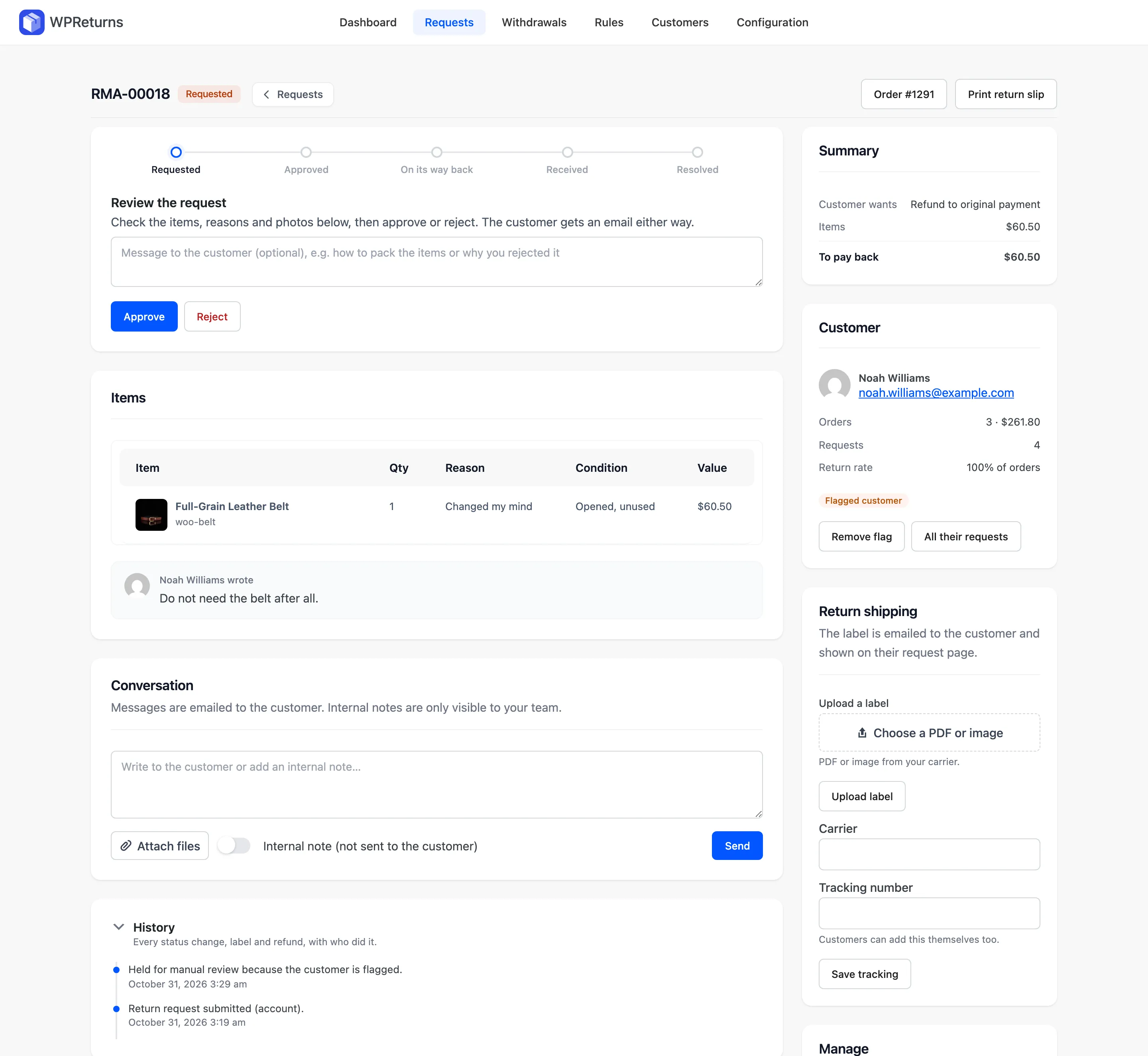
Auto-approve rules can also leave flagged customers out. Set the rule’s Customers condition to “Only customers who are not flagged”.
The hold covers the request. The parcel needs its own check, since an empty box only shows up when you open it. Leave “Automatic resolution” off on the Automation tab, or keep “Wait after receipt (hours)” at its default of 24 hours to inspect the items first.
6. Keep a Blocklist for Known Abusers
A blocklist stops customers you have already decided not to serve from starting a return online. WPReturns Pro reads one email address or one @domain per line. A matching customer sees a message asking them to contact you, and your team can still create a request for them.
The field is “Blocklist” on the Fraud Protection tab. An entry such as @example.com blocks every address on that domain. Blocked customers show a Blocked badge on the Customers screen.
WPReturns > Configuration > Fraud Protection

The blocklist matches emails and domains only. It does not match street addresses or devices.
A customer with a new email address gets past it. That is why it sits late in this list.
The blocklist never stops an EU withdrawal. The section on withdrawals below explains why.
7. Flag High-Value Returns
A high-value flag marks any request that includes an item worth at least an amount you set. It gives expensive returns a second look before you approve them and send a label. The request itself goes through as normal, and the flag only adds weight to the score.
The setting is “High-value item” on the Fraud Protection tab. It defaults to 0, and 0 turns the flag off. The plugin compares the line value, meaning the item price times the quantity being returned.
WPReturns > Configuration > Fraud Protection

Set it to a figure that fits your catalog, such as $200 for a fashion store. To ask for photos on those same items, add a Require photos rule with the same minimum item value.
8. Flag Very Quick Returns
A very quick return is a request made within a few days of the order being completed. It can point to buy-to-use-once behavior or bracketing, and it can also be an honest wrong size. WPReturns Pro flags it with “Very quick return within (days)”, which defaults to 2 days.
The clock starts at the date the order was marked Completed. Orders in any other status never get this flag. Set the value to 0 to turn it off.
WPReturns > Configuration > Fraud Protection
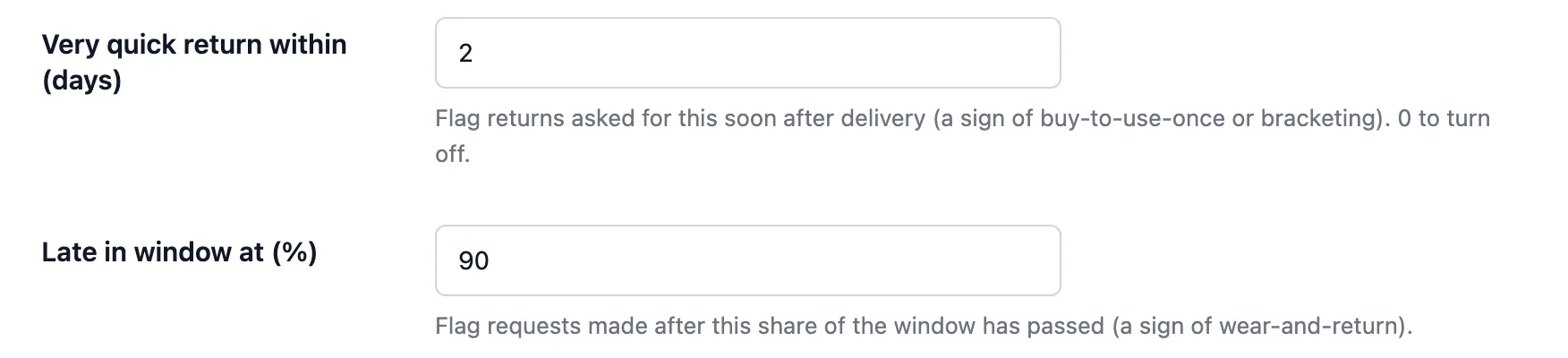
This flag carries a low weight on purpose. A shopper who receives a shirt on Monday and asks to return it on Tuesday often picked the wrong size. The flag earns its keep next to other signals, such as a high return rate.
How the Risk Score Adds Up
WPReturns Pro gives each new request a risk score from 0 to 100 by adding the weight of every flag it raises. Each flag counts once, however many items trigger it. The score sorts and filters the requests list, and the flag pills beside it explain the number.
The scoring runs once, when the request is submitted. This is the path a request from the form takes:
How a Request Is Scored and Held
- 1Blocklist checkA blocked email is turned away with a contact messageEU withdrawals skip it
- 2Seven signalsReturn rate, order dates and item details checkedCancellations skip it
- 3ScoreWeights of the raised flags added upCapped at 100
- 4Customer checkSerial returner or flagged customerHeld for a person
- 5RulesEvery other request meets your auto rulesApprove or reject
These are the flags and their weights in version 1.0.0:
| Flag | Weight | What triggers it |
|---|---|---|
| Serial returner | 40 | Return rate and earlier requests both reach your thresholds |
| Flagged customer | 40 | You flagged the customer by hand |
| Used or worn | 20 | The customer picked “Used or worn” as the condition |
| Same product returned before | 20 | An earlier request from the customer included this product |
| Very quick return | 15 | The request came within the quick-return days of completion |
| Late in window | 15 | The request came once your late-window share had passed |
| High value | 10 | An item line is worth at least your high-value amount |
Here is a worked example with high value set to $200. A customer returns a $250 coat marked “Used or worn” on day 28 of a 30-day window.
That request scores 20 for used, 15 for late and 10 for high value, which adds up to 45. If the customer were also a serial returner, it would add 40 and reach 85. A repeat product on top would make 105, and the score stops at 100.
The “Flagged only” filter on the requests list shows every request with a score above 0. Turn off “Fraud checks” and no request gets a flag or a score.
Why EU Withdrawals Are Flagged and Never Refused
An EU withdrawal is a legal right that a store cannot refuse online. A store may question the condition of the goods when they come back. WPReturns Pro therefore scores a withdrawal like any other request and never blocks, rejects or charges a fee on one.
Directive 2011/83/EU gives consumers 14 days to withdraw from a distance contract “without giving any reason”. Article 14(2) makes the consumer liable only for diminished value from handling beyond what was needed to check the goods.
So the law gives you a remedy for a worn item. That remedy is a claim about the value of the goods, and refusing the withdrawal is off the table.
In WPReturns Pro, this is built into each control:
- A blocklisted customer can still submit an EU withdrawal.
- Automatic serial returner rejection skips withdrawals even when it is turned on.
- Auto-reject rules never reject a withdrawal.
- Restocking fees and photo requirements never apply to a withdrawal.
With the default Hold setting, a withdrawal from a flagged customer still waits for a person. That person checks the goods and refunds as the law requires. The withdrawal flow itself is covered in our EU withdrawal button guide and on the EU withdrawal button feature page.
Worth checking: Diminished value claims depend on national law and the facts of each case. Get local legal advice before you deduct anything from a withdrawal refund.
Keep Fraud Checks Fair to Honest Customers
Most returns are honest, and a fraud setup that treats every customer as a suspect costs more than it saves. Flag first and block last. Keep automatic rejection for the clearest cases, and let a person decide everything in between.
Shoppers notice strict policies. In the Appriss Retail 2026 report, 47% of shoppers said they had held back from a purchase over return policy concerns. The same report found 56% of frequent returners had opted out of buying for the same reason.
Retailers feel the fraud side as well. The NRF and Happy Returns 2025 returns report estimates that 9% of all returns are fraudulent. Of the retailers that track incidents, 65% reported more empty box returns.
Flags avoid that trade-off. The customer sees the same request form and the same emails, and only your team sees the score.
A strict policy text on the product page can turn away buyers who would never have returned anything. A quiet flag on the requests list costs those buyers nothing.
What You Can Do on the Free Plugin
The free WPReturns plugin covers the basic checks: photo-required reasons, photo and video uploads with your own limits and final-sale products and categories. It also has one store-wide return window. Return rates, risk flags, the blocklist and rules need WPReturns Pro, which starts at $99 a year.
You can download the free WPReturns plugin or install it from Plugins > Add New. The free and Pro comparison lists the full split.
The fraud protection feature page shows the Pro side. The return rules feature covers auto-approve, auto-reject and photo rules.
Moving from another returns plugin keeps your history. Configuration > Import brings in requests from 10 other returns plugins, and the migration guide lists them. Imported requests count toward each customer’s return rate from day one, and WPReturns Pro pricing lists every plan.
Conclusion
To reduce return fraud in WooCommerce, start with the numbers: the return rate per customer and the flags that point to wardrobing. Ask for photos where they settle a question, and keep the blocklist for customers you have already decided about.
Then let a person make the final call, and open the parcel before the refund goes out. Holding flagged requests for review protects your margin without punishing the honest majority.
EU withdrawals stay outside all of it. Flag them for your records, check the goods when they arrive and refund as the law requires.