
Store credit vs refund comes down to who keeps the money after a return. Credit keeps the money in your store and a refund sends it back to the shopper. Most WooCommerce stores do best by offering both and letting a small bonus steer change-of-mind returns toward credit.
This guide checks every rule against its primary source, read on November 2, 2026. Those sources are EU Directive 2011/83/EU, the US federal gift card rule and two state codes. Every setting, label and calculation comes from the WPReturns Pro 1.0.0 code and its demo store.
You get a side-by-side comparison first and the cases where each option fits. Then come the rules on forcing and expiring credit, a worked bonus example, coupons versus Wallet balance and the setup steps.
Store Credit vs Refund Compared
In the store credit vs refund choice, credit is a balance or coupon the customer spends in your shop. A refund sends the money back to the card or method they paid with. Credit keeps revenue in your store, while a refund keeps trust when the store was at fault.
The two differ on the points a store owner weighs most:
| Point | Store credit | Refund |
|---|---|---|
| Where the money goes | Stays in your store | Back to the customer’s payment method |
| When the customer can use it | The moment the coupon or top-up is issued | When the payment provider settles the refund |
| EU withdrawal | Only if the customer expressly agrees | The default under Article 13 |
| Guests without an account | Yes as a coupon | Yes |
| Expiry | You set it within the law | Not applicable |
The NRF and Happy Returns 2025 report estimated that 19.3% of online sales would be returned in 2025. It also found that 76% of shoppers are more likely to choose a return option that gives an instant refund or exchange. That 76% is the case for fast credit.
A coupon a shopper can spend today competes well with a refund that waits on a parcel and a bank.
When a Refund Is the Right Call
A refund is the right call when the store caused the problem or when the law asks for one. That covers damaged, defective and wrong items, every EU withdrawal and cancellations before shipping. Pushing credit in those cases costs more goodwill than the sale it saves.
These are the returns where a refund should come first or stand alone:
- An item that arrived damaged, defective or wrong is the store’s fault. The customer did nothing wrong and expects their money back.
- An EU withdrawal under the 14-day legal right ends in a refund through the original payment method unless the customer agrees otherwise.
- A cancellation before shipping means the customer never received anything. Credit here feels like a penalty.
- A first-time buyer with a bad order may never spend the credit. It mostly leaves them annoyed.
- A large balance from a high-value item is a hard sell when it is locked in one shop.
WooCommerce sends a refund back through the gateway when the gateway supports it. The WooCommerce refunds docs explain that a manual refund only records the order as refunded. You then pay the customer back yourself.
My Account > Returns > RMA-00003
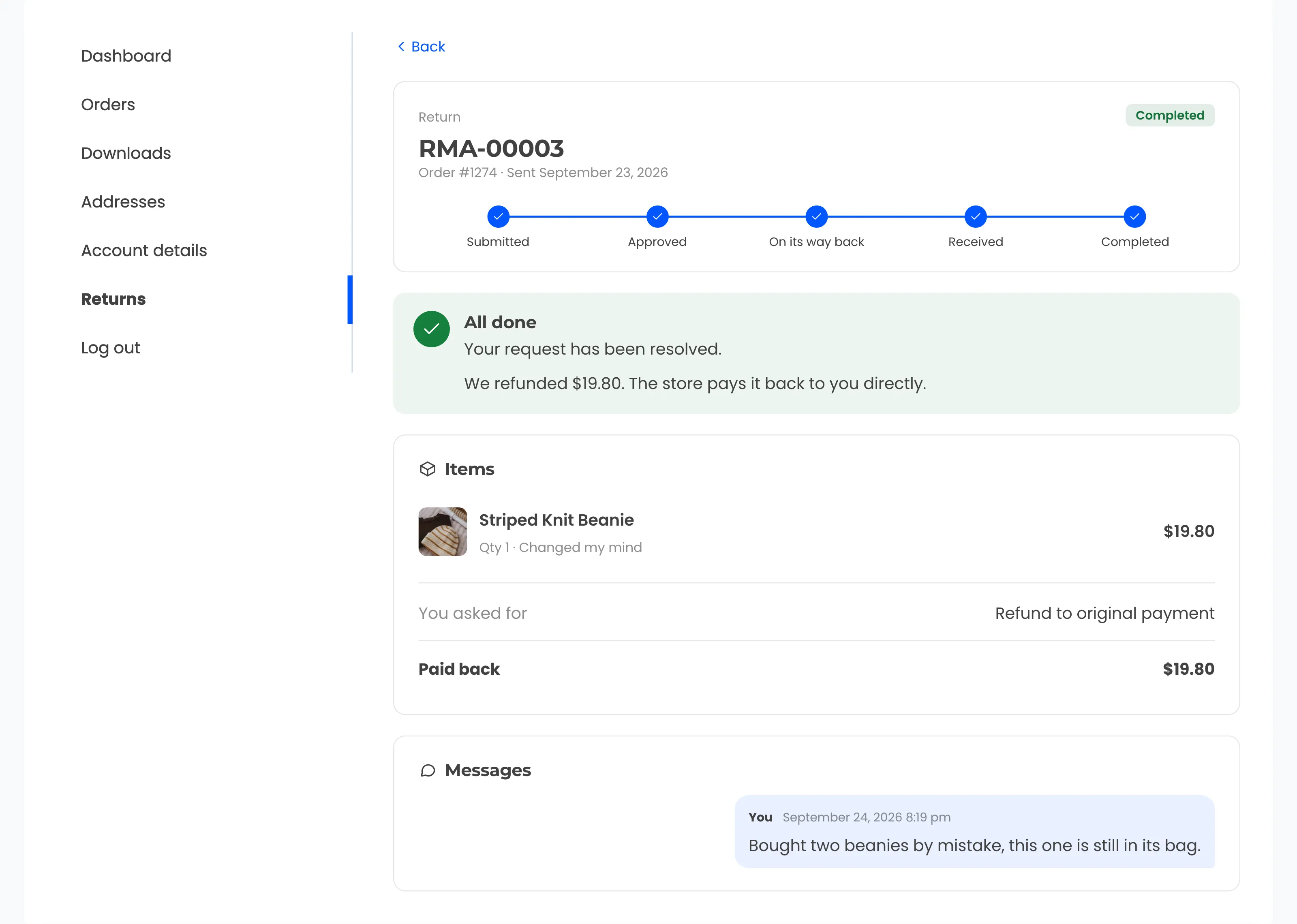
The customer sees the result on their request page. With a recorded refund the message reads “The store pays it back to you directly”, which tells them the money comes from you outside WooCommerce.
Store Credit or Refund: When Credit Makes Sense
Store credit makes sense when the product was fine and the customer wants something else. Wrong size, changed mind and unwanted gifts are the classic cases, and those customers often plan to shop with you again. A credit with a small bonus suits them and keeps the sale in your store.
Credit also fits a few situations that stores often miss:
- The person returning an unwanted gift never paid. A refund to the buyer’s card helps nobody standing at your counter.
- Repeat customers with several past orders tend to spend a balance in the same shop.
- A customer just past your return window may accept credit as goodwill where a refund would break your policy.
- In a sizing return the customer still wants the product, and an exchange or credit gets them the right one.
Who should pick store credit or refund in the end? Let the customer choose. A form that shows credit first with a visible bonus and the refund right under it keeps the choice honest.
Our store credit feature page shows how that choice looks to a shopper. It also covers how the credit is paid out after you approve the return.
Tip: If most of your credit returns are size swaps, an exchange for another variation may serve the customer better. It ships the right item without a second checkout.
Can a Store Force You to Take Store Credit Instead of a Refund?
A store cannot force store credit for an EU withdrawal, because Article 13 requires a refund to the original means of payment. Outside that legal right, the store credit refund policy you publish sets what customers can expect. Faulty goods and local consumer law can still give the shopper a stronger claim.
The EU rule is plain. Article 13 of Directive 2011/83/EU says the trader reimburses “using the same means of payment as the consumer used”. The only exception is when “the consumer has expressly agreed otherwise” and pays no fees for it.
The same article sets the deadline at 14 days from the day the trader learns of the withdrawal. Under Article 13(3), you may hold the refund until the goods arrive or the customer shows proof of sending, whichever comes first.
Two rights sit side by side for EU shoppers. The legal withdrawal gives 14 days with no reason needed, while your own policy might give 30 days with credit or a refund.
So a customer on day 20 who uses your returns portal can be offered credit first. That return runs under your policy, and the same shopper on day 10 using the withdrawal flow gets a refund.
My Account > Returns
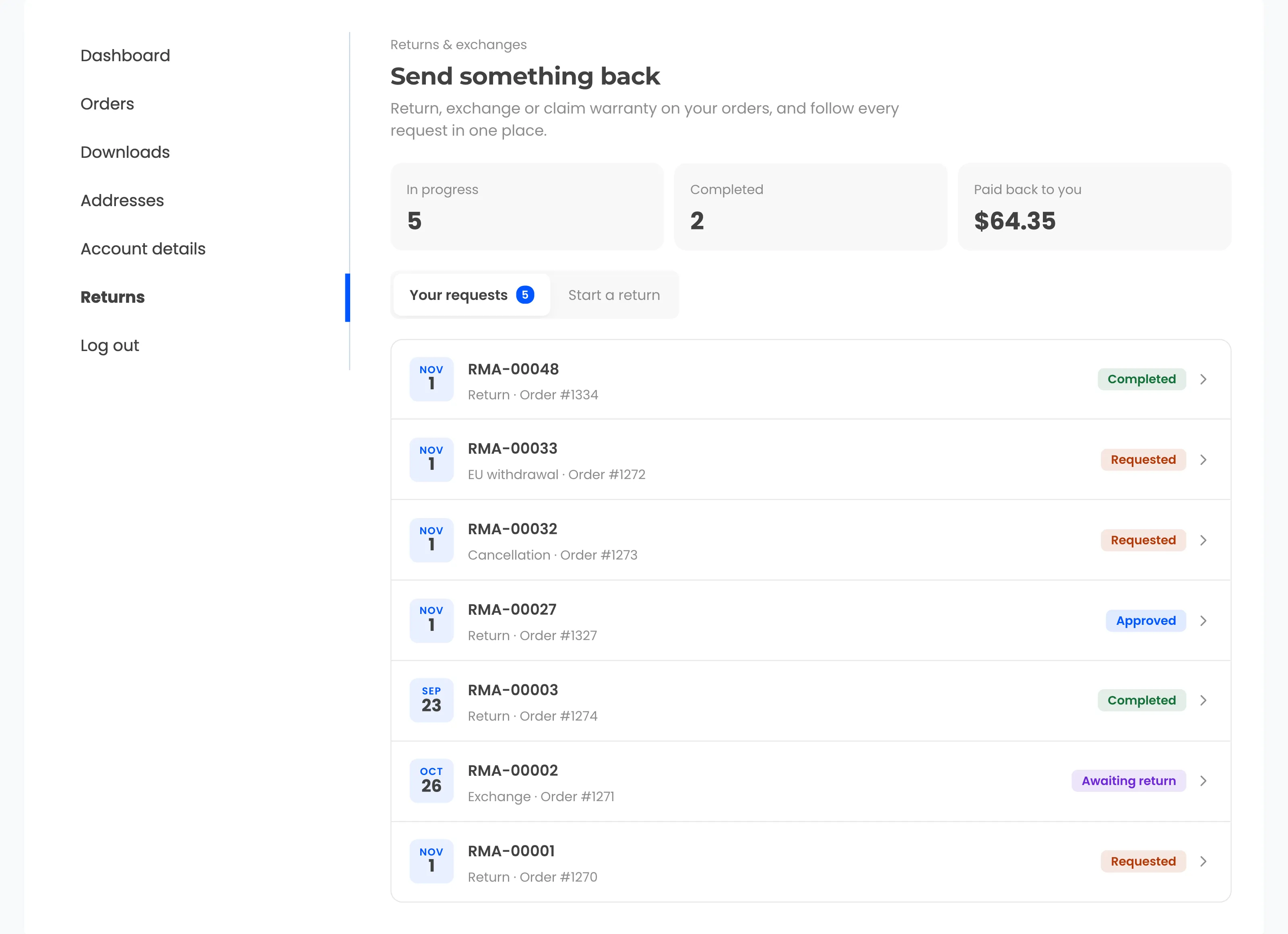
WPReturns draws that line in code. A withdrawal request and a cancellation request only ever offer a refund, while store credit and exchanges appear only on normal return requests.
In the US, return rules come mostly from state law and from the policy you post. Before you make credit the only option, read your state’s consumer protection rules and state it on your returns page.
Our guide to adding the EU withdrawal button to WooCommerce covers the refund flow in detail. The EU withdrawal button feature is part of the free plugin.
Does Store Credit Expire?
Store credit can expire if your terms allow it and your local law does too. US federal rules set a five-year floor for gift cards sold for payment, and some states ban expiry dates on certificates outright. In WPReturns, credit coupons expire after 365 days by default, and 0 turns expiry off.
The federal rule is 12 CFR 1005.20. It bars issuing a gift certificate or store gift card with an expiration date unless several conditions are met. One is that the funds last at least five years.
Its definitions cover cards issued “in exchange for payment”. Loyalty, award and promotional gift cards are excluded. The rule text does not say whether a credit issued for a return counts.
State law can go further. Washington defines a gift certificate as a record promising goods “to the value or credit shown in the record” in RCW 19.240.010.
Washington then makes it unlawful to issue such a certificate with an expiration date. The exceptions are awards or loyalty programs and certificates donated to charity.
California bans expiration dates on gift certificates sold to a purchaser under Civil Code 1749.5. Whether a return credit counts depends on each statute’s wording. Check the text for every state you ship to.
WPReturns keeps the choice in one field, “Coupon expires after (days)”. Set 0 for coupons that never expire, which removes the question for every state at once. Wallet balances follow the rules of the Wallet plugin.
How Bonus Store Credit Works
Bonus store credit is extra value added on top of the return when the customer picks credit over a refund. WPReturns Pro sets it as a percentage in the “Bonus credit (%)” field. The bonus is worked out on the return value after fees and shows on the request form before the customer chooses.
Here is the simplest case as a worked example. A customer returns a $100 item, there are no fees, and the store offers a 10% bonus.
Example: a $100 return paid two ways
Refund
- Item value
- $100.00
- Return fees
- $0.00
- Refund to the card
- $100.00
Money leaves the store.
Store credit with a 10% bonus
- Item value
- $100.00
- Bonus at 10%
- +$10.00
- Credit to spend
- $110.00
The order shows a $100.00 refund record. The $10.00 bonus stays out of it.
The code works the bonus out in two steps. First it takes the net value: item value minus any restocking fee and return shipping fee.
Then it multiplies the net by the bonus percentage and rounds to your store’s price decimals. A $33.33 item at 10% gives $3.333, which rounds to a $3.33 bonus and $36.66 of credit.
Fees change the comparison, because each resolution can carry its own return shipping fee. This example sets “Return shipping fee: refunds” to $5 and “Return shipping fee: store credit” to 0:
| Line | Refund | Store credit with 10% bonus |
|---|---|---|
| Item value | $80.00 | $80.00 |
| Return shipping fee | $5.00 | $0.00 |
| Net value | $75.00 | $80.00 |
| Bonus | $0.00 | $8.00 |
| Customer receives | $75.00 | $88.00 |
With a bonus set, the form shows “Fastest option, plus 10% extra to spend.” under store credit. Without one that line reads “Fastest option: use it on your next order.”
Start with a small bonus and watch how many customers pick credit before you raise it. A bonus that is too high gives away margin on returns that would have taken credit anyway.
Coupon or Wallet Balance: Two Ways to Pay Credit
WPReturns Pro pays store credit in two ways: a single-use WooCommerce coupon tied to the customer’s email, or a top-up of their DevDiggers Wallet balance. Coupons work for guests and on every store. Wallet balance needs a customer account and the Wallet plugin active on the site.
The coupon is a normal WooCommerce coupon with a code such as CREDIT-RTK0JXTJ. It is a fixed cart discount with a usage limit of 1, restricted to the customer’s email and combinable with other coupons.
The WooCommerce coupon docs say allowed emails are “Verified against customer’s billing email.” So a guest must check out with the same billing email to use the code.
From Return to Spent Credit
- 1RequestCustomer picks Store credit on the formBonus shown up front
- 2ApproveYou approve and the parcel comes back
- 3ResolveCoupon or Wallet top-up issuedEmail sent
- 4RecordRefund record on the order without the bonus
- 5SpendCustomer uses the credit at checkout
Wallet credit lands in the customer’s balance and is spent at checkout without a code. It suits stores that already run a WooCommerce Wallet plugin for cashback or top-ups.
WPReturns > Configuration > Wallet
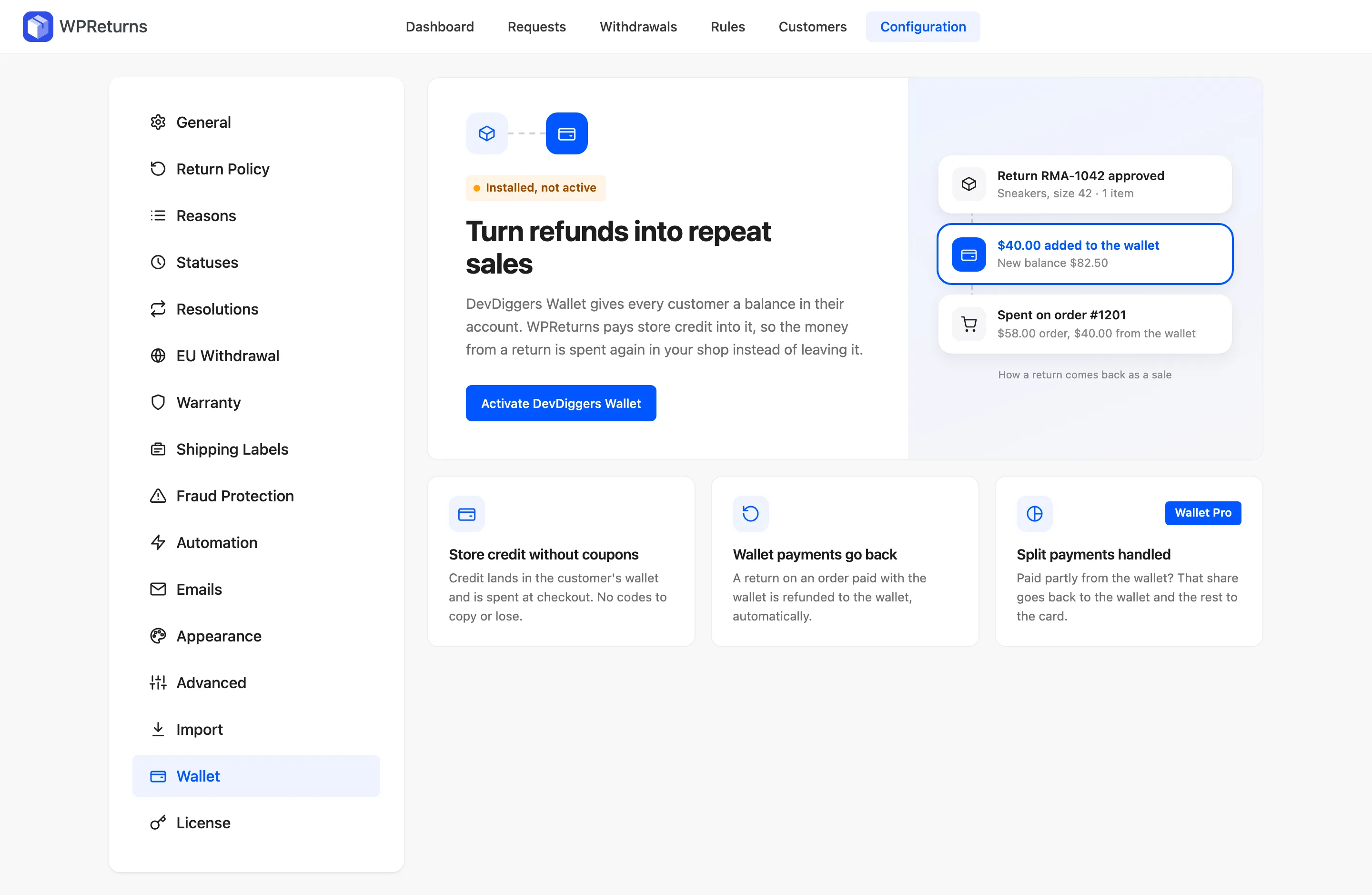
The Wallet integration docs cover the setup. If you are still choosing between the two models, this comparison of WooCommerce wallet vs store credit lays out the trade-offs.
Note: You can still switch the method on a single request. A guest order on a Wallet store gets a coupon, because Wallet credit needs an account.
How to Offer Store Credit in WooCommerce With WPReturns Pro
To offer store credit in WooCommerce, install WPReturns Pro next to the free plugin and turn on “Offer store credit”. Then set the payment method, the bonus and the expiry on the Resolutions tab. From then on, the request form offers credit on every normal return.
Pro needs the free plugin installed first. Search for WPReturns under Plugins > Add New or get the free WPReturns plugin download.
Step 1: Turn On Store Credit
Go to DevDiggers Plugins > WPReturns > Configuration > General and switch on “Offer store credit”. Keep “Offer a refund to the original payment method” on as well.
1WPReturns > Configuration > General

Leaving both on gives the customer a real choice. Turning refunds off would push every normal return into credit or an exchange.
Step 2: Set How Credit Is Paid and When It Expires
Open the Resolutions tab. “Credit first” shows store credit before the refund on the request form and is on by default.
Set “Pay store credit as” to the coupon or the DevDiggers Wallet balance. Then fill in “Bonus credit (%)” and “Coupon expires after (days)”, where the defaults are 0 and 365.
2WPReturns > Configuration > Resolutions

Lower down, “Return shipping fee: refunds” and “Return shipping fee: store credit” set a fee for each choice. A lower fee for credit is a second nudge, and the field takes 0 to make credit free to return.
Step 3: Check the Choice on the Request Form
Open a completed test order as a customer and start a return. Step 2 of the form asks “How should we make it right?” and lists your options in the order you chose.
3My Account > Returns > Start a return
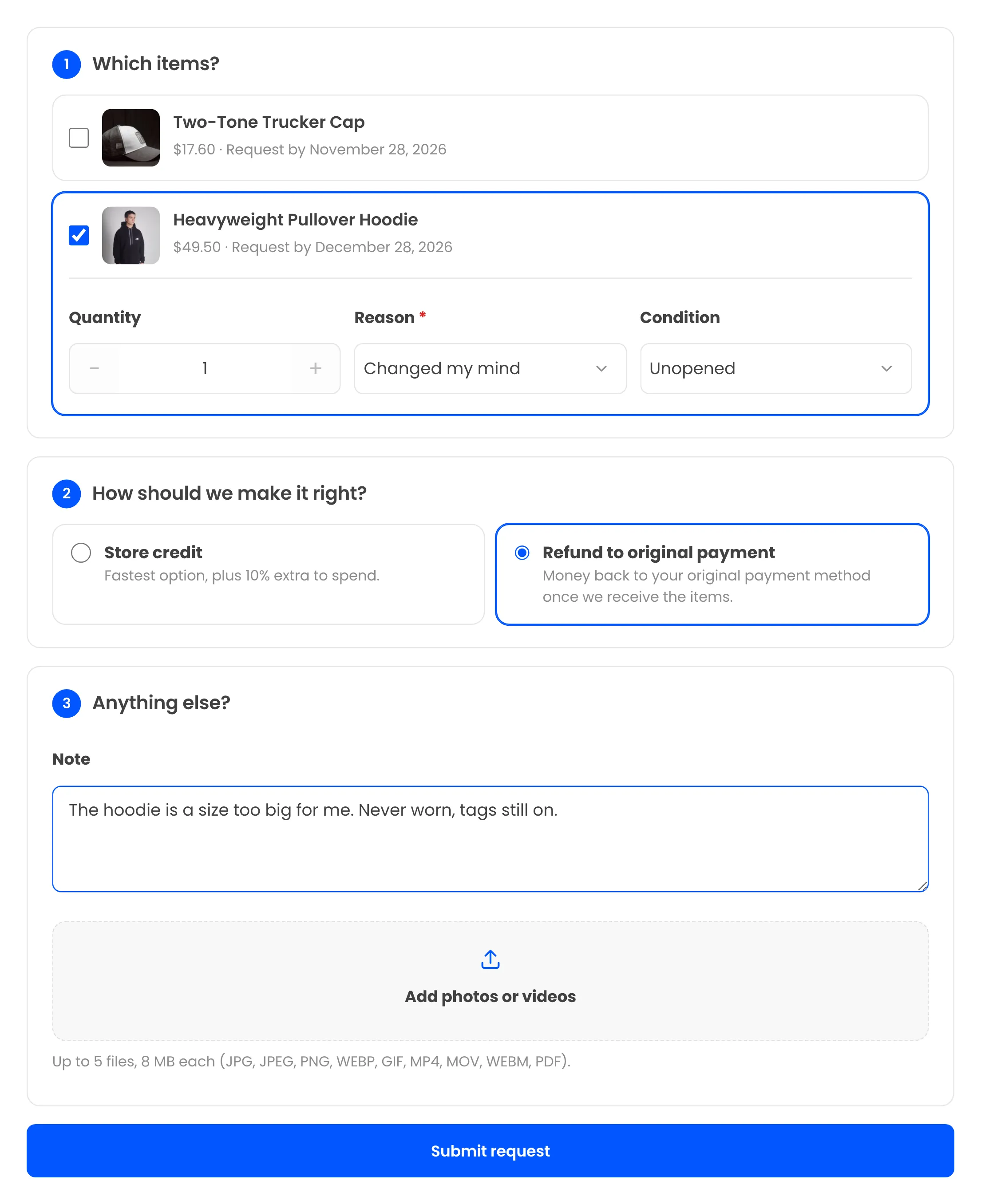
Store credit shows the bonus line, and the refund says the money goes back once the items arrive. If the bonus line is missing, check that “Bonus credit (%)” is above 0.
Step 4: Resolve the Request
When the parcel is back, open the request and use the “Items received: resolve the request” card. The Resolution menu starts on the customer’s choice, and the Amount field holds the item value minus fees plus any credit bonus.
4WPReturns > Requests > RMA-00061
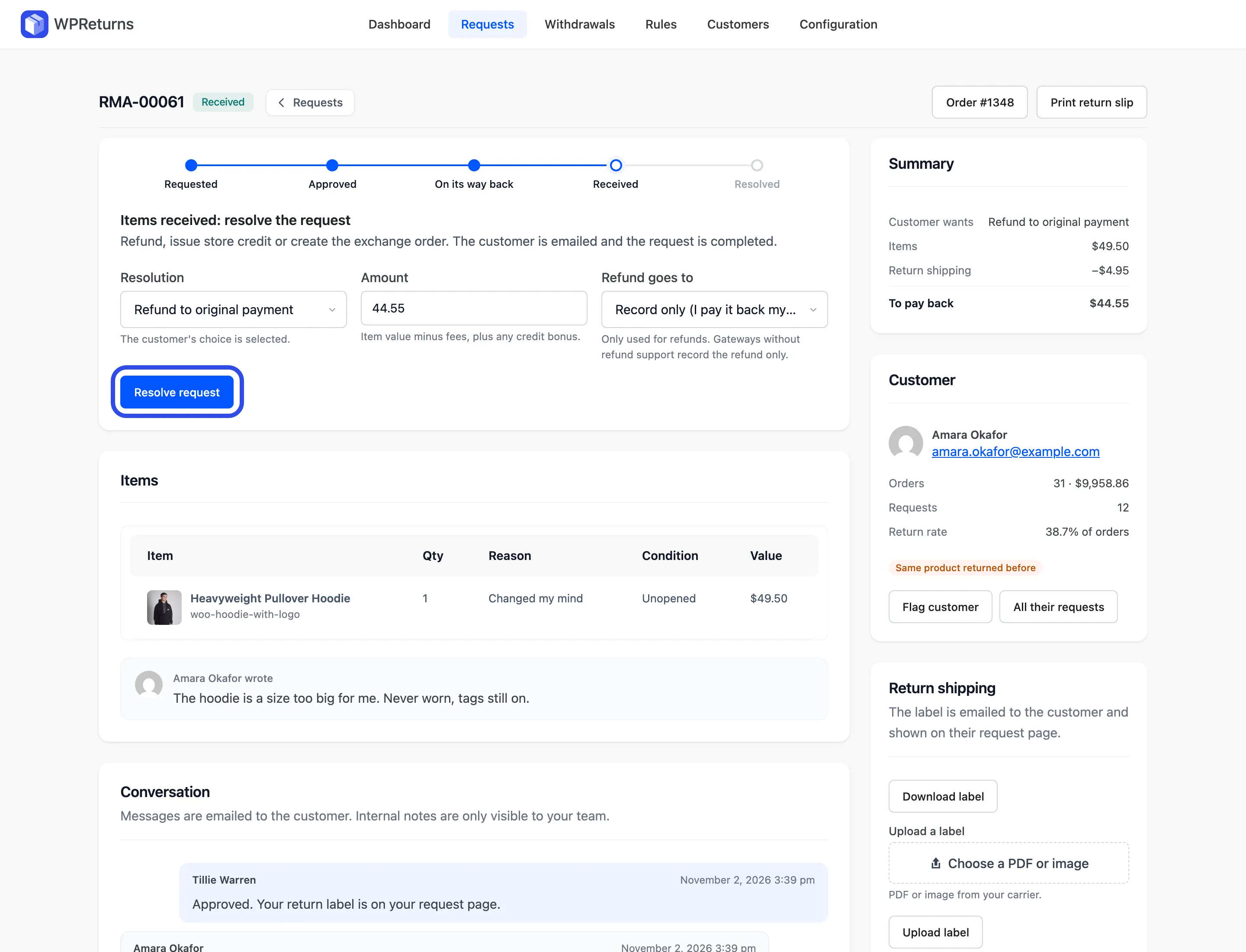
You can change the resolution here before you click Resolve request. That helps when a customer asks for credit by message after picking a refund.
Step 5: Confirm the Coupon or Wallet Top-Up
After you resolve, the request shows what was issued. The demo request below added a $1.98 bonus to a $19.80 item and issued a $21.78 coupon.
5WPReturns > Requests > RMA-00007

WPReturns also records the credit as a WooCommerce refund that sends no money, without the bonus. Order totals, cashback and points then follow the return.
The resolutions settings docs list every field. Pro costs $99 a year for one site, and the pricing page shows the 5-site and 10-site plans.
How to Tell Whether Store Credit Is Working
Store credit is working when customers pick it often and then spend it. Measure the share of returns resolved with credit and the share of credit coupons redeemed. If credit is chosen but rarely spent, the bonus or the expiry needs another look.
The WPReturns dashboard shows Refunded next to Revenue kept, which counts store credit and exchanges. The Resolutions chart splits requests by outcome. The store credit share is one line in that chart.
WPReturns > Dashboard

WooCommerce shows each coupon’s usage on the coupon itself. Search the coupon list for CREDIT to see how many were redeemed.
Credit that is never spent leaves the customer with nothing to show for the return. Count spent credit as the win and unspent credit as a warning sign.
Store Credit in Other Returns Plugins
Several WooCommerce returns plugins offer store credit, and only a few of them add a bonus on top. Some keep store credit for their paid tier. The table below shows what each product’s own page said about store credit and bonus credit when we compared them.
| Plugin | Store credit | Bonus credit |
|---|---|---|
| WPReturns Pro | Coupon or DevDiggers Wallet | Yes |
| Zorem Returns | Yes | Yes |
| YITH Advanced Refund System | Coupon | – |
| KoalaApps Advanced Returns and Refunds | Coupon with prefix and expiry | – |
| WP Swings RMA | Wallet in the paid tier | – |
| WP Desk Flexible Refund | Refund coupon in the paid tier | – |
Compared on October 30, 2026. A dash means the source page did not mention it, which does not prove the feature is missing. On Shopify, AfterShip Returns and ReturnGO list bonus credit, and Loop lists it on a paid plan.
The free vs Pro page shows which WPReturns features need Pro. Store credit, bonus credit and exchanges are all on the Pro side.
Moving from another plugin? You can migrate your old returns with the importer in both builds.
Conclusion
Store credit vs refund is a choice you make per return reason. Refund the store’s mistakes, every EU withdrawal and cancellations before shipping. Offer credit first with a small bonus on change-of-mind and sizing returns, and keep the refund on the same form.
Pay credit as a coupon for guests or as Wallet balance for account holders, and pick an expiry your state’s law allows. Then watch how often credit is chosen and spent before you raise the bonus.