
An RMA number is the reference code a store gives a return. It ties the customer’s request, the parcel, the inspection and the refund to one record. RMA stands for return merchandise authorization, and the number proves the store said yes.
You see it on return slips, labels and emails, usually as a short code such as RMA-00042. For a store it is the difference between a box with a name on it and a box you can match in seconds.
We wrote this guide from the WPReturns source code and our demo store in November 2026. WPReturns is our own WooCommerce returns plugin, and the screens below come from its demo store. Everything else comes from public sources linked in the text.
What Is an RMA Number?
An RMA number is a unique code a seller creates for one return. It identifies that return from the first request to the final refund or exchange. Staff, the customer and the warehouse all quote the same code, and every step of the return is filed under it.
Think of it as the order number for a return. The order number names what was bought. The RMA number names what is coming back, why it is coming back and what the customer asked for.
Most stores print it with a prefix and a running count. WPReturns writes it as RMA- plus a five digit count, and request 61 becomes RMA-00061. The customer sees it on screen the moment they send the request.
My Account > Returns > RMA-00061
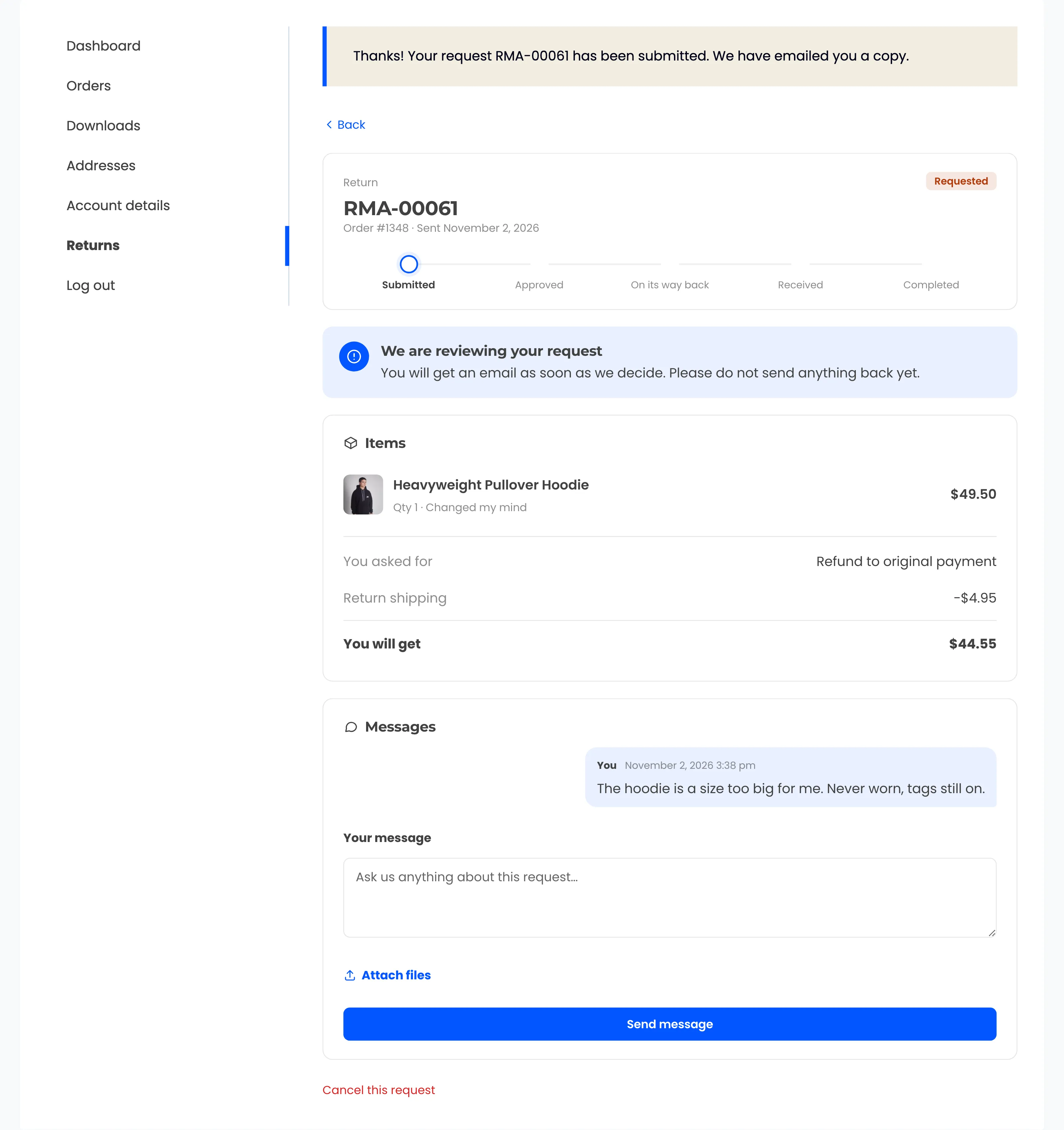
The message on that screen says the request was submitted and asks the customer not to send anything back yet. The number exists before approval. Approval changes the status and leaves the number as it was.
RMA Meaning and What It Stands For
RMA stands for return merchandise authorization, and manufacturing often says return material authorization. Both mean the seller approved a return and gave it a reference. So when people ask what is RMA, the short answer is permission to send something back.
The RMA meaning is the same in retail, wholesale and repair work. Only the paperwork around it changes. A clothing shop sends a slip by email, while an electronics supplier may want a serial number on the form.
With an RMA the customer asks before posting anything. The store checks the order and the reason, and answers with a yes, a no or a question.
Other names you will meet for the same idea:
- A return authorization number or RA number is common on retail return pages.
- An RGA number, for returned goods authorization, shows up with suppliers and wholesalers.
- Many online shops simply say return number or return ID.
What does RMA stand for when a repair shop uses it? The same thing. A laptop sent in under warranty carries an RMA number so the service desk knows which claim it belongs to.
RMA Number vs Order Number vs Tracking Number
An order number identifies a purchase and an RMA number identifies a return against it. A tracking number identifies a parcel in a carrier’s network. One order can have several returns, and each return can have its own tracking number.
People mix these up all the time, and customers often type the wrong one into a form. This table shows what each code points to.
| Code | Who creates it | What it identifies | Example |
|---|---|---|---|
| Order number | Your store at checkout | The purchase | #1348 |
| RMA number | Your store when a return is requested | One return on that order | RMA-00061 |
| Tracking number | The carrier when the parcel ships | The parcel in transit | A UPS or USPS code |
Two returns on one order get two RMA numbers. Say a customer returns a hoodie in March and a pair of jeans from the same order in April. Each return carries its own code, its own status and its own refund.
This is why a returns form should ask for the code the customer is sure to have. A new return starts from the order number and email, since no RMA number exists yet. Questions about a return in progress are faster with the RMA number.
How the RMA Process Works
The RMA process runs in five stages. The customer asks, the store approves, the customer ships, the store inspects and then the store resolves the request. The RMA number stays the same through all five, and only the status changes.
The five stages of one RMA
- 01RequestThe customer picks items and a reason and gets a numberStage 1
- 02ApprovalStaff check the order and approve or rejectStage 2
- 03ShippingThe customer packs the slip and ships with trackingStage 3
- 04InspectionThe warehouse scans the number and checks the itemsStage 4
- 05ResolutionRefund, store credit or exchange closes the RMAStage 5
In WPReturns the customer sees these stages as Submitted, Approved, On its way back, Received and Completed. Staff see the same request on the request screen. The title bar shows the RMA number with its status badge, and the review card holds the Approve and Reject buttons.
DevDiggers Plugins > WPReturns > Requests > RMA number
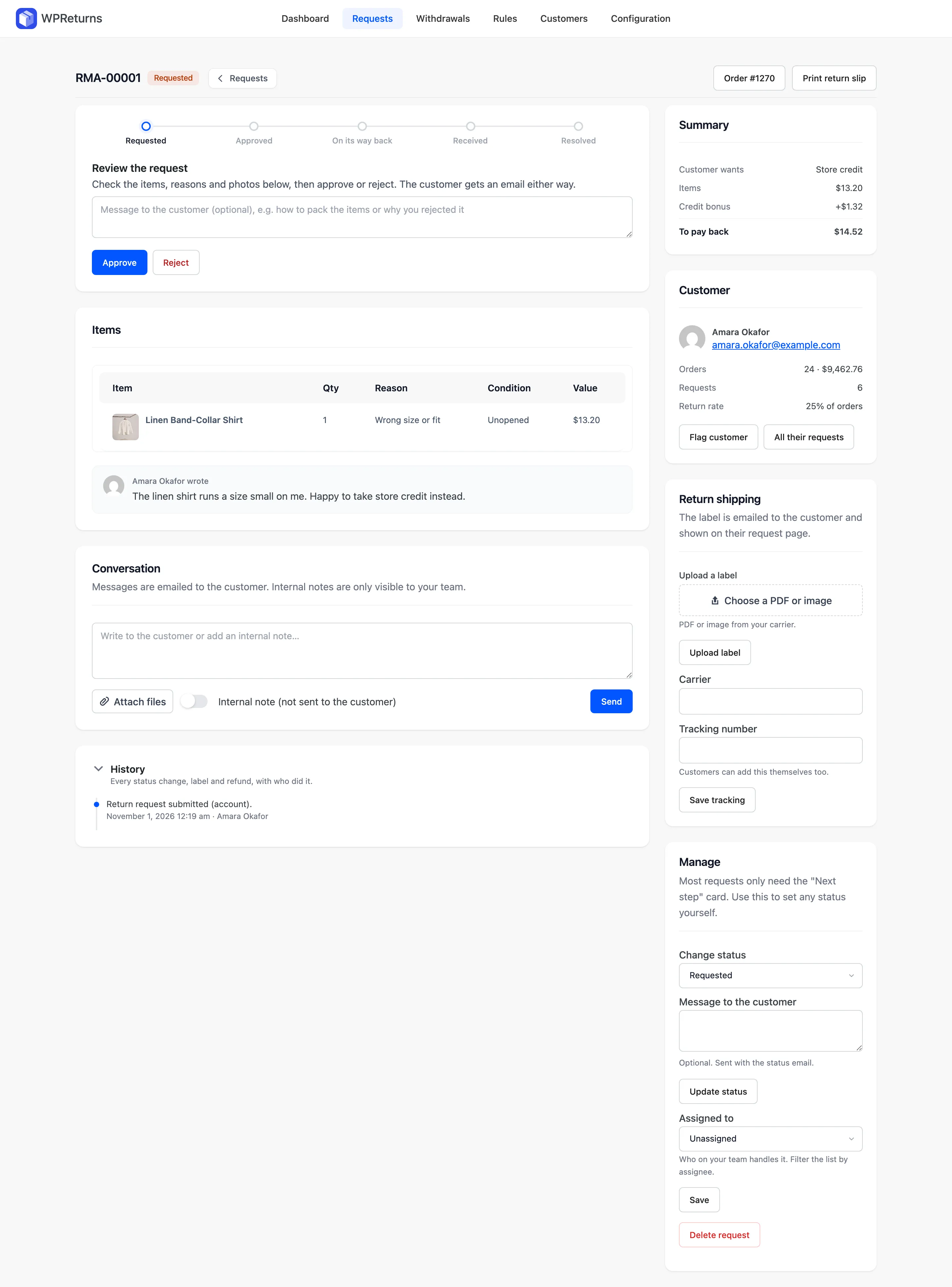
The request screen also links the WooCommerce order and keeps a history of every change. Our request screen guide walks through each card.
Where Customers Find Their RMA Number
Customers find their RMA number in four places. It is in the confirmation on screen, in every email about the return, on the request page in their account and on the return slip. A guest without an account gets it in the emails and on a private request link.
Emails carry most of the load. WPReturns puts the number in the subject line of each customer email, for example “Your request RMA-00061 is approved”. A customer searching their inbox for RMA finds the whole thread.
Customer email: request approved
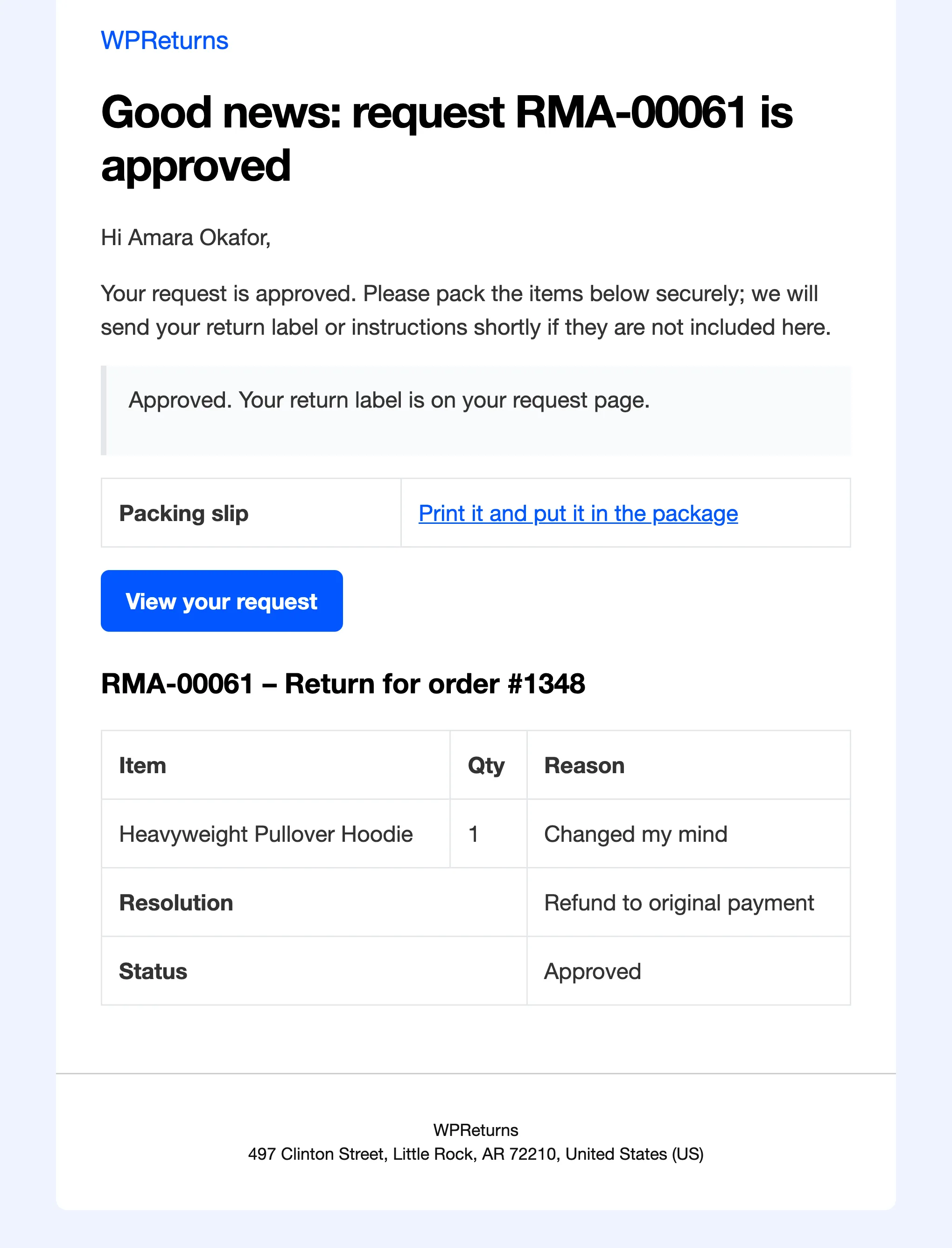
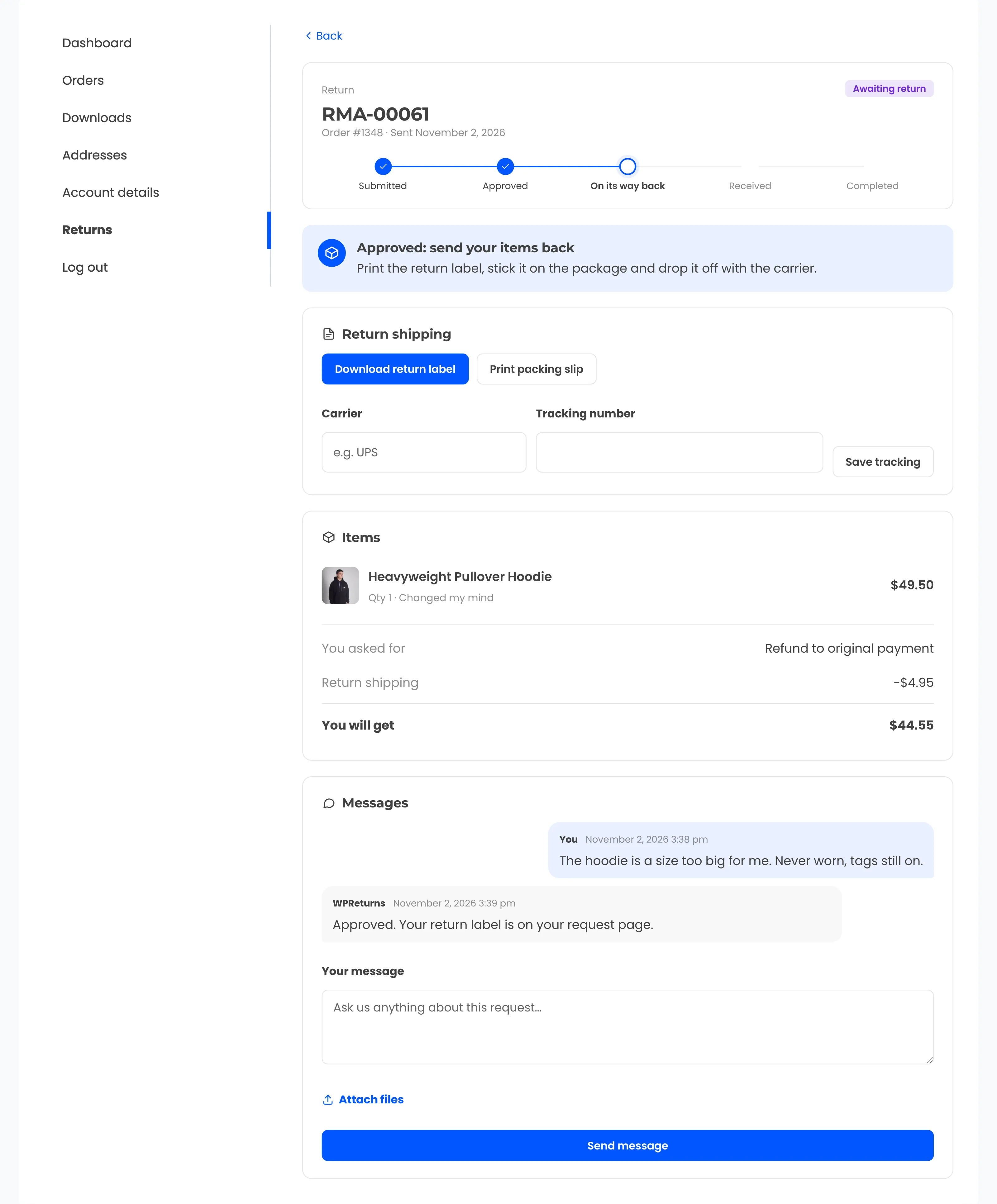
After approval the request page in My Account shows what to do next. The customer can download the return label, print the packing slip and add their own tracking number. Each of those screens shows the RMA number at the top.
My Account > Returns > request awaiting return
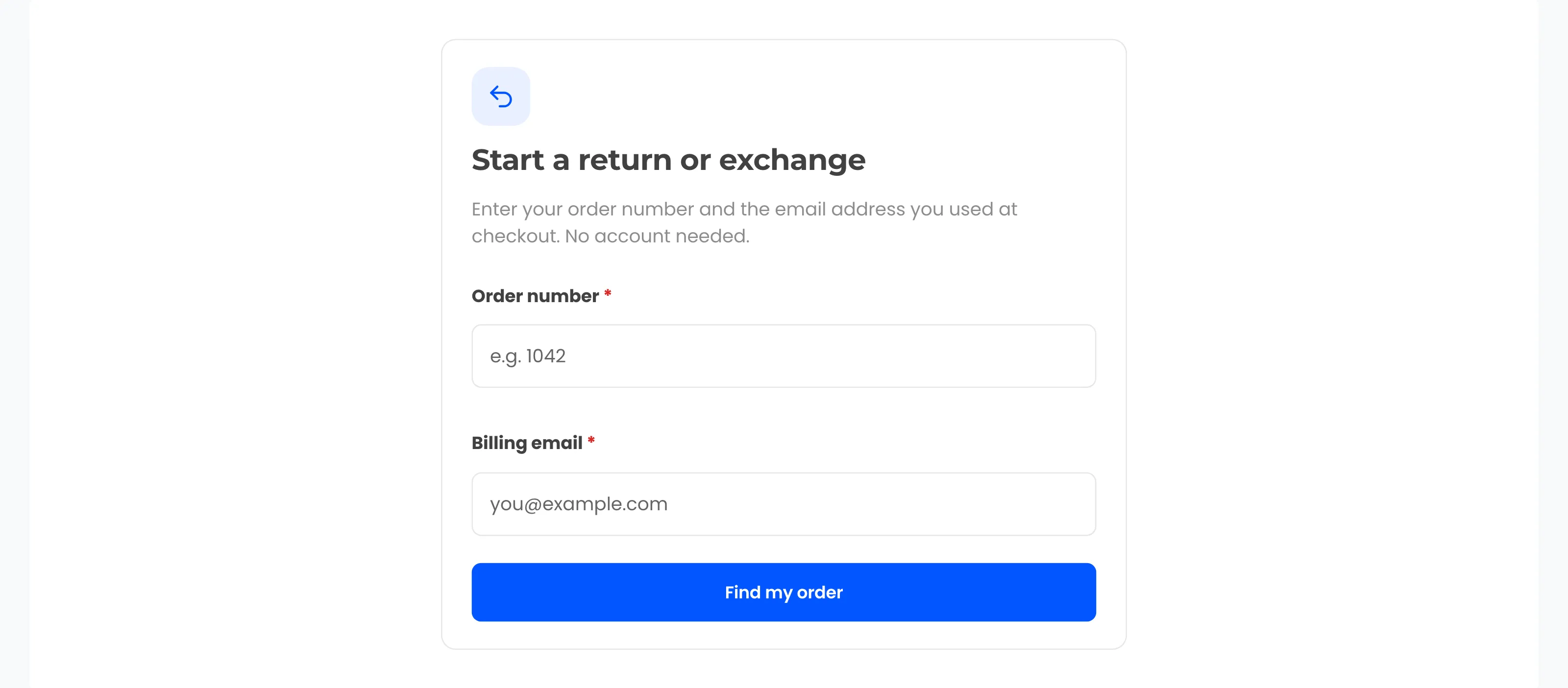
Guests use the returns portal with their order number and email. The portal opens the same request page, number included. That way a shopper who checked out as a guest is never stuck without a reference.
yourstore.com/returns
What to Write on the Return Box
Put the RMA number inside the box on the packing slip and outside the box where staff can read it. The inside copy matches the items to the request if the label falls off. The outside copy lets the receiving desk sort parcels before opening them.
Many stores ask the customer to write the number on the outside by hand. That works, but handwriting smudges and customers forget. A printed slip is easier for both sides.
The WPReturns Pro return slip prints the RMA number large at the top with a QR code beside it. It lists the order number, the customer, the return address and each item with its quantity and reason. The QR code holds only the RMA number, and no carrier is involved.
Return packing slip
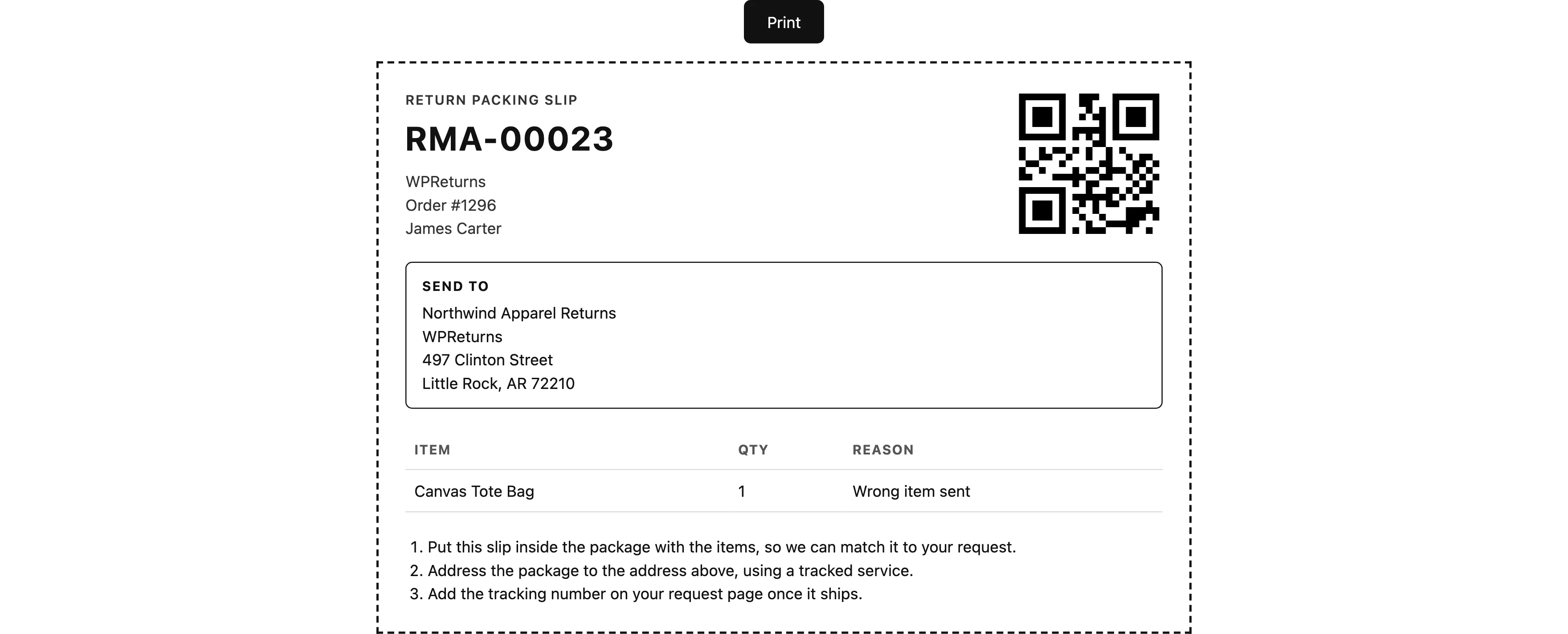
The slip also tells the customer what to do with it. Put it inside the package, address the parcel to the address shown and add the tracking number on the request page once it ships. Our guide to creating a return shipping label in WooCommerce covers the label side.
Tip: Keep the RMA number off the shipping label’s address lines. Carriers do not need it, and an extra line can push the address out of the printed area.
Why Stores Use RMA Numbers
Stores use RMA numbers because returns arrive in volume and look alike. A code on every parcel lets staff match boxes to requests without guessing. It also gives you a clean record for refunds, disputes and reports on why products come back.
The National Retail Federation and Happy Returns estimate that 15.8% of US retail sales will be returned in 2025, about $849.9 billion. For online sales the estimate is 19.3% (NRF, October 2025).
One in five online orders coming back means a busy store can open dozens of return parcels a day. Without a reference on each one, someone has to read names and dig through orders by hand.
Here is what one number per return gives you:
- The warehouse can scan or type a code and pull up the expected items before opening the box.
- Support answers “where is my refund?” by searching one code. Nobody has to read back through emails.
- Refunds point at a request with a reason, a condition and photos, which helps in a chargeback.
- Reports on reasons and products work only when each return is its own record.
The same NRF report says 9% of all returns are fraudulent. A number issued only after a check makes empty box and wrong item returns easier to spot. Our guide to preventing return fraud in WooCommerce goes further.
How WooCommerce Issues RMA Numbers
WooCommerce does not issue RMA numbers on its own. Its built-in tools record refunds against an order, with no return request, approval step or return number. A returns plugin like WPReturns adds that layer and numbers each request the moment the customer submits it.
The WooCommerce docs describe two kinds of refund. An automatic refund goes back through the payment gateway, while a manual refund only records the order as refunded in your store (WooCommerce refunds documentation). Neither one tracks a parcel coming back.
With WPReturns installed, each request appears on the Requests list under DevDiggers Plugins > WPReturns > Requests. The Request column shows the RMA number, the request type and the order number. Status tabs at the top count how many requests sit in each stage.
DevDiggers Plugins > WPReturns > Requests
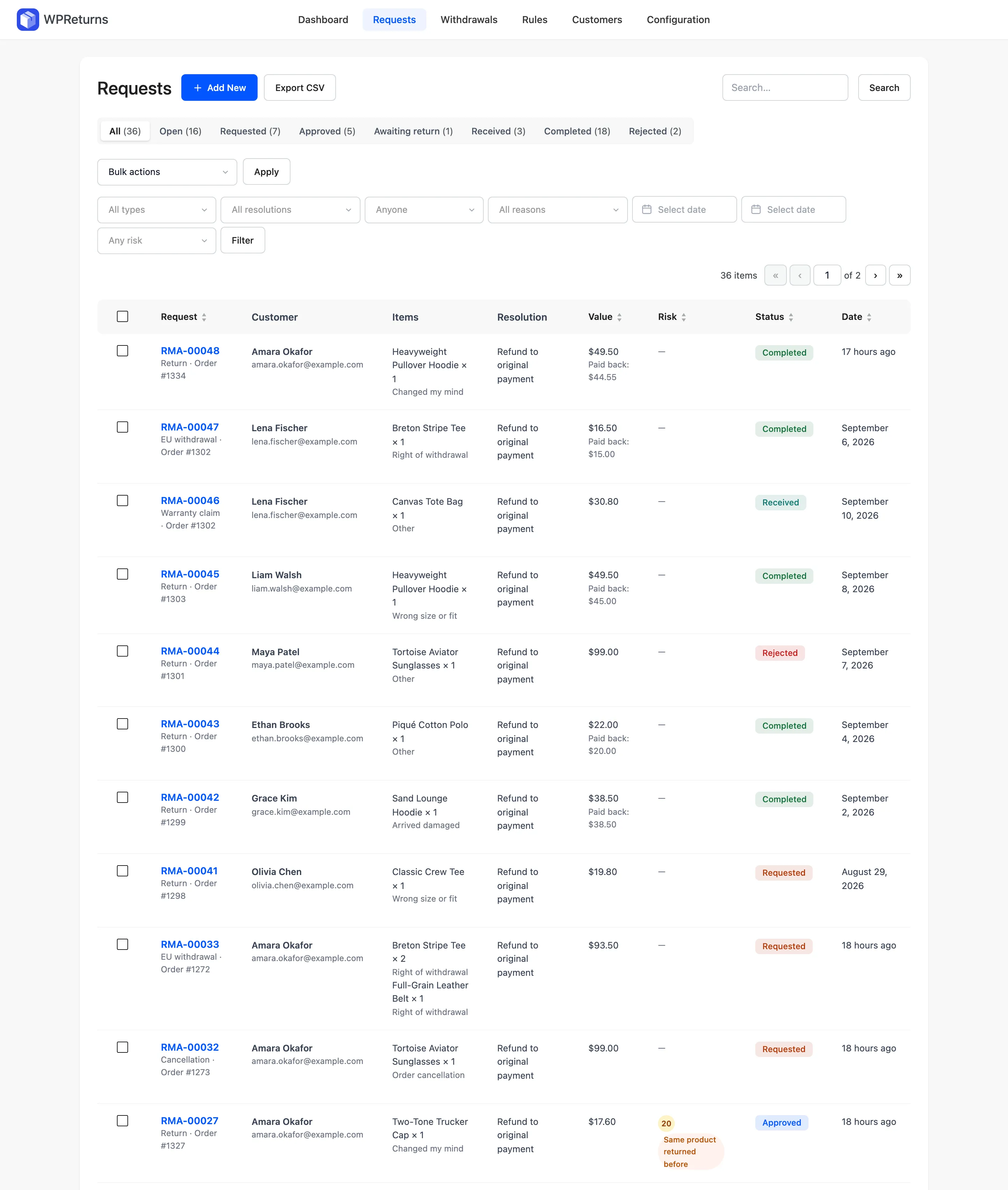
Search takes the number in any form. Type RMA-00061, 61 or an order number such as #1348 and the list finds the request. Our Requests list guide shows the filters and bulk actions.
Each new request also adds a note to the WooCommerce order. It reads like “WPReturns: RMA-01042 (Return) was created for this order.”
Anyone who opens the order sees that a return exists. The number, the emails and the search all work in the free plugin.
Want a different prefix? A developer can change it with one filter. This snippet turns RMA-00042 into RET-00042 and keeps search working because search reads the digits.
<?phpadd_filter( 'ddwcwr_request_number', 'myshop_request_number', 10, 2 );
function myshop_request_number( $number, $request_id ) {  return 'RET-' . str_pad( (string) absint( $request_id ), 5, '0', STR_PAD_LEFT );}
Put it in a small custom plugin or a code snippets plugin, because a theme update would wipe it from your theme files. The developer hooks guide lists the other filters. The full set of return tools sits on the WPReturns features page.
Note: Change the prefix before you go live. Customers who already hold an RMA-00042 email will not recognize RET-00042 in a later message.
Should Every Return Need an RMA Number?
Every return should have a number, but not every return should need the customer to wait for one. A number issued automatically at request time costs the customer nothing. Problems start when a store makes the number hard to get or uses it as a gate.
Keep the request form short. Ask for the items, the reason and the condition, and issue the number right away. A form that takes ten minutes sends customers to their card company instead.
Mind local rules too. In the EU, shoppers can cancel an online purchase within 14 days “without providing any justification” (Your Europe, checked April 2026). A reason field there should be optional, and our EU withdrawal button guide covers the separate withdrawal flow.
Some returns need no parcel at all. A cheap or bulky item can be refunded and kept, which saves you the shipping. WPReturns Pro has a keep-it rule for that, and the request still gets its RMA number for your records.
Worth checking: Read your own return page as a customer would. If it says “returns without an RMA number will be refused”, make sure the number is easy to get without emailing support.
Conclusion
An RMA number follows a return from the request to the refund, and everyone involved quotes it. Customers find it on screen, in emails and on the slip, and staff find it with one search.
WooCommerce records refunds but does not number returns, and a returns plugin fills that gap. WPReturns issues the number at request time in the free plugin, and Pro adds the printable slip with a QR code.
See every tool on the features page, or compare editions on Free vs Pro.