
The most common return reasons are poor fit, a listing that does not match the product, damage in transit and a plain change of mind. Each one has a different cause and a different fix. Treat them as one pile and you fix none of them.
Returns are big money. The National Retail Federation and Happy Returns expect 19.3% of online sales to come back in 2025 (NRF, 2025). Your own reasons data shows which slice of that is yours to cut.
This guide covers 10 reasons, who is at fault for each and what to change. It also shows how to track them in WooCommerce with WPReturns Pro 1.0.0, which we make. We read the plugin’s reason settings and docs in November 2026 for this guide.
What Are Return Reasons?
Return reasons are the choices a customer picks when they ask to send an item back. Each choice tags the request with a cause, such as wrong size or damaged. Stores use the tags to count causes, set rules and spot weak products.
Teams in other systems call them return reason codes. Microsoft’s Business Central docs describe the same idea as codes that identify why an item came back (Microsoft Learn).
A good list is short. Eight or ten choices cover almost every case. Long lists make customers pick the first option and ruin your data.
WPReturns > Return form
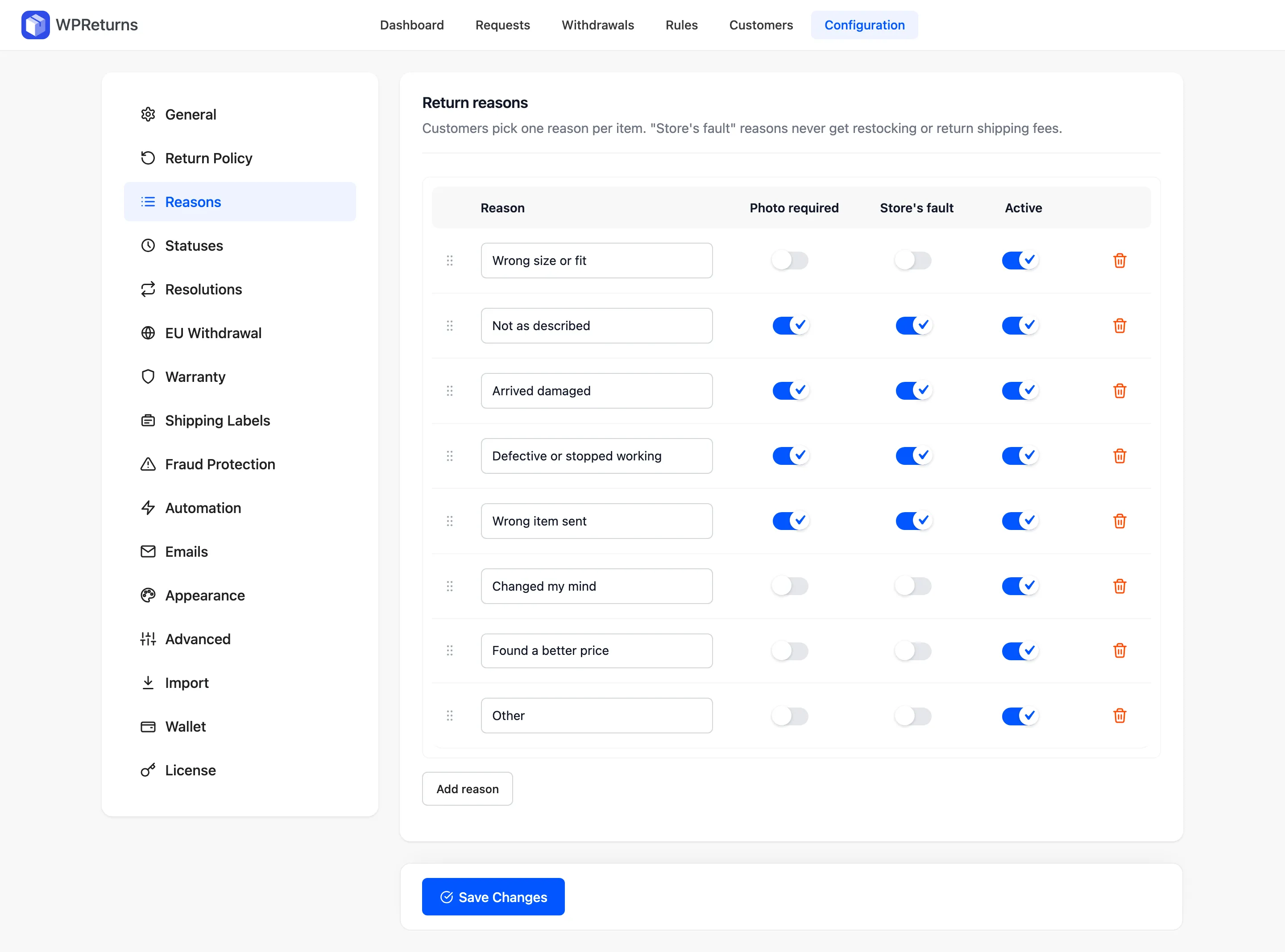
The Reasons tab in WPReturns ships with eight defaults.
The list reads Wrong size or fit and Not as described. Next come Arrived damaged and Defective or stopped working. Wrong item sent, Changed my mind, Found a better price and Other finish it.
You can rename, reorder or hide any of them.
Why Do Customers Return Items Online?
Customers return items online because they cannot try, touch or check the product before they pay. The gap between the screen and the parcel creates most returns. Some are your fault and some are not, and the fix depends on which.
The scale is clear in the NRF numbers (NRF, 2025). Retailers expect 15.8% of all sales to come back. Online sales run higher, at 19.3%.
Sort every reason into one of two groups. Store-caused reasons come from your listing, your packing or your shipping. Customer-caused reasons come from taste, budget or buying habits.
You fix the first group at the source and manage the second with policy.
The WooCommerce core refund tool does not record a reason. Its docs describe the refund screen on the order and nothing about why the customer asked (WooCommerce Docs). That gap is why most stores cannot answer the question above.
10 Common Return Reasons and How to Fix Each One
The 10 reasons below run from the ones stores cause most often to the ones customers cause. Each item says what the reason means, who owns it and what to change. The plugin notes show where WPReturns Pro helps you act on it.
Read them in order or jump to the one that fills your Top reasons chart. Fixes for the first five sit in your listings, packing and picking. The last five sit in policy and habits.
1. Wrong Size or Fit
Wrong size or fit is the top reason in apparel and footwear. The customer ordered a size that does not suit them. It is a customer-caused reason, but your listing decides how often it happens.
Add a size chart with real measurements on every product page. Say if an item runs small. Then give a fit return a cheaper path than a refund, such as an exchange for another size.
WPReturns > Configuration > Resolutions
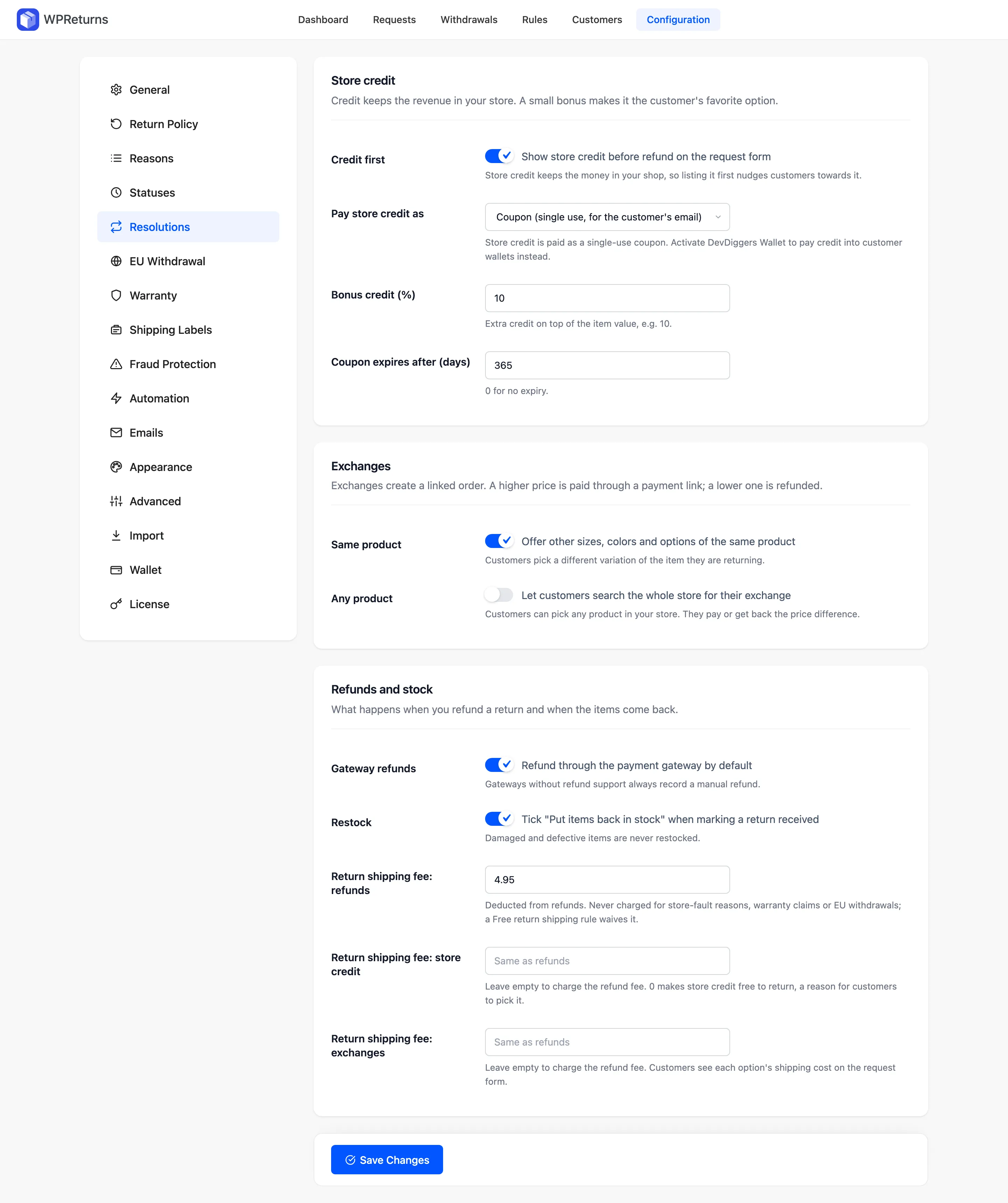
Exchanges are a Pro feature. With “Offer other sizes, colors and options of the same product” switched on, the customer picks another variation. You keep the sale.
Our guide to exchange price differences covers what happens when the new size costs more.
2. Not as Described
Not as described means the product looks or works differently from your listing. It is a store-caused reason. A photo, a color name or a spec on the page made a promise the parcel did not keep.
Compare the returned item to your page. Fix the photo, the color name or the spec. Ask for a customer photo on this reason so you see the gap.
On the Reasons tab, tick Photo required for this row. The photo option is free. The Store’s fault switch is a Pro setting that waives restocking and return shipping fees for the reason.
WPReturns > Configuration > Reasons
3. Arrived Damaged
Arrived damaged means the item was broken when the customer opened the parcel. It is a store-caused reason even when the carrier did the harm, because you chose the packing and the carrier.
Check how damaged items were packed. Add padding or a stronger box for fragile lines. Keep the customer’s photo as proof in case you claim from the carrier.
WPReturns > Requests > Request
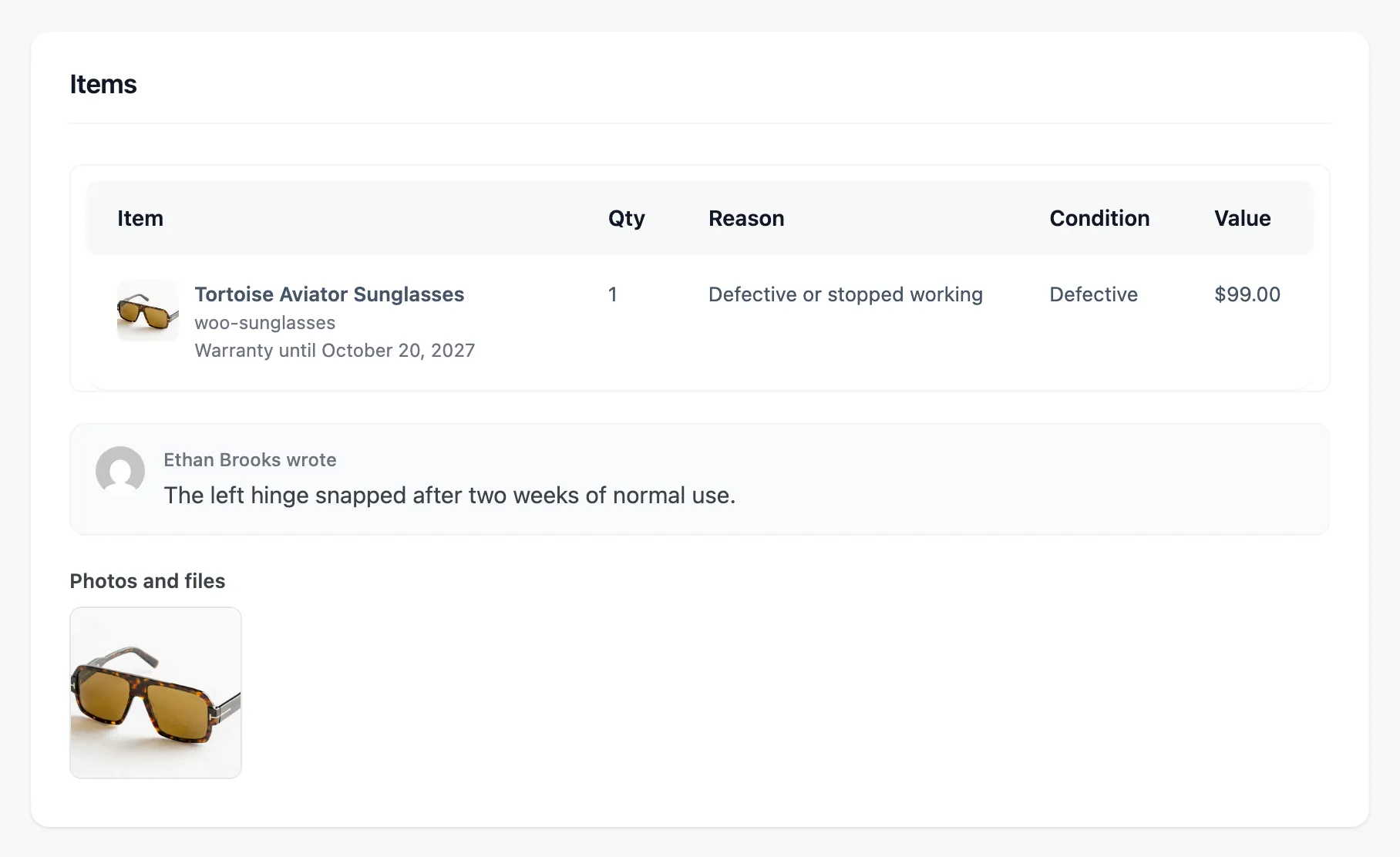
A photo shows up on the Items card of the request, and you approve with the evidence in front of you. We cover fees on damaged goods in our restocking fee guide.
4. Defective or Stopped Working
Defective means the item failed on arrival or soon after. It is a store-caused reason.
The fault may sit in the batch or the supplier. Check other reports on the same product.
Group defect reports by product and supplier. Test a sample of each batch before you stock it. If a product keeps failing, drop it.
WPReturns > Product page
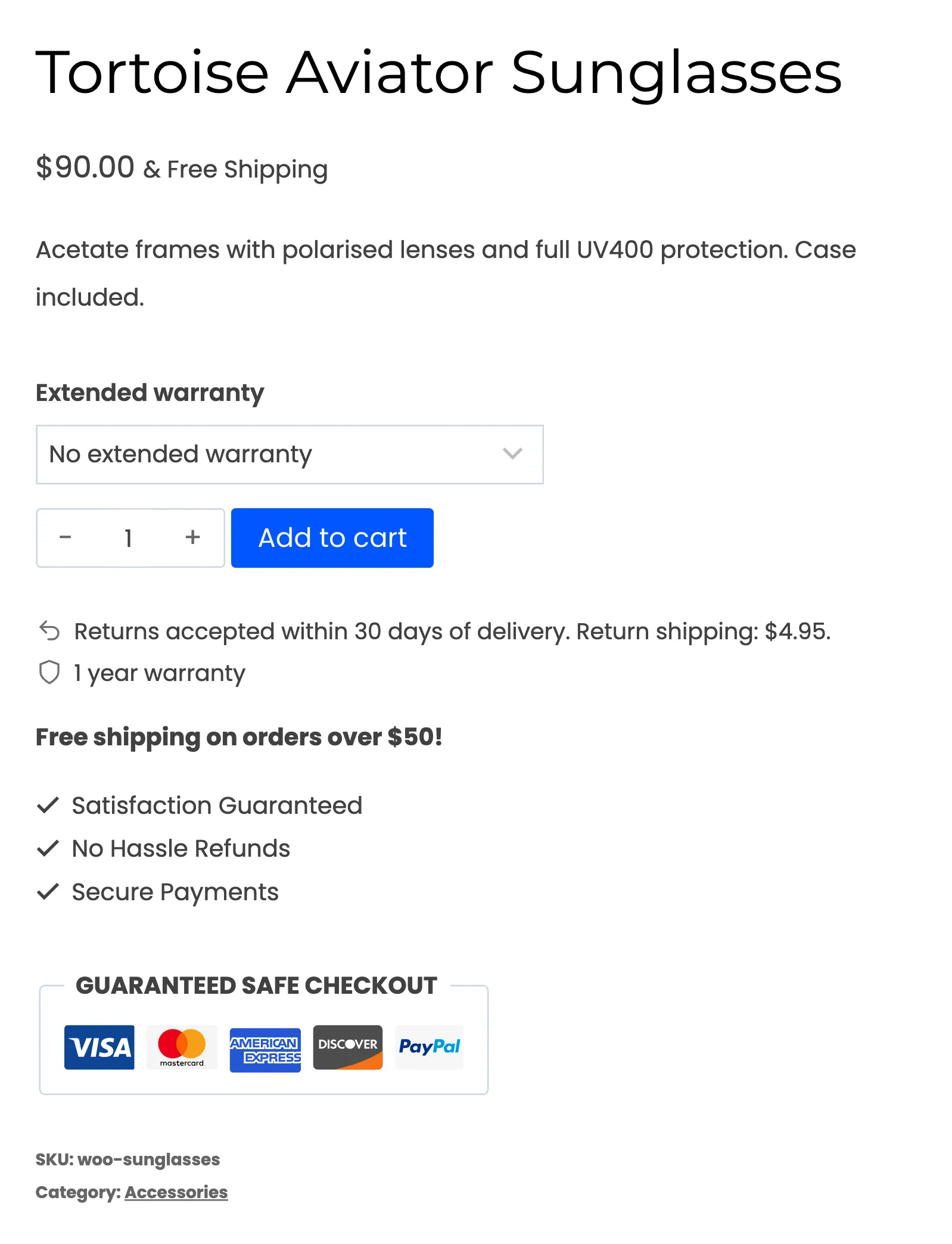
Defects past the return window are a warranty matter. WPReturns Pro tracks warranty claims separately and shows the warranty on the product page. See warranty claims.
5. Wrong Item Sent
Wrong item sent means the customer received a different product or variation from the one they ordered. It is a store-caused reason and the clearest sign of a picking error in your warehouse or on your packing table.
Count these every month. A cluster on one product often points to look-alike variations. Add a scan or a second look at packing time for those lines.
WPReturns > Requests
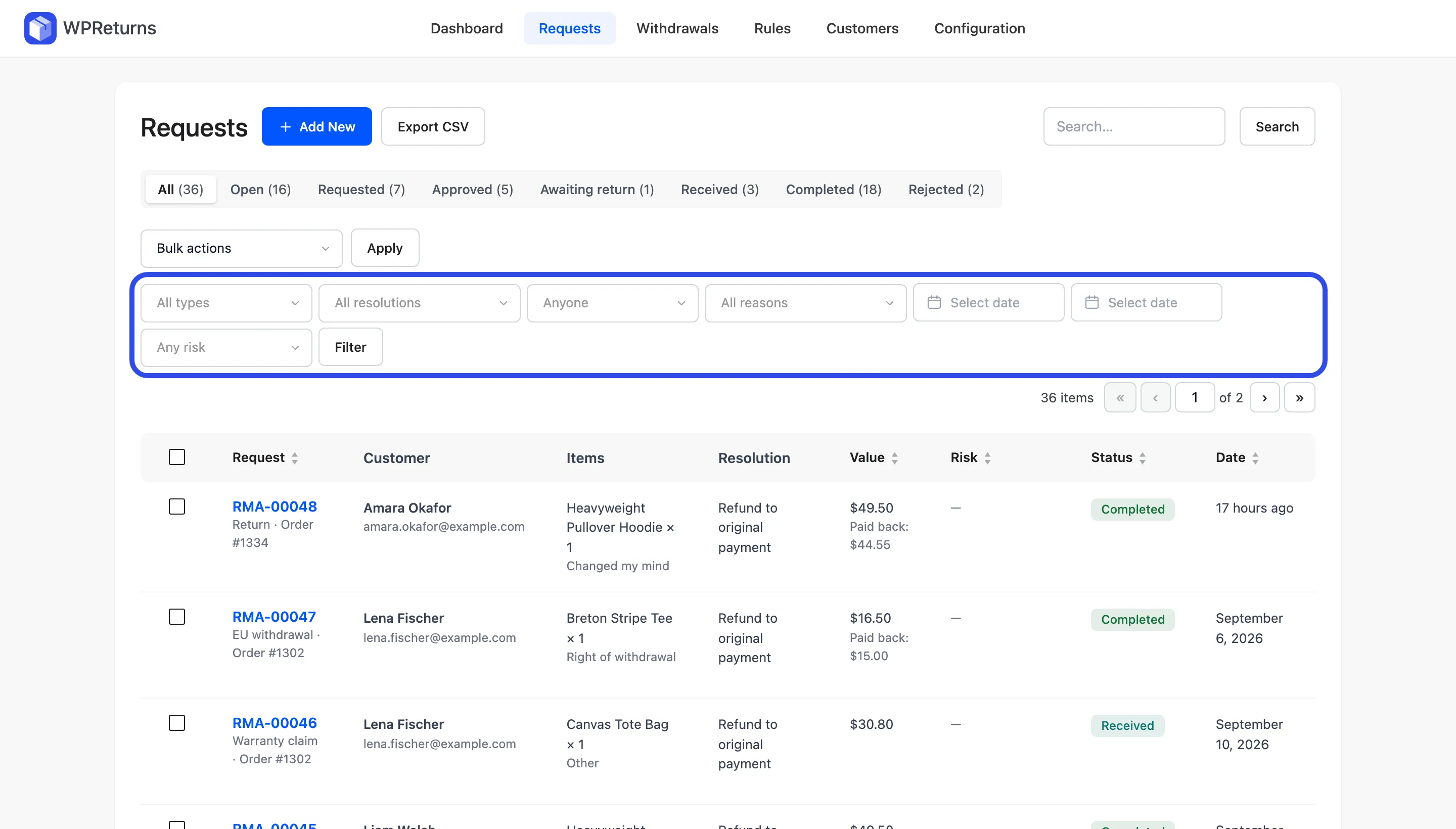
The Requests list filters by reason. Filter on Wrong item sent to see which orders went out wrong, and open each one.
6. Changed My Mind
Changed my mind is a customer-caused reason with no fault on either side. The customer simply does not want the item. It is also the reason where you can still keep the money.
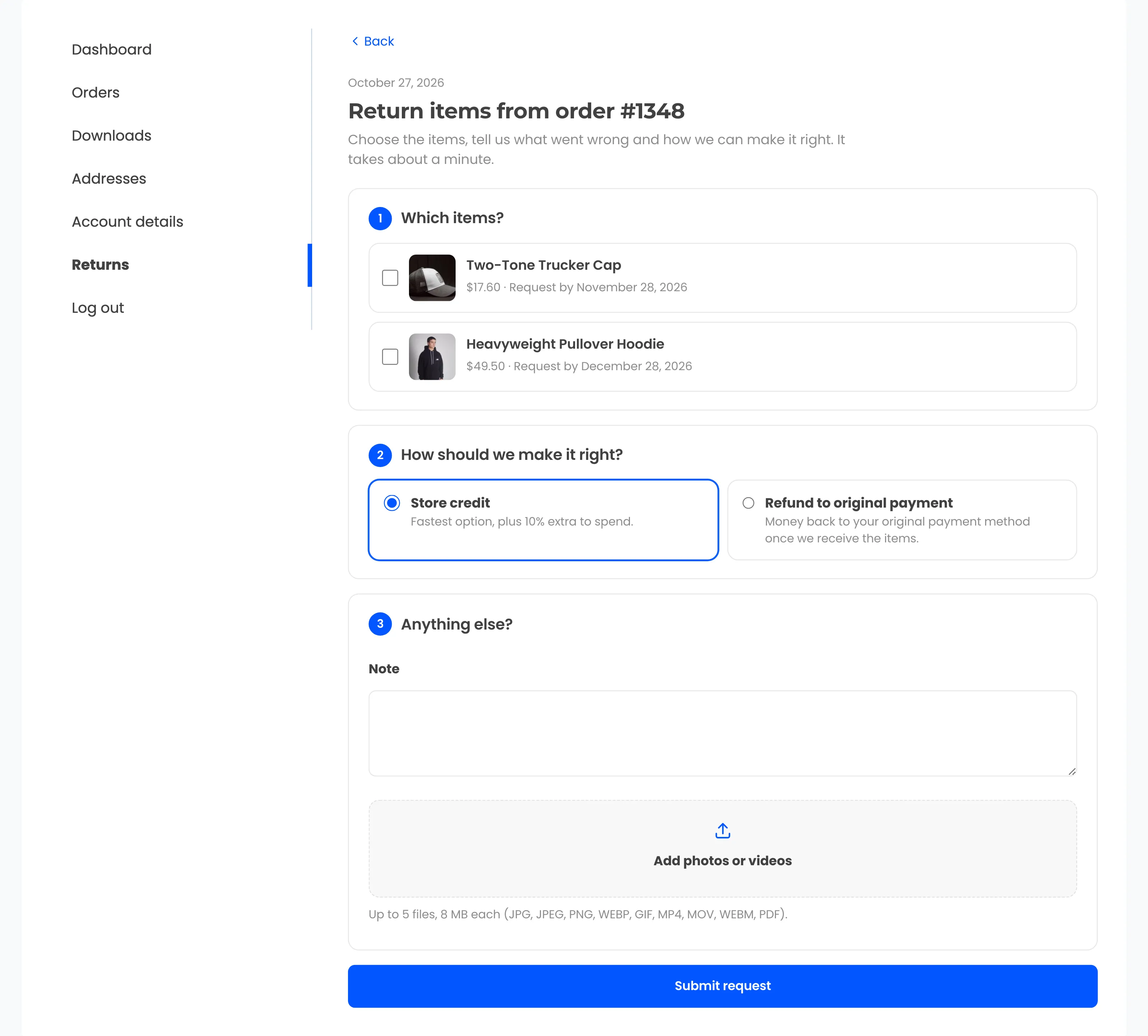
Offer store credit before a refund. A small bonus on the credit makes it the better deal. Our store credit vs refund guide shows the math.
WPReturns > Return form
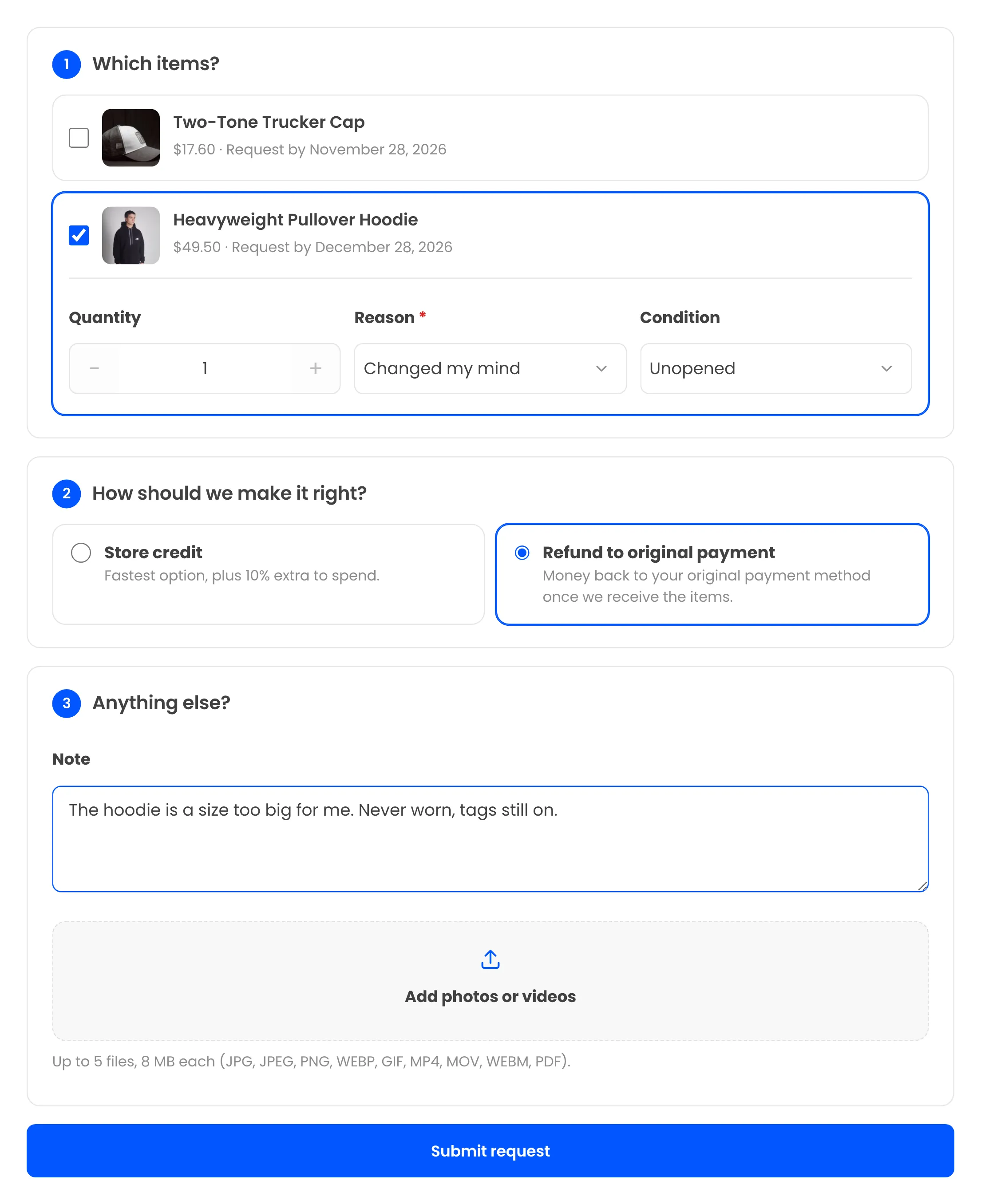
In WPReturns Pro the return form can show “Store credit +10%” next to the refund. The customer sees the bonus at the moment they choose.
7. Found a Better Price
Found a better price means the customer saw the same item cheaper elsewhere after buying. It is a customer-caused reason. Your price, a sale that started days later or a coupon site can all trigger it.
Decide a price match policy and say it on the product page. If a sale starts right after a purchase, a short price adjustment window is cheaper than a return. For a plain return, a restocking fee on this reason is fair.
WPReturns > Rules
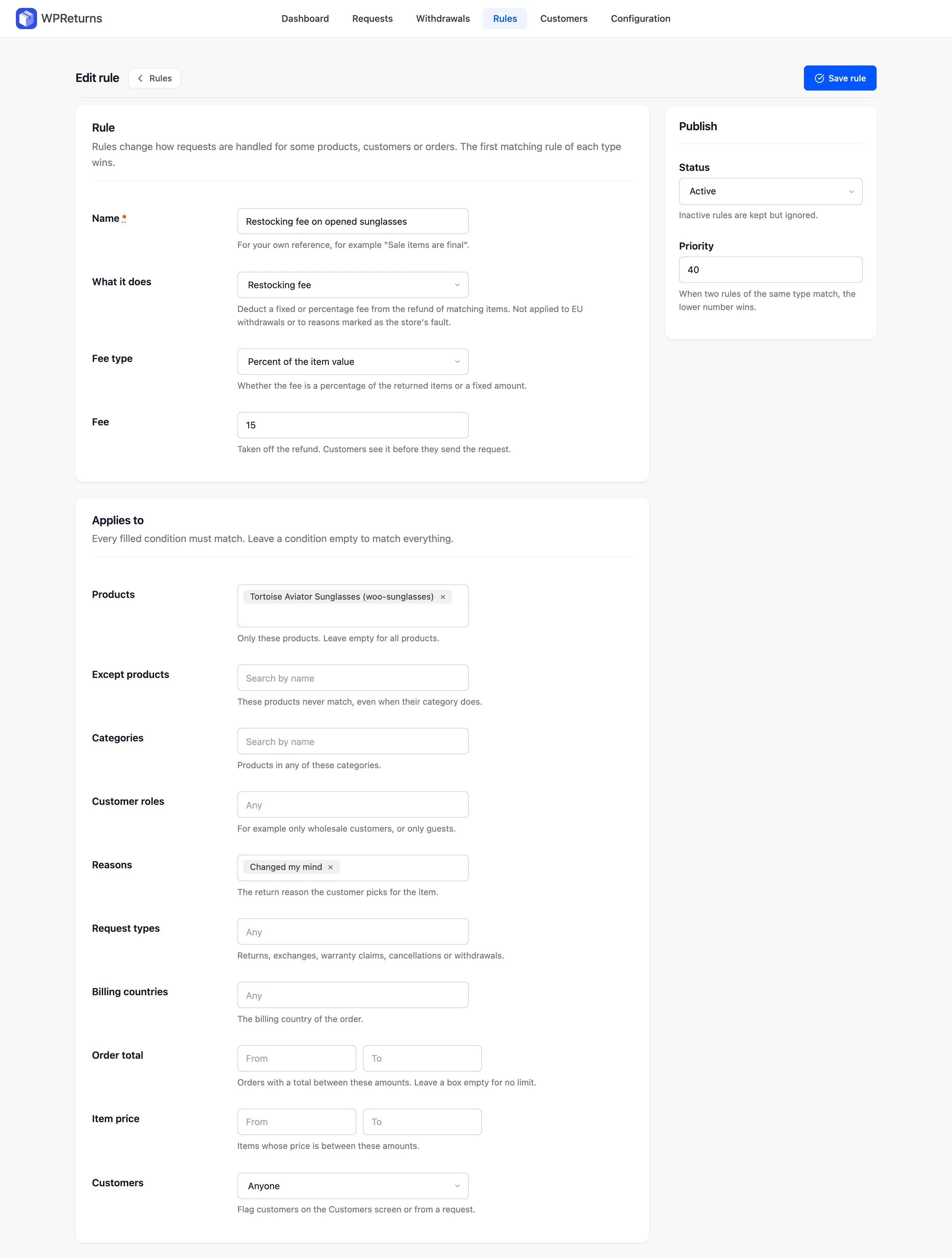
A Pro rule can apply a fee only to chosen reasons. Store’s-fault reasons are never charged.
8. Arrived Late
Arrived late means the parcel came after the date the customer expected. It is a store-caused reason that carriers share.
A late gift or event item is useless to the buyer. The return is a fair one.
Show a real delivery estimate at checkout. Pick carriers on their record.
Warn about cutoff dates before holidays. Our holiday return policy guide covers the seasonal side.
WPReturns > Return form
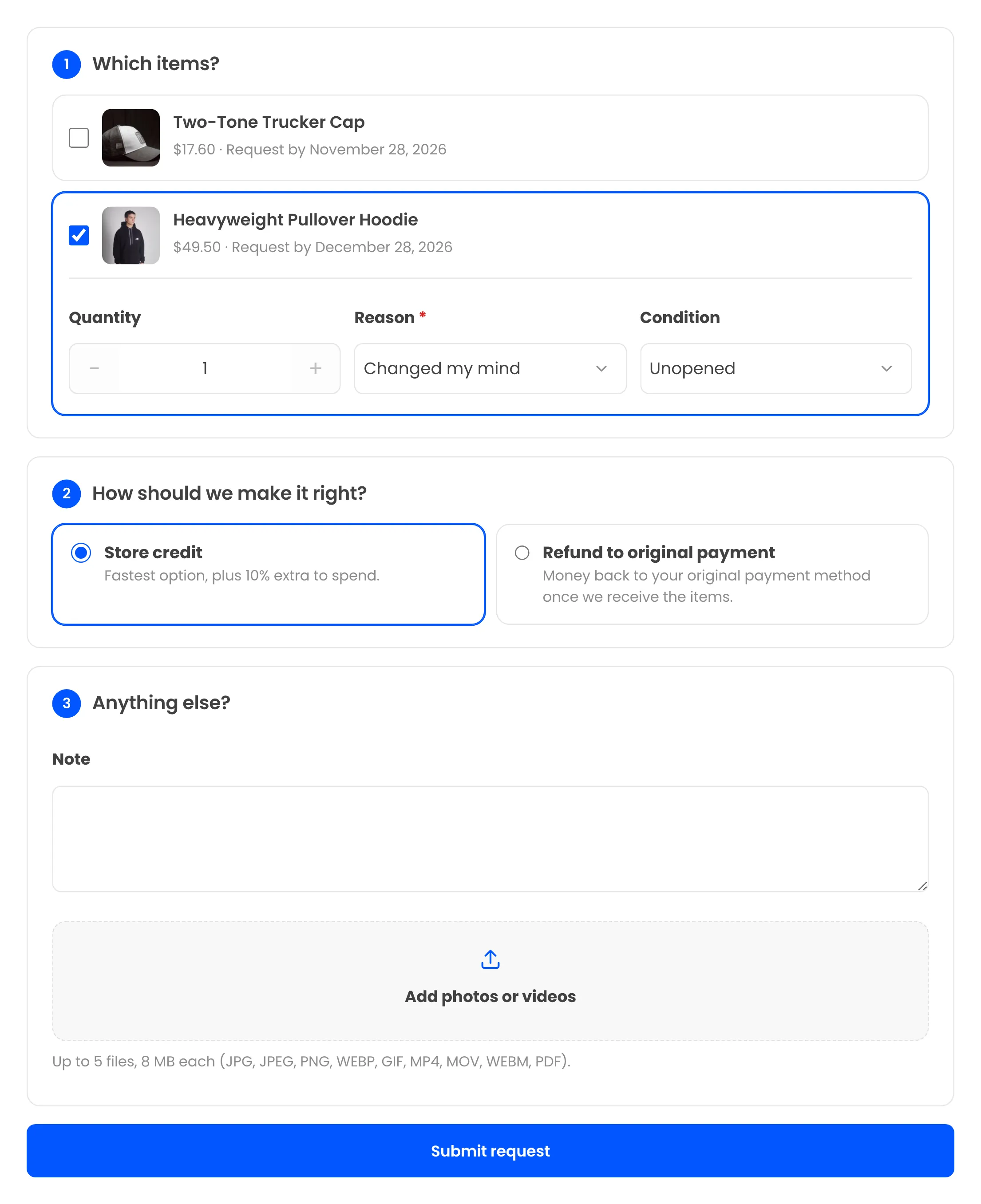
Arrived late is not a default reason. Add it on the Reasons tab, mark it as the store’s fault and the reason shows on the return form beside the others.
9. Ordered Several Sizes to Keep One
Ordering several sizes to keep one is called bracketing. The customer plans to return most of the order. NRF reports that close to two-thirds of consumers admit to at least one costly returns behavior, including wardrobing and bracketing (NRF, 2025).
Customers never pick “bracketing” as a reason. It shows up as Wrong size or fit on every item of one order. Look for customers whose return rate is far above the store’s.
WPReturns > Customers
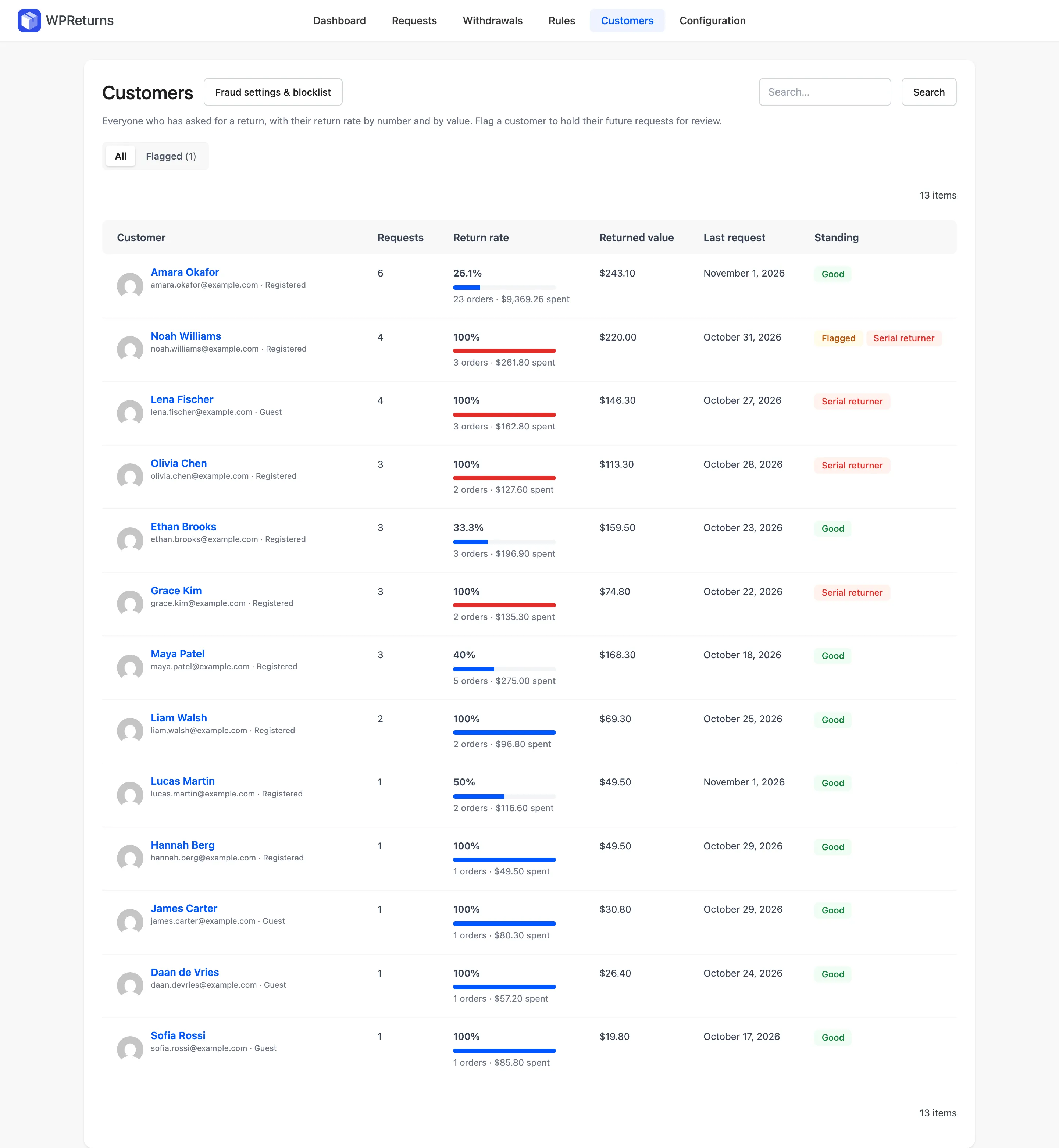
WPReturns Pro keeps a return rate for each customer. Our return fraud guide covers how to tell a heavy returner from an abuser.
10. Wardrobing
Wardrobing means a customer wears or uses an item once and returns it as new. Customers will not choose this as a reason either. It hides under Changed my mind, Wrong size or fit and Other.
Use clear condition rules: tags attached, unworn, in original packaging. Ask for a photo on high-risk categories. Use a restocking fee on opened items.
WPReturns > Configuration > Fraud
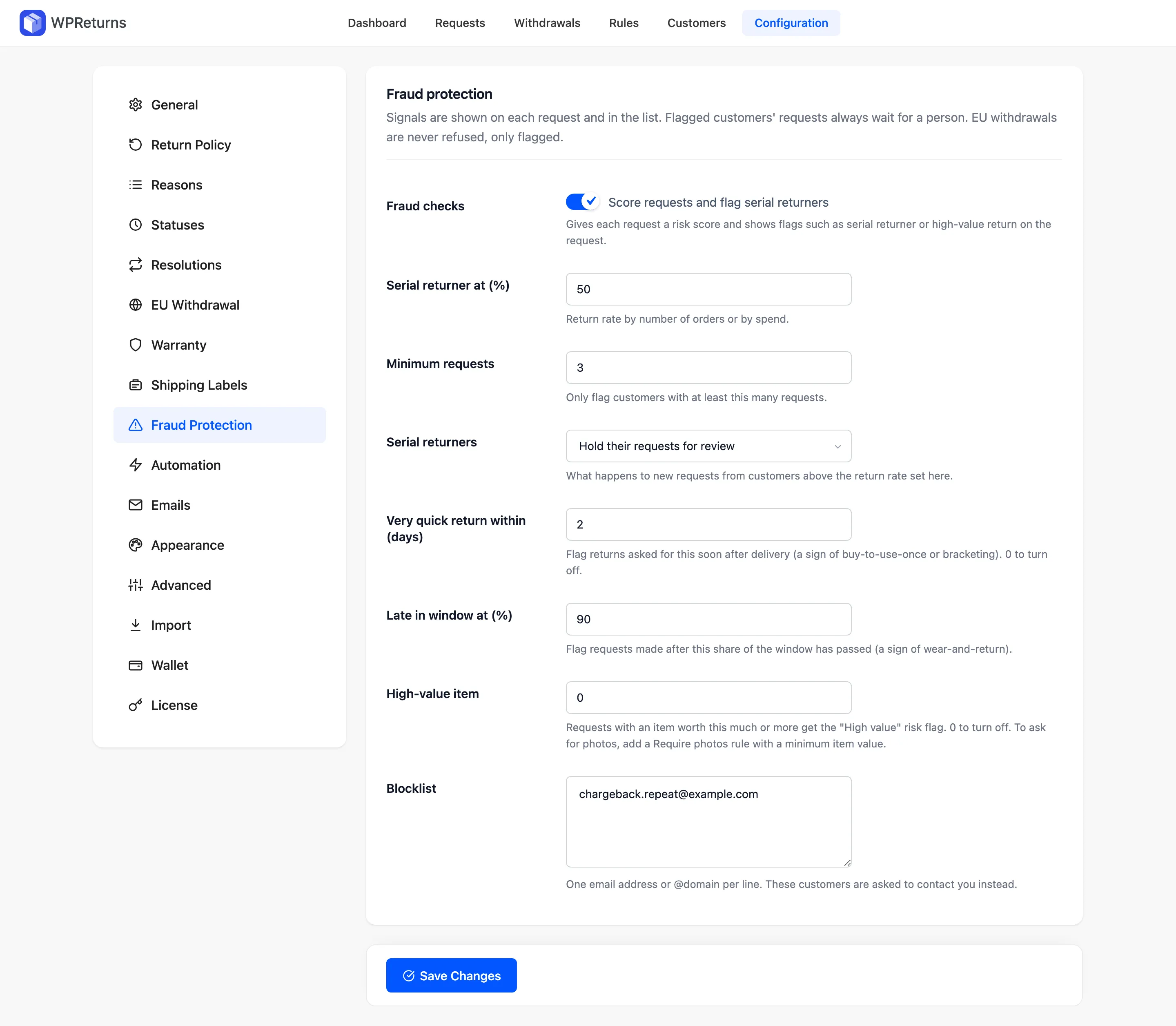
The Fraud tab sets the return rate that marks a serial returner. The fraud protection feature page lists every signal it scores.
Note: Do not treat every wardrobing suspect as a thief. A single flag is a reason to look at the order. It is never proof.
Which Return Reasons Are the Store’s Fault?
Not as described, arrived damaged, defective and wrong item sent are the store’s fault, because your listing, packing or picking caused them. The customer should not pay for the return. Late delivery is shared with the carrier but still sits with you.
Marking them matters because fees follow the flag. A restocking fee on a damaged item is the fastest way to lose a customer and a chargeback. Our chargeback guide explains why.
| Return fees by reason on a $60 item | Wrong sizeCustomer reason | Arrived damagedStore's fault |
|---|---|---|
| Item price | $60.00 | $60.00 |
| Restocking fee at 15% | -$9.00 | $0.00 |
| Return shipping fee | -$5.00 | $0.00 |
| Refund to the customer | $46.00 | $60.00 |
WPReturns Pro never charges restocking or return shipping fees on a store’s fault reason. You pick which reasons carry the flag on the Reasons tab.
The default list flags four reasons: Not as described, Arrived damaged, Defective or stopped working and Wrong item sent. Wrong size or fit, Changed my mind and Found a better price stay unflagged. You can change any flag when your policy differs.
A flag also protects your reputation. A customer who got a broken item and then a fee will tell other people. A customer who got a free return label and a quick refund often buys again.
How to Track Return Reasons in WooCommerce
To track return reasons in WooCommerce you need a reason on every request and a report that counts them. Core WooCommerce has neither. A returns plugin adds the picker, and a dashboard shows the top reasons by period and by product.
Open the WPReturns dashboard and pick a date range. The Top reasons chart shows what customers pick most.
Read it next to Returns by category and Most returned products. Both are Pro charts.
WPReturns > Dashboard
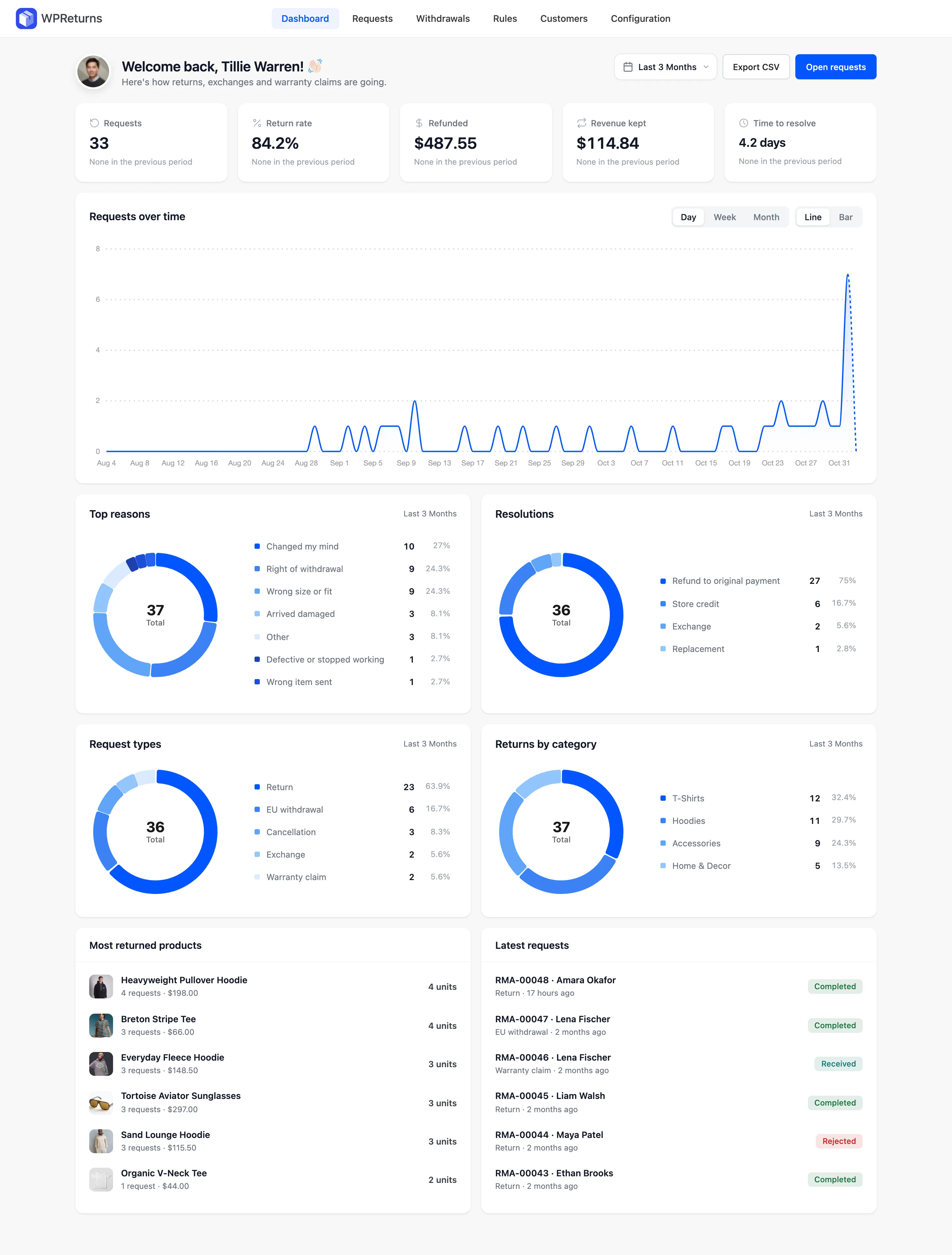
Start with the reason that has the most requests. Then open the products behind it. One product often explains most of a reason.
Check the dashboard once a month. A reason that climbs on one product is a listing or supplier problem.
A reason that climbs everywhere is a policy or shipping problem. Our analytics feature page and the Reasons docs have the full setup.
Tip: Hide a reason you no longer want with Active instead of deleting it. Old requests keep the reason name in reports.
Conclusion
Return reasons tell you what to fix. Size and fit need better charts. Not as described needs better pages.
Damage and wrong items need better packing and picking.
Changes of mind need store credit and a fair policy.
Start small. Mark the store’s fault reasons, ask for photos where the item proves the case and read your Top reasons chart each month. Our WooCommerce returns analytics page shows what the dashboard tracks.