
Chargeback vs refund comes down to control. Both send money back to a customer, but you decide a refund and the customer’s bank decides a chargeback.
That control changes the cost. A refund costs the order value. A chargeback adds a dispute fee, staff time and a mark on your dispute rate, and you can still lose the money.
We make WPReturns, a WooCommerce returns plugin. That puts us at the point where the two paths meet. We read Stripe’s dispute docs and the WPReturns Pro 1.0.0 code in November 2026 for this guide.
What Is the Difference Between a Chargeback and a Refund?
A refund is a payment you send back to the customer by your own choice. A chargeback is a payment the customer’s bank takes back from you after a dispute. You control the first and the bank controls the second.
The two paths differ in six ways:
- You start a refund. The customer starts a chargeback with their bank.
- You pick the refund amount. The bank picks the chargeback result.
- A refund takes days. A chargeback takes weeks or months.
- A refund has no dispute fee. A chargeback usually does.
- A refund leaves your dispute rate alone. A chargeback raises it.
- A refund needs no evidence. A chargeback needs a response with evidence.
Nothing here says a chargeback always means the customer is lying. Many customers file one because the store was slow, the policy was hard to find or the parcel never arrived.
What Is a Chargeback?
A chargeback is a forced reversal of a card payment. The cardholder asks their bank to take the money back, and the bank pulls it from the store through the payment processor. The store gets a chance to answer with evidence.
Banks built chargebacks to protect cardholders from fraud and from sellers who do not deliver. In the United States the billing error rules cover goods that were not delivered as agreed (12 CFR 1026.13).
The same rule lets a customer send a billing error notice to the card company. It must arrive no later than 60 days after the first statement that shows the charge. That is a separate path from the longer window card networks allow.
How Do Chargebacks Work?
A chargeback moves through five stages: dispute, hold, your response, issuer review and decision. The slow parts are a short response window for you and a long review for the issuer. The next paragraph gives both clocks in days for card payments.
Card networks let cardholders dispute a payment within 120 days of the original payment in most cases. You then have usually 7 to 21 days to respond, and the issuer takes usually 60 to 75 days to decide (Stripe, 2026).
How a chargeback moves from dispute to decision
- 01Customer disputesThe cardholder asks their bank to reverse the chargeDay 0
- 02Money is heldThe processor debits the amount plus a dispute feeDay 0
- 03You respondEvidence is due in usually 7 to 21 daysYour move
- 04Issuer reviewsUsually 60 to 75 days after you submit evidenceWait
- 05DecisionYou win or lose the amountFinal
Some banks start with a lighter step first. Stripe calls it an inquiry. The bank asks for clarity on a charge before it opens a formal dispute, and that is your best moment to settle the case.
A few disputes cannot be answered at all. Cartes Bancaires disputes in the SEPA area cannot be challenged. Discover inquiries can turn into unchallengeable disputes if you send no evidence.
The response window is short against the review that follows. Gather the order, the delivery proof and your return records while the case is fresh. A late reply counts as no reply.
What Is a Chargeback Fee?
A chargeback fee is the charge your payment processor adds when a customer disputes a payment. On Stripe it comes in two parts: a received fee when the dispute opens and a countered fee if you challenge it (Stripe, 2026).
Amounts depend on your country and sit on your processor’s pricing page. Stripe says it never returns the received fee unless your contract states otherwise. It returns the countered fee if you win (Stripe, 2026).
That is why winning a dispute still costs money. You get the order value back. You still lose the received fee and the hours spent on evidence.
Regions differ. Businesses in Mexico might get the received fee back on a win, and the countered fee does not apply in Mexico and Japan (Stripe, 2026).
A refund has no dispute fee at all.
Can a Refund Stop a Chargeback?
Yes, a refund can stop a chargeback if you send it before the bank opens a dispute. A full refund closes an inquiry with no dispute fee (Stripe, 2026), but once the dispute is open you cannot refund outside it. Timing decides the outcome.
This timing rule is the most useful fact in the whole topic. Stripe states it plainly: “You can’t issue a refund outside the dispute process while the dispute is open” (Stripe, 2026).
Three cases show where a refund helps:
- An inquiry from the bank. A full refund closes it with no dispute fee.
- A customer who emails to say they will dispute. Refund before they act.
- An early fraud warning on a low-priced order. Stripe suggests refunding charges worth about the dispute fee or less.
A partial refund is weaker. Stripe notes that inquiries on partially refunded charges can still escalate to a chargeback, A half refund may not close the case.
Note: Refunding every early fraud warning is not a good plan. Stripe warns that you will refund some orders that would never have become disputes.
Chargeback vs Refund: Which Costs a Store More?
In the chargeback vs refund comparison a chargeback costs more in almost every case. A refund returns the order value and nothing else. A chargeback adds fees and staff time, and even a win only limits the loss on the sale.
Take a $60 order as an example. The fee amounts below are placeholders, because fees differ by country and processor.
| Refund or chargeback on a $60 order | RefundYou send it | Chargeback lostBank decides | Chargeback wonBank decides |
|---|---|---|---|
| Order value paid back | $60 | $60 | $0 |
| Dispute received fee | $0 | $15 | $15 |
| Dispute countered fee | $0 | $15 | $0 |
| Cash cost to the store | $60 | $90 | $15 |
A win looks cheap in the table. It needed evidence, time and a bank that agreed with you. A refund is the sure result.
There is a second cost that no table shows. Your dispute rate rises with every dispute, whether you win or lose. A store that refunds early keeps that rate low and keeps its processor relationship calm.
There is also a trap on the other side. A customer can get a refund and still dispute the charge. Keep proof of the refund date and amount so you can show the bank the money already went back.
What Evidence Helps in a Chargeback Response?
Evidence that helps shows the order, the delivery and every contact with the customer. A dated record of the return request and your refund answer carries real weight. Processors set their own forms, and each dispute reason asks for different proof.
Gather four things for most cases:
- The order number, the amount and the date of payment.
- Proof of delivery or of the return you received.
- The messages between you and the customer.
- The date and amount of any refund you already sent.
Send only what answers the reason on the dispute. A long file that does not match the reason adds work for the reviewer and no weight for you.
Why Customers File Chargebacks Instead of Asking for a Refund
Customers file chargebacks when asking for a refund feels slower or harder than disputing. A buried policy, a missing return form or a silent inbox pushes them to their bank. The fix is a return path that is easy to find and quick to answer.
Common triggers are easy to name:
- The return policy is hard to find.
- The return form needs a login or a phone call.
- The first reply takes days.
- The customer sees no sign that the request was received.
WPReturns gives every customer one place to start. The guest portal at yourstore.com/returns finds the order from an order number and email. Nobody needs an account to use it.
WPReturns > Guest portal > yourstore.com/returns
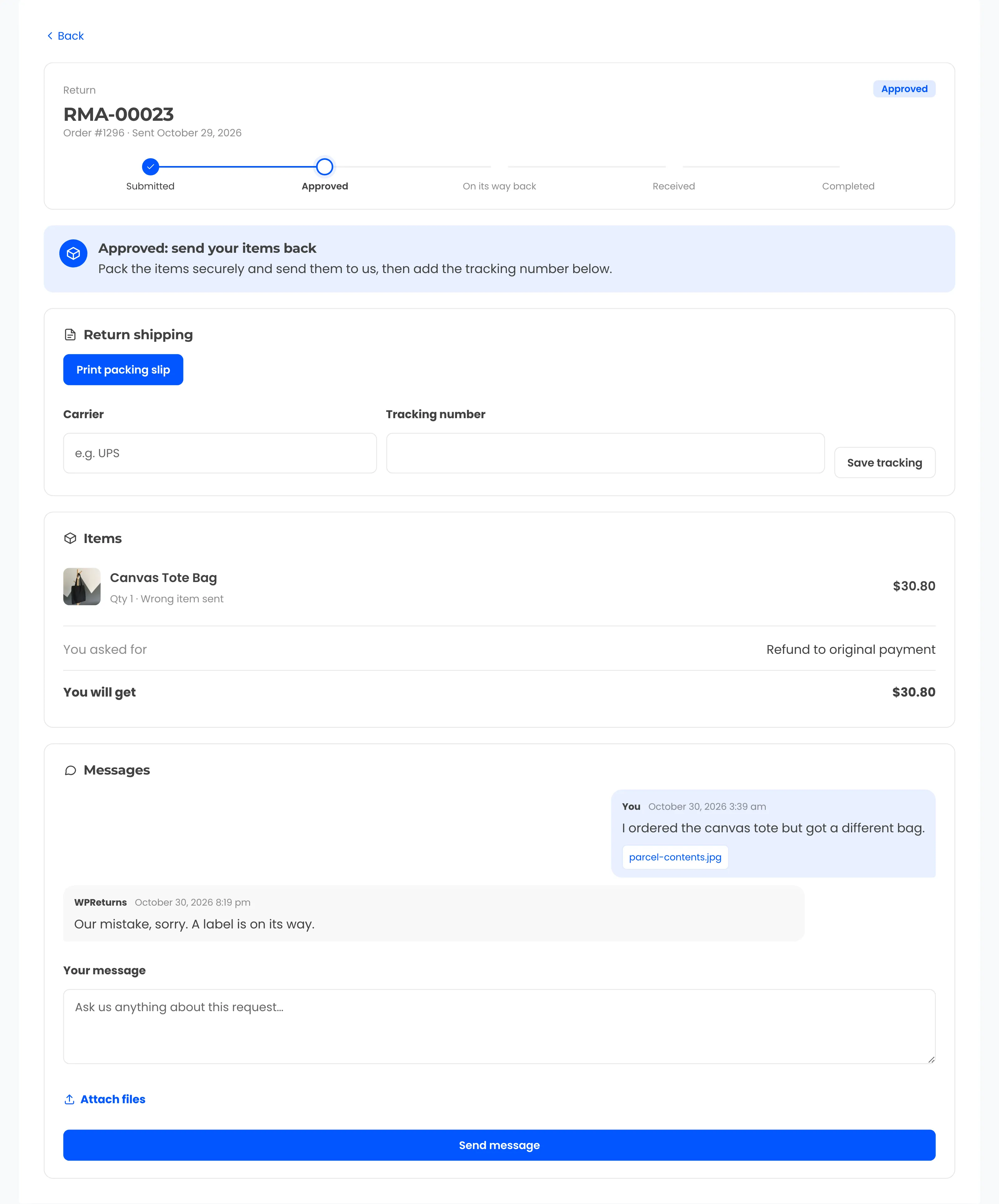
Our returns portal guide walks through the setup. A clear policy helps too, and our return and refund policy template gives you text to paste.
How to Refund Fast Before a Customer Disputes
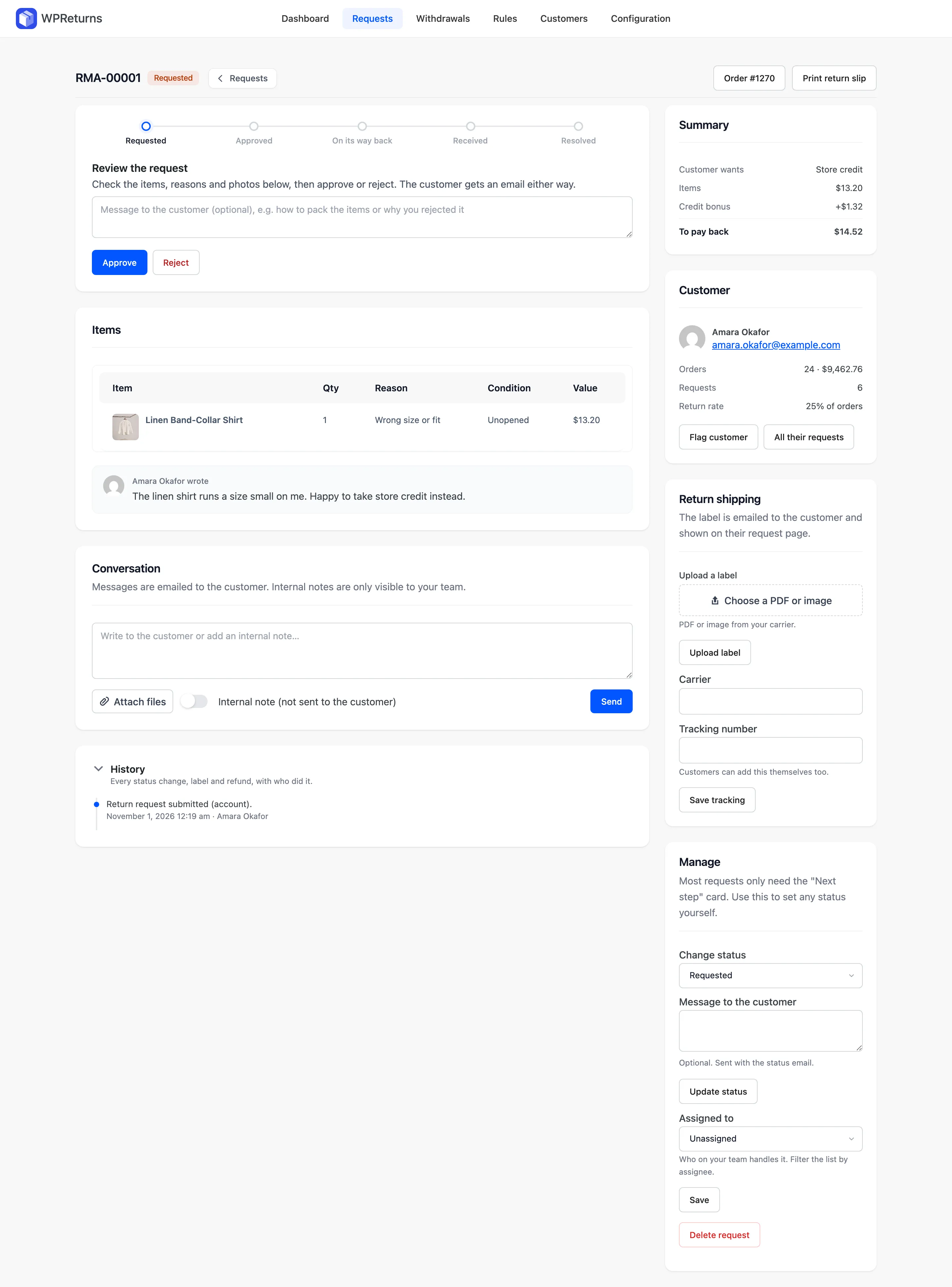
Refund fast by answering every return request the day it arrives and resolving the approved ones in one step. A customer who sees progress rarely calls the bank. In WPReturns a request waits in a queue until you approve it.
Open the Requests screen in DevDiggers Plugins > WPReturns > Requests and look at the Pending tab. A new request shows up there as soon as the customer submits the form.
WPReturns > Requests > Pending
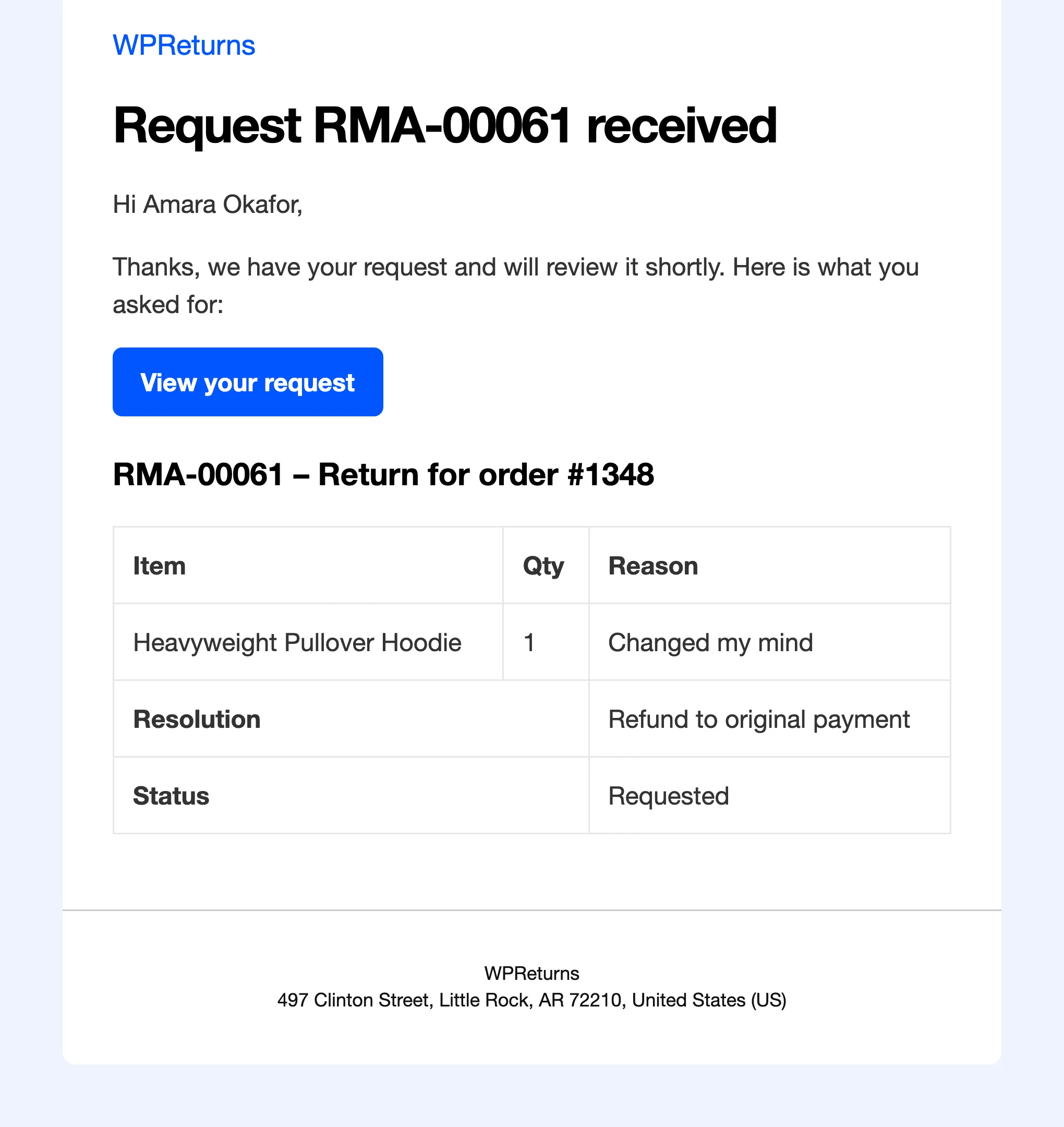
The customer gets a received email at once. That one message answers the first question a worried customer asks.
Email to the customer: Return received
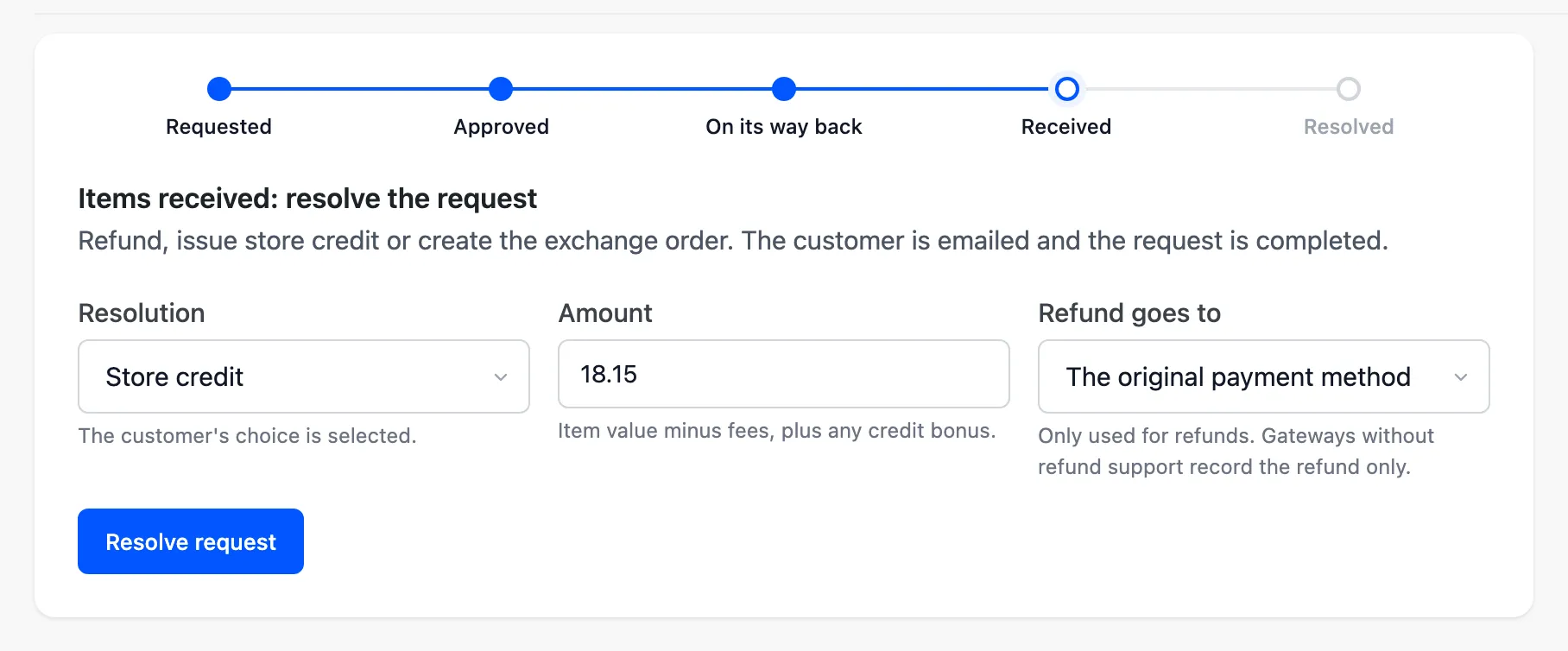
When the return is done, press Resolve request on the request screen. Refund goes to the original payment method by default, and WooCommerce asks the gateway to send the money. The resolutions guide lists the options and what a gateway without refund support does.
WPReturns > Requests > Resolve request
Some customers would take store credit instead of cash. Our store credit vs refund guide shows when that saves you money.
How to Keep Records You Can Use in a Dispute
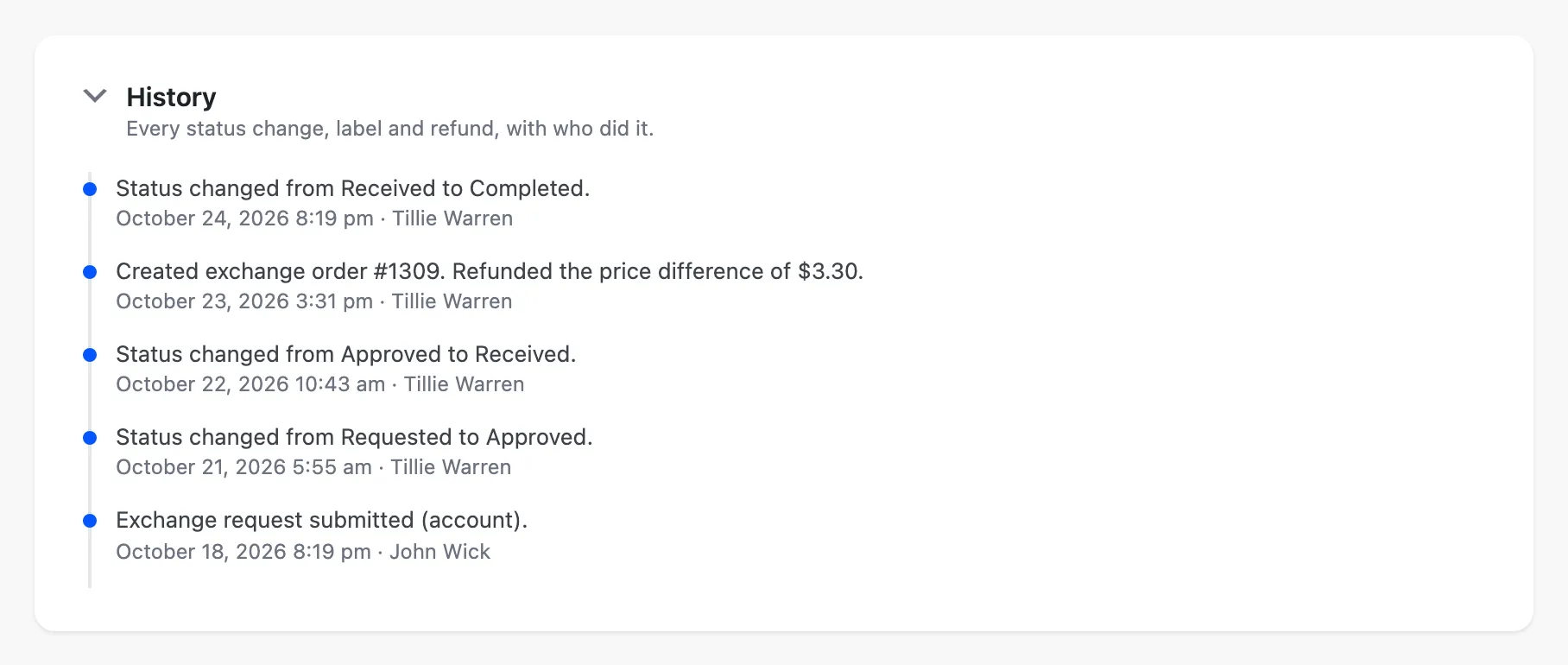
Keep a dated record of every return request. If a dispute opens anyway, you can answer from facts: when the customer asked, what you replied and when you paid. A request screen that logs each step saves you from rebuilding the story.
WPReturns writes each status change and decision to the request history. You can read it top to bottom and copy the dates into the evidence form at your payment processor. The plugin does not send evidence to your processor for you.
WPReturns > Requests > Request > History
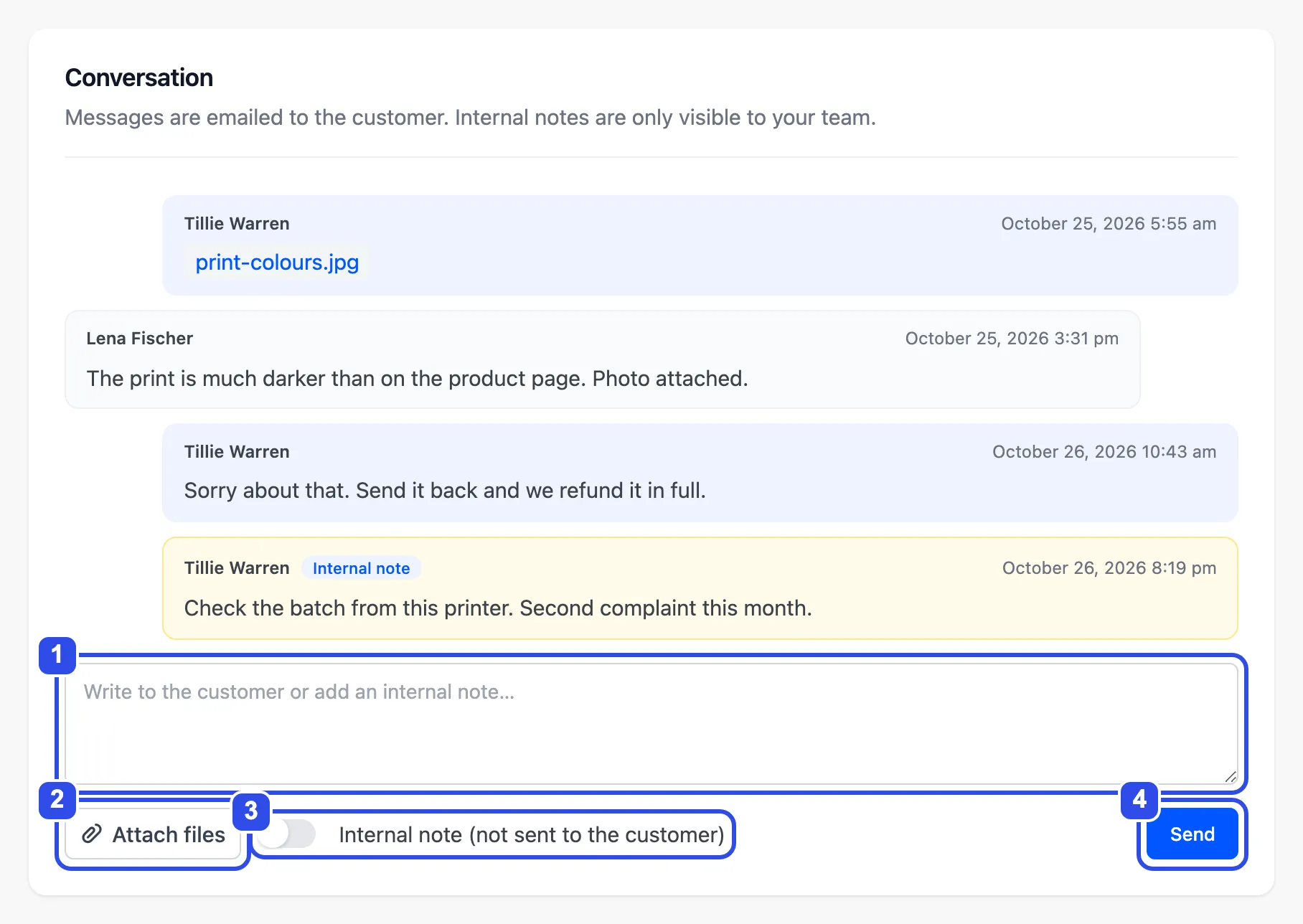
The Conversation card keeps the messages between you and the customer in one place. Attached photos stay with the request.
WPReturns > Requests > Request > Conversation
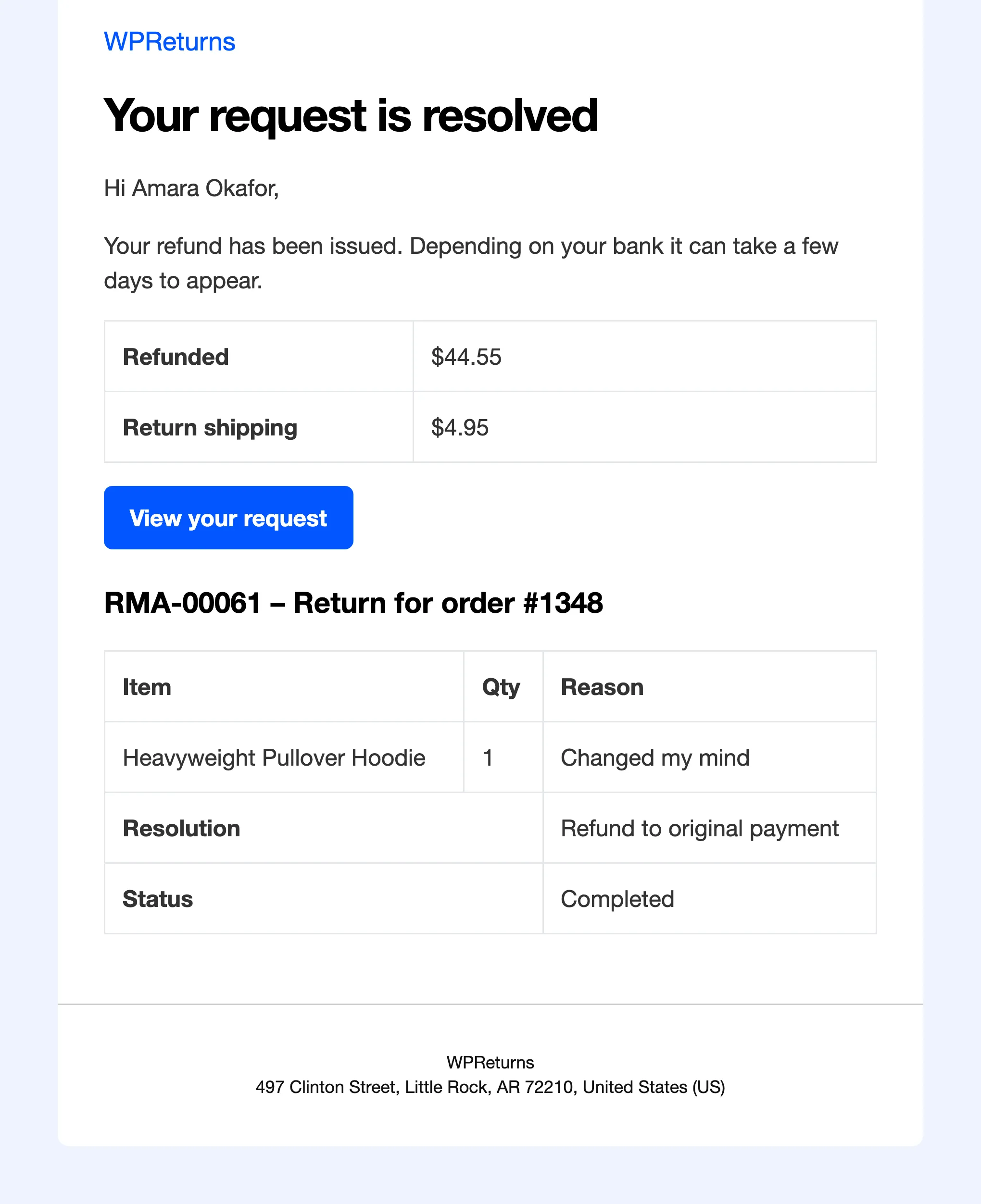
The final email shows what was paid back and when. If a customer disputes a charge you already refunded, this is the proof of the earlier refund. That is the double refund case.
Email to the customer: Return resolved
How to Spot Dispute Risk Before You Ship
Some disputes start with a customer who returns a lot. Spot them early by watching each customer’s return rate and holding their requests for a person. This does not stop card fraud at checkout, but it limits abuse of your return process.
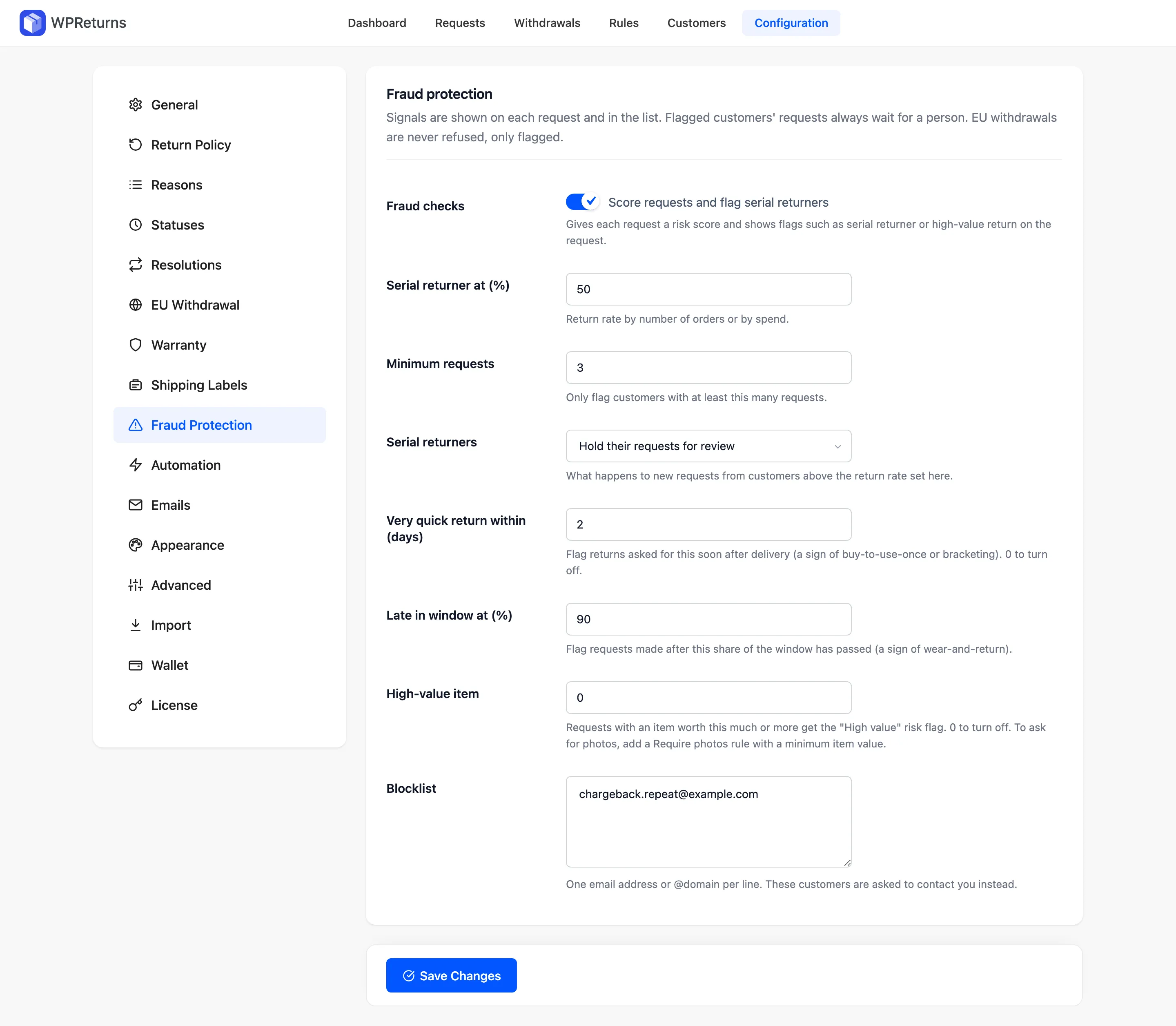
WPReturns Pro scores every request. Open WPReturns > Configuration > Fraud Protection to set the serial returner rate and what happens to those requests. A held request waits for a person even when an auto-approve rule matches.
WPReturns > Configuration > Fraud Protection
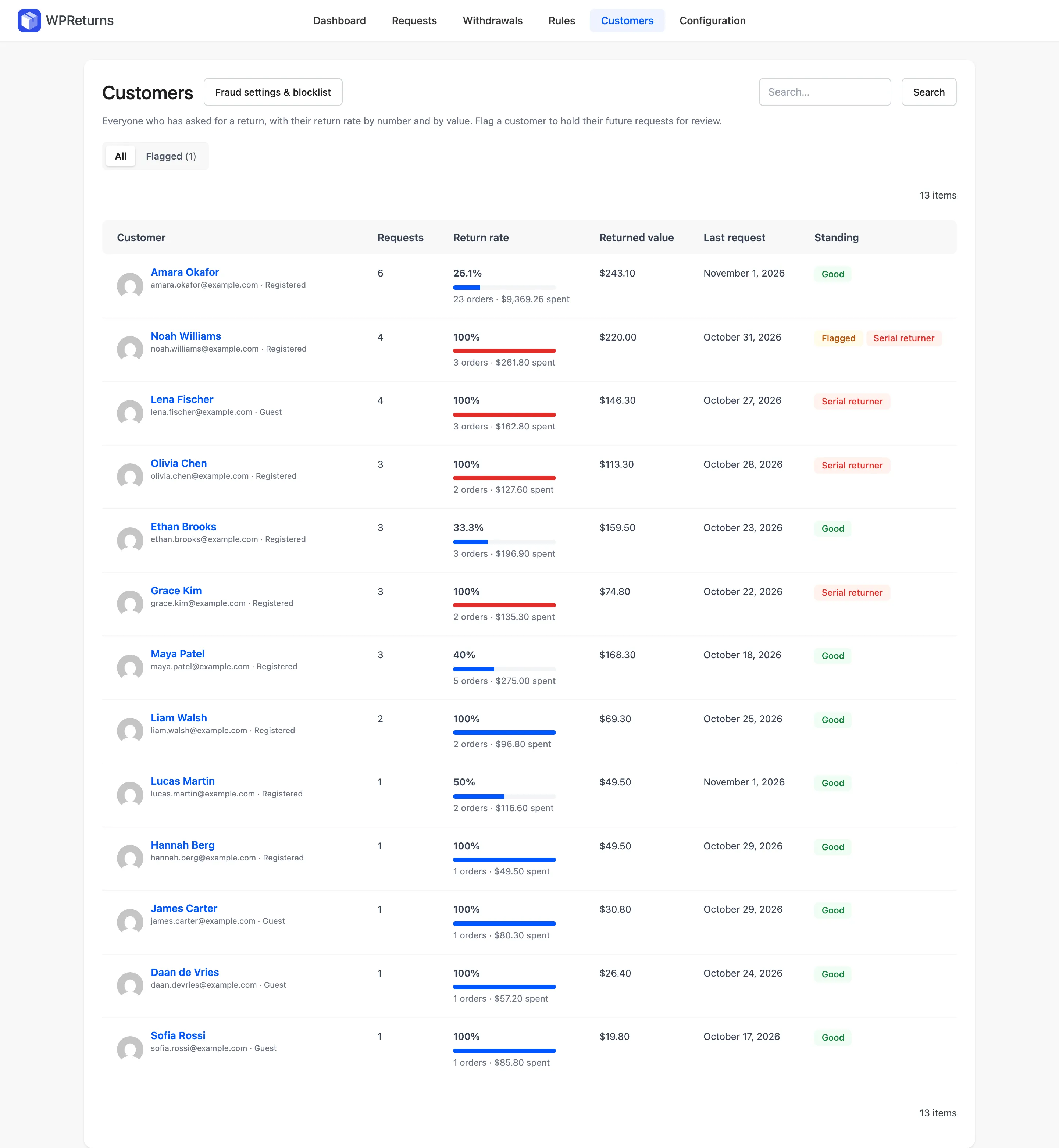
The Customers screen shows each customer’s return rate and standing. A serial returner shows a flag you can read at a glance.
WPReturns > Customers
Our fraud protection feature page lists every signal. For checkout side checks, read the DevDiggers guide on ways to prevent fraud before an order ships. Our own return fraud guide covers the return side.
How Many Chargebacks Is Too Many?
Stripe calls dispute activity above 0.75% excessive (Stripe, 2026). Visa’s VAMP program flags a store at a 1.5% ratio and 1,500 disputes in the United States. A sudden spike can trigger monitoring even before a store reaches either of those limits.
The 0.75% figure comes from Stripe’s own measuring page. It adds that card networks can fine stores in a monitoring program. Excessive activity also affects your ability to process with other processors.
Stripe lists the VAMP non-compliant level at a 0.5% ratio with a count of 5. The excessive level is a 1.5% ratio with a count of 1,500 in the United States. Visa may fine stores above the excessive level and can fine stores above the non-compliant one (Stripe, 2026).
Small stores sit far from the count of 1,500. The ratio and the trend still matter. One bad month can look like a spike (Stripe, 2026).
Conclusion
Chargeback vs refund comes down to control. A refund costs the order value and nothing more. The bank controls a chargeback, and you pay fees and time even when you win.
Refund early and answer every inquiry. Keep a dated record of each request and watch the customers who return a lot. Most chargebacks start when a customer cannot get a quick answer from you.
WPReturns Pro handles the request, the refund and the record in one place. See the pricing page for plans.