
A return and refund policy is the page that tells shoppers how long they have to send an item back. It also says what condition the item must be in and how you pay them. Write it before your first sale.
A shopper who cannot find these terms is less likely to buy. A clear return policy for an online store works as a sales page too.
This guide gives you a copy-paste template with a US version and an EU version. You also get a filled-in sample for a small store and the WooCommerce settings that match each line. We read the legal sources in November 2026 and tested the setup on WPReturns Pro 1.0.0, our own plugin.
What Is a Return and Refund Policy?
A return and refund policy states when a customer can return an item and how you repay them. It names the window, the item condition, the refund method, the timeline and any fees. Most stores publish one page that covers both returns and refunds.
People search for “what is a refund policy” because the two terms overlap. A return policy is about the item coming back. A refund policy is about the money going out.
Some stores add a third part for exchanges and store credit. Keep all three in one document so a shopper finds one set of rules. Our guide to store credit vs refund explains how to word that part.
Do You Need a Return and Refund Policy?
No federal US law makes an online store offer returns, but some states make you post your policy. New York is one, and a store there that posts nothing owes buyers a refund for 30 days. Outside the US the rules are stricter.
The EU adds a legal right of withdrawal.
The FTC Mail, Internet or Telephone Order Merchandise Rule covers shipping times and refunds for orders you cannot ship. It does not require a return policy (FTC). If you miss a promised ship date, you must offer a cancellation and send the refund within seven working days.
New York General Business Law section 218-a says a seller must post its refund policy before the buyer enters billing details. If it does not, the buyer can return an unused item for 30 days (NY Senate). Check the rules of every state you sell into.
In the EU a customer can cancel a distance sale within 14 days of delivery without giving a reason. The consumer pays return postage unless the seller offers to or failed to say so before the sale (Your Europe). Made-to-order goods and unsealed audio, video and software are exempt.
Note: This is not legal advice. Have a lawyer read your final text if you ship to several countries.
What to Include in a Return and Refund Policy
A complete policy answers eight questions. It gives the window, the item condition and the excluded items. It also says how to start a return, who pays shipping, how you refund, what else you offer and how to reach you.
Here is what each part should settle before you write it.
- The return window, in days, and whether it counts from the order date or from delivery.
- The condition an item must be in, such as unused and in its original packaging.
- The items you cannot take back, such as final sale, gift cards and personalized goods.
- How a customer starts a return and how fast you reply.
- Who pays return shipping and whether you waive it for damaged or wrong items.
- The refund method, the timeline and any restocking fee.
- Exchanges and store credit when you offer them.
- A contact address that you check.
The order of the list is the order of the policy. A customer reads top to bottom until they find their answer. Put the window first, because it is the first thing they look for.
The return and refund policy at a glance
- 01WindowHow many days and counted from whenRule 1
- 02EligibilityItem condition and excluded itemsRule 2
- 03Start a returnWhere to go and what to sendRule 3
- 04Shipping and feesWho pays the way backRule 4
- 05RefundMethod and timelineRule 5
Return and Refund Policy Template for the US
This return policy template is a return policy for online store owners in the US. Replace every bracket with your own number or choice, and delete the lines you do not need. It keeps each sentence short so a shopper can skim it on a phone.
Use it as your refund policy template too. The refund section sits in the middle, and the exchange section is optional.
Return and Refund Policy
Return windowYou can return most items within [30] days of [delivery].Items must be unused, in the original packaging and come with proof of purchase.
Items we cannot take back[Final sale items, gift cards, personalized items and downloads] cannot be returned.Items marked "Final sale" on the product page are final.
How to start a returnGo to [yourstore.com/returns] and enter your order number and billing email.Pick a reason and add photos if the item arrived damaged.We reply within [2] business days.
Return shipping[You pay return shipping. We take $[X] from your refund.]We pay return shipping when the item is damaged, defective or not what you ordered.
RefundsWe refund to your original payment method within [7] business days after we receive and check your return.[Original shipping is not refunded unless we made the mistake.][Restocking fee: [none / X percent] of the item price.]
Exchanges and store credit[You can exchange an item for another size or color.][You can choose store credit instead of a refund. Credit expires after [365] days.]
Damaged, defective or wrong itemsTell us within [7] days of delivery and send a photo. We replace the item or refund it in full, including shipping.
ContactWrite to [support@yourstore.com]. We answer within [2] business days.
Choose your numbers from your own costs and your own customers. A 30 day window is common, but we found no neutral data that says it is the right one for your catalog. Test one number and change it later.
EU and UK Version of the Return and Refund Policy
An EU store adds a withdrawal clause and removes fees that cannot apply to it. The customer has 14 days from delivery to cancel a distance sale and needs no reason. Your own return window then sits on top of the legal one.
Paste this block under the US template and edit it. We did not research UK consumer law for this guide, so check a UK source before you sell there. Our Consumer Contracts Regulations guide covers the UK 14 day rule for sellers.
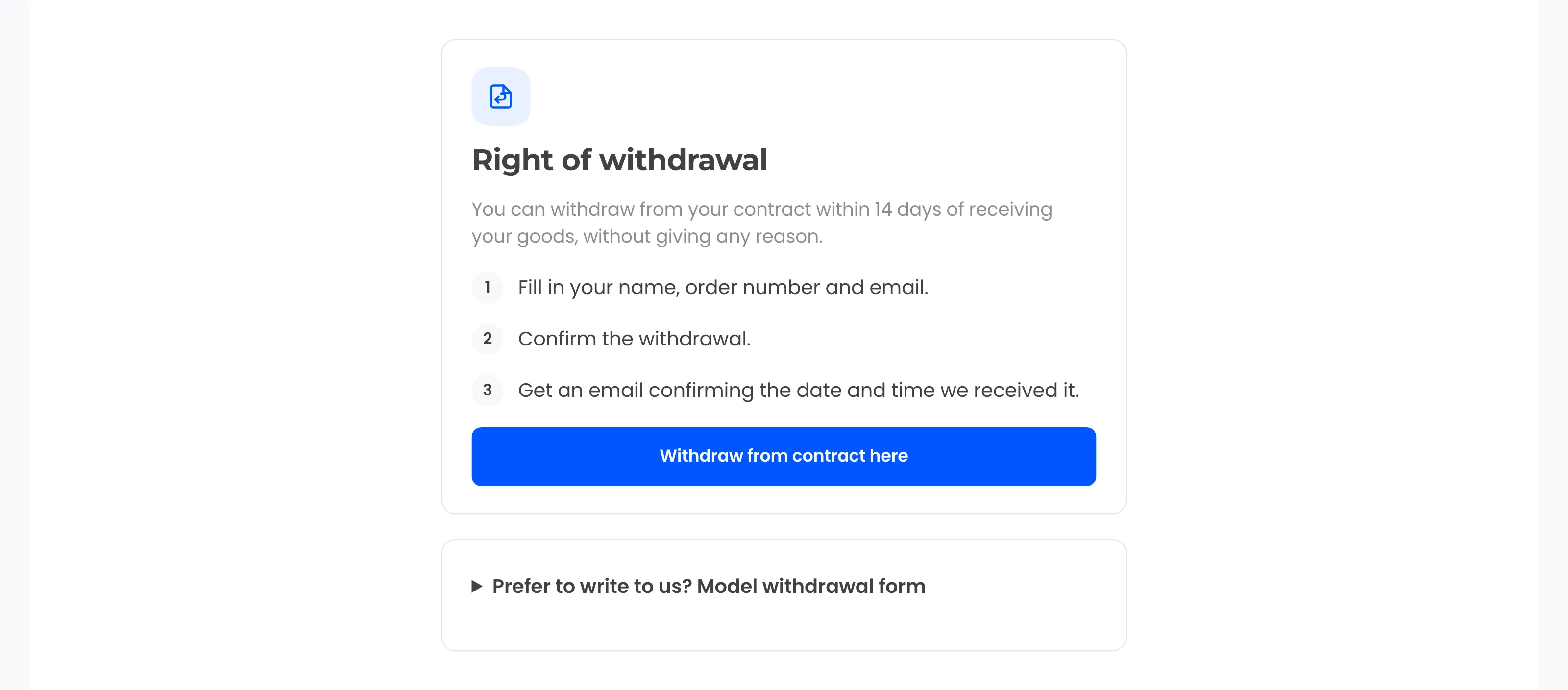
Right of withdrawal (EU customers)You can withdraw from your order within 14 days of delivery without giving a reason.Use the "Withdraw from contract here" link on our site or write to [support@yourstore.com].Send the goods back within 14 days of telling us. [We pay / You pay] the cost of returning them.We refund the price you paid to your original payment method.This right does not cover personalized goods, sealed items that cannot be returned for hygiene reasons once opened, or downloads you started.Return fees and restocking fees do not belong in the EU clause. WPReturns never applies them to a withdrawal. Our EU withdrawal button guide explains the online withdrawal function the directive added from June 19, 2026.
Tip: Keep the withdrawal clause separate from your return window. A shopper who reads “14 days” in both places will assume they are the same thing.
Your store > Withdrawal page
Sample Return Policy for a Small Business
A small business return policy should fit on one screen, with one window, one excluded category, one refund method and one contact address. The sample below is for a made-up store called Linen & Loom. Copy its shape and swap in your own terms.
Linen & Loom returns
Return anything unused within 30 days of delivery.Sale items and gift cards are final.Start a return at linenandloom.example/returns with your order number.We email a prepaid label. We take $5 from your refund for it.If we sent the wrong item or it arrived damaged, we pay the label and refund you in full.Refunds reach your card within 7 business days of us receiving the parcel.Questions? Write to help@linenandloom.example.
That is 80 words, and it covers all eight parts. Short policies get read. A page that runs to three screens usually hides an exclusion that a customer will find only after they buy.
Small stores often skip the restocking fee. That is a reasonable choice when your items resell at full price. If you want one, read our guide to what a restocking fee is first.
How to Write a Return Policy in Five Steps
To write a return policy, make five decisions in order and write one section for each. Settle the window, the exclusions, the return shipping rule, the refund method and the tone. Do the numbers first and the wording last, because wording follows from them.
- Pick the number of days and the start point. Counting from delivery is fairer to shoppers who wait a week for a parcel. Counting from the order date is simpler when you cannot track delivery. A longer seasonal window is covered in our holiday return policy guide.
- Name the goods you cannot take back, such as final-sale items, gift cards and personalized items. Say it in the policy and again on the product page under Add to cart.
- Decide who pays return shipping. You can charge a flat fee, take postage from the refund or offer free returns above an order total. The wording must match what the system charges.
- Choose the refund method. Say whether you refund to the original payment method, issue store credit or offer both, and state the timeline in business days.
- Write it plainly in second person. Write “You can return” instead of “Customers may be entitled to return”, read it aloud once and split any sentence that needs a breath.
Seven business days is a common refund timeline. It also matches the FTC deadline for refunding orders you cannot ship. The example below shows what two refunds look like once the fee rule is set.
| What the refund looks like for a $60 item | Wrong sizeCustomer's choice | Arrived damagedStore's fault |
|---|---|---|
| Item price | $60.00 | $60.00 |
| Return shipping fee | -$5.00 | $0.00 |
| Restocking fee | $0.00 | $0.00 |
| Refund | $55.00 | $60.00 |
How to Set Up Your Return and Refund Policy in WooCommerce
WooCommerce core has no return window setting. The policy text and the store can therefore drift apart. WPReturns puts the window, the final-sale items and the policy line in one settings tab, and Pro adds fees, store credit and category rules.
Step 1: Set the Window and Final-Sale Items
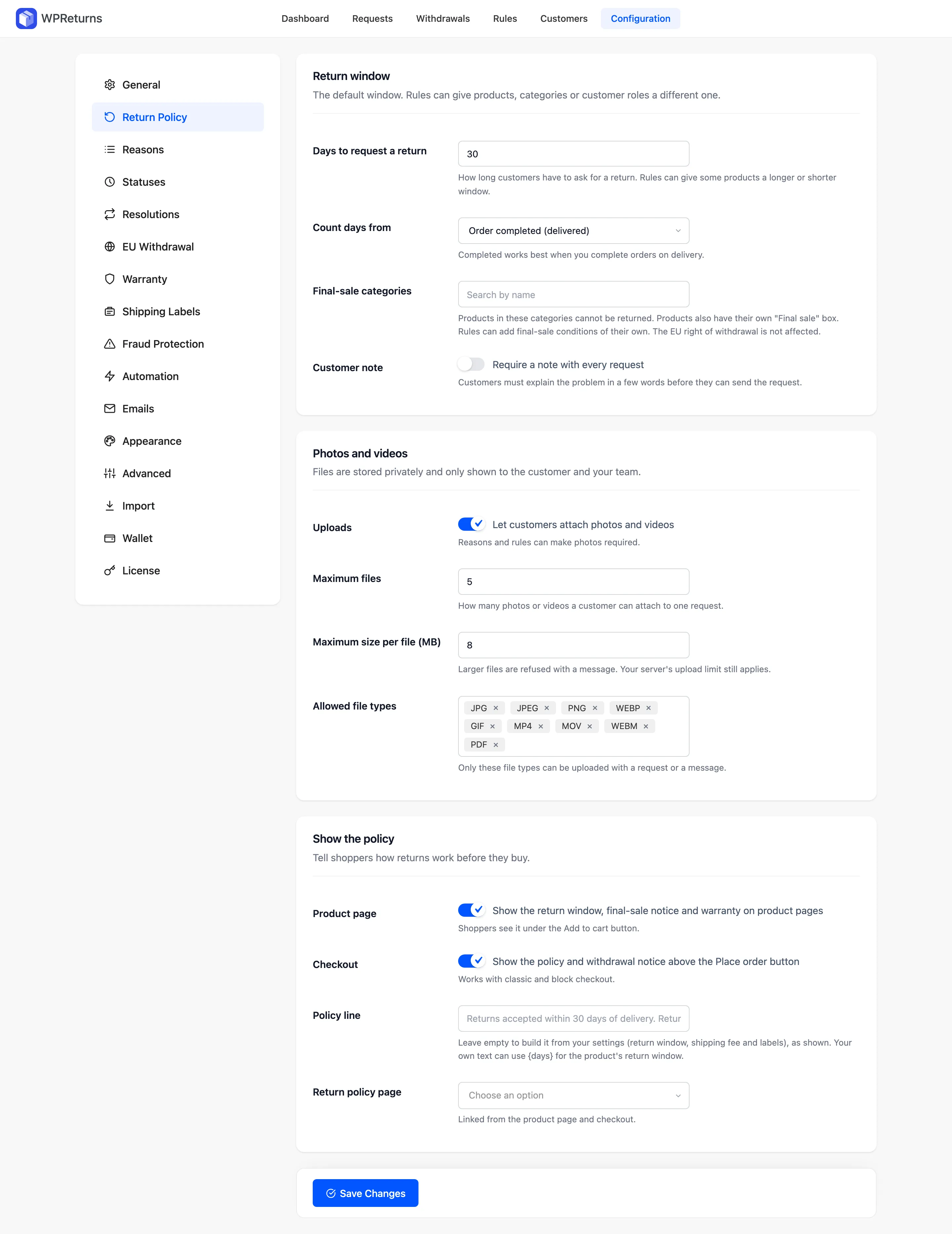
Go to DevDiggers Plugins > WPReturns > Configuration > Return Policy. Enter the Days to request a return and choose Order completed (delivered) or Order placed under Count days from. Add your final-sale categories on the same tab.
This tab is in the free plugin. Our return policy settings guide lists every field.
1WPReturns > Configuration > Return Policy
Step 2: Choose How Refunds Are Paid
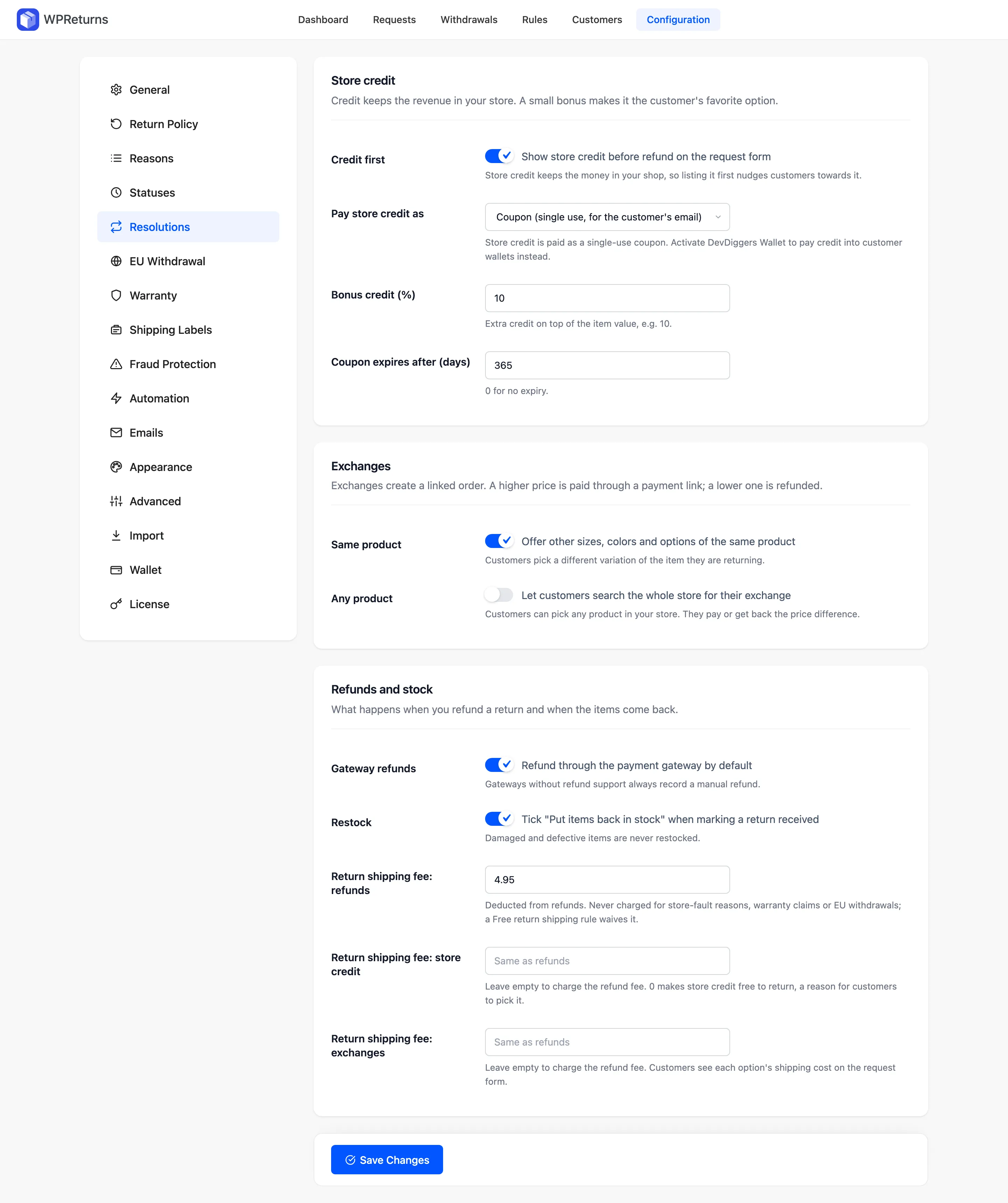
Open DevDiggers Plugins > WPReturns > Configuration > Resolutions. Gateway refunds are on by default, and Restock puts returned items back in stock. In Pro, you can add a return shipping fee for each resolution and pay store credit with a bonus.
Your policy must name the same fee. If the tab says $5, the page says $5.
2WPReturns > Configuration > Resolutions
Step 3: Add Rules for Fees and Longer Windows
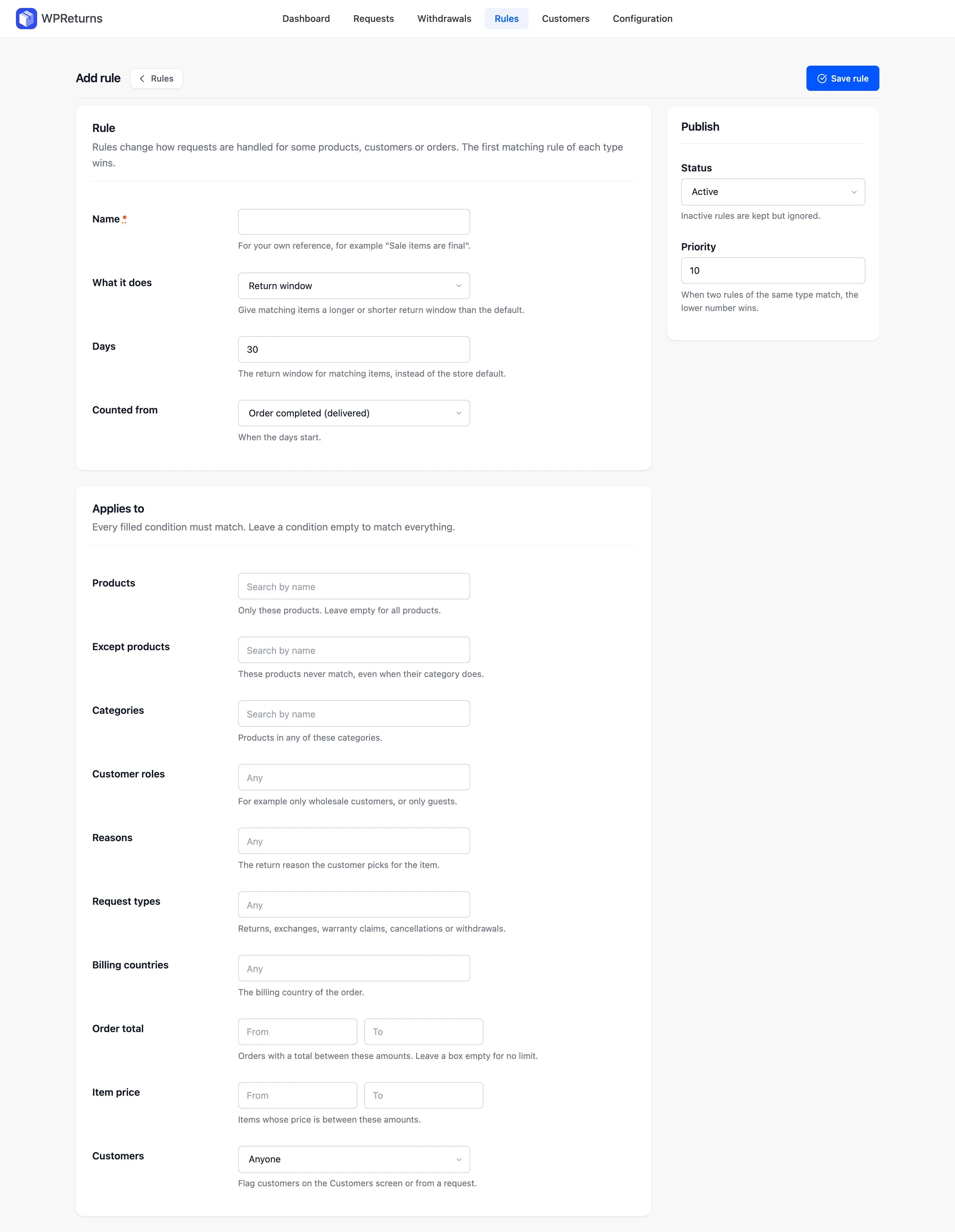
Pro stores can give one category a longer window or add a restocking fee with Rules. Go to DevDiggers Plugins > WPReturns > Rules and select Add New. Pick Return window, Restocking fee or Free return shipping under What it does.
Fees never apply to EU withdrawals or to reasons marked as the store’s fault. The rules guide lists the conditions, and our page on return rules shows what each one does.
3WPReturns > Rules > Add rule
Step 4: Show the Policy Before Checkout
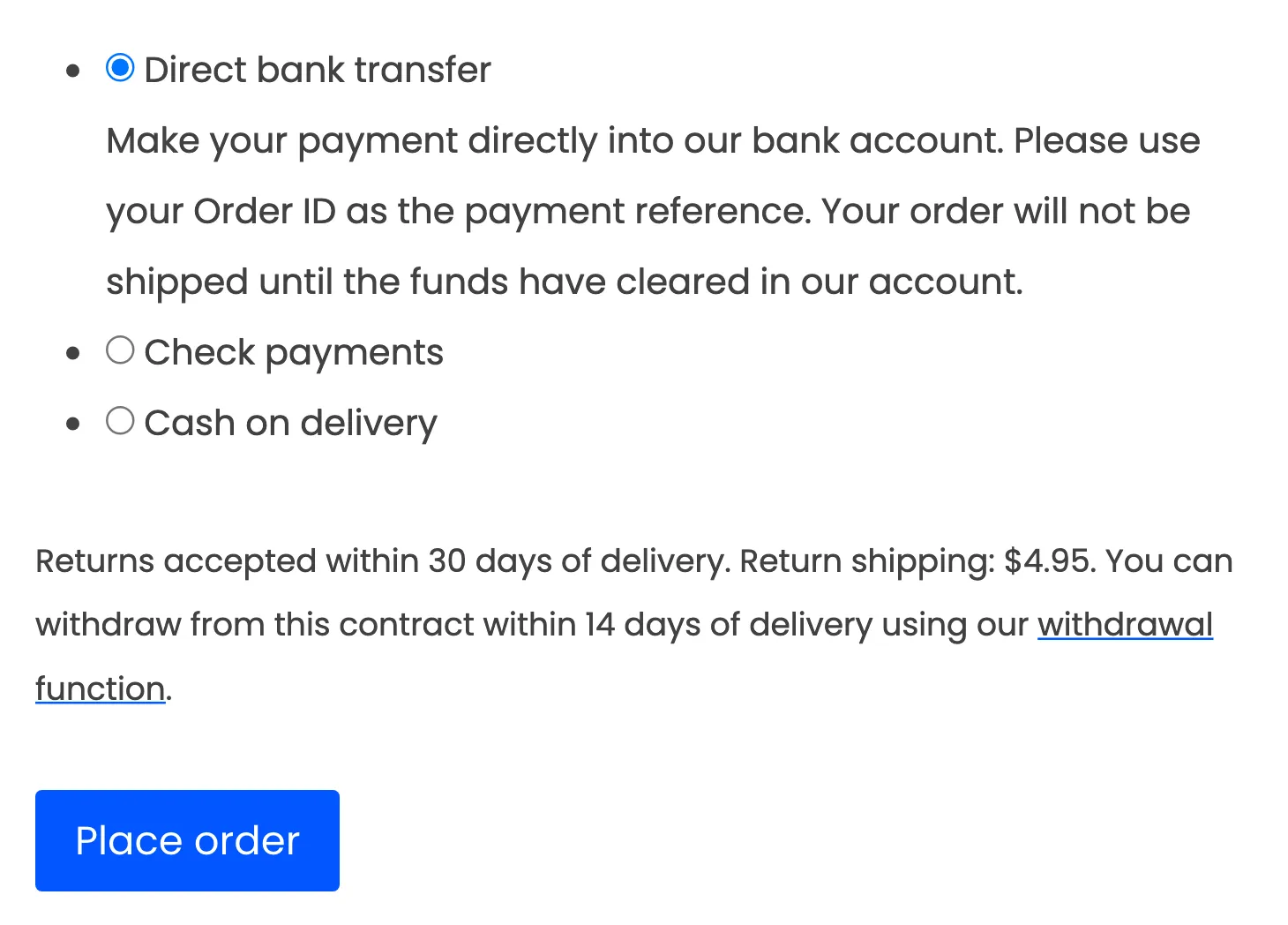
Leave the Policy line empty and WPReturns builds it from your window. It reads like “Returns accepted within 30 days of delivery.” Or type your own text and use {days} for the product’s window.
Set a Return policy page and the line links to it from the product page and from checkout. Product page and Checkout are both on by default.
4Checkout
Return and Refund Policy Mistakes to Avoid
Most policy problems come from text that does not match what the store does. Promising a window the plugin does not enforce, hiding a fee or using vague words all lead to disputes. Check each line against your settings before you publish.
A policy that says “all sales final” next to a plugin that accepts returns confuses everyone. So does a policy that promises free returns while the checkout adds a fee. Pick the rule once and set the store to follow it.
Vague words cause the next round of arguments. “Gently used”, “reasonable time” and “at our discretion” mean something different to each reader. Use days, dollar amounts and a named condition such as “original packaging”.
Leave out clauses you do not enforce. A restocking fee that you waive every time teaches customers to argue. A final-sale list that grows every month makes the policy look like a trap.
Finally, date the page. Write “Last updated” at the bottom and change it when you change the terms. Orders placed under old terms keep those terms, so say that in one line.
Product page
Where to Show Your Return and Refund Policy
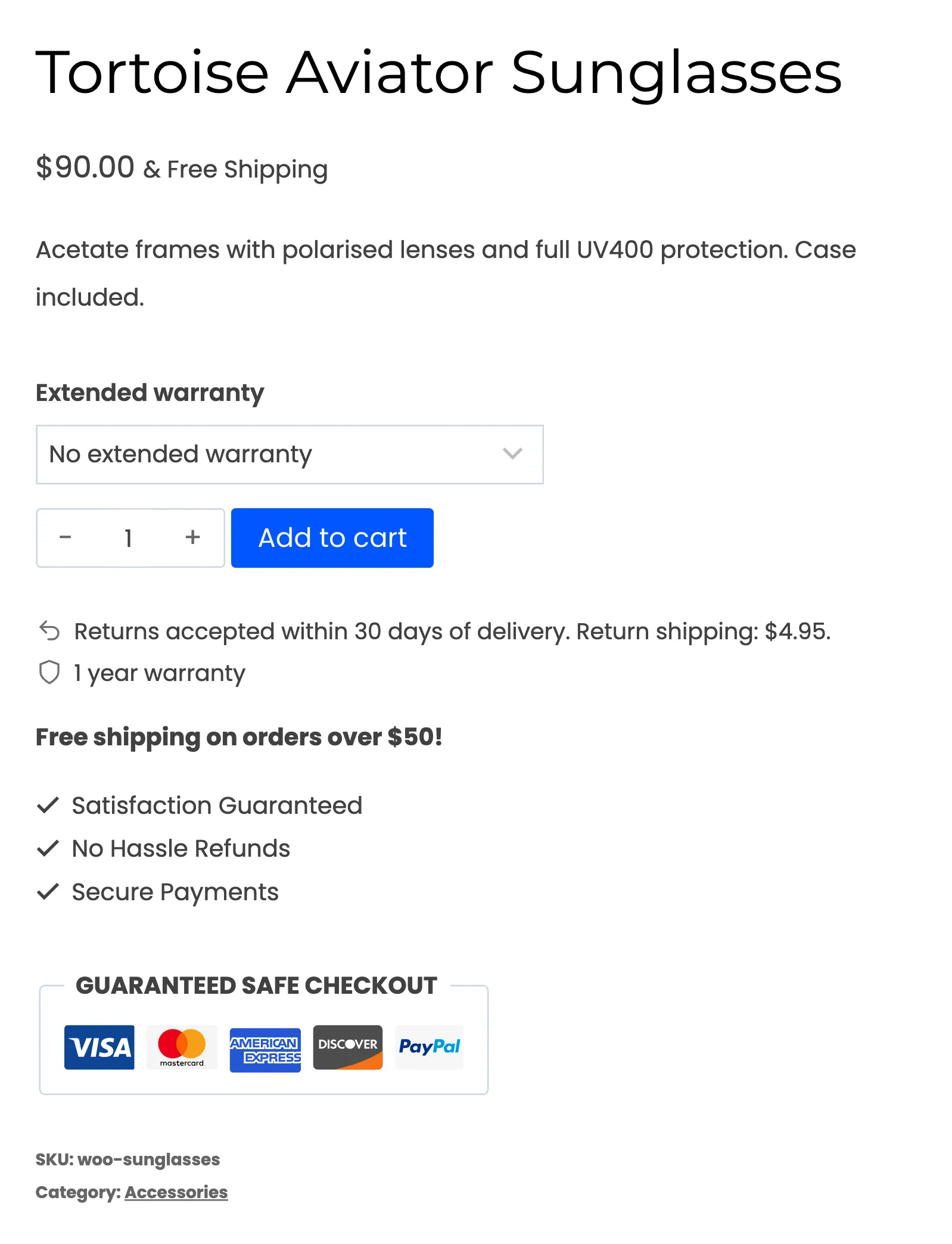
Show the policy where a shopper decides to buy. Put it in the footer, on every product page and above the Place order button. A policy on one hidden page does not help sales or protect you in a dispute.
New York’s rule asks for a notice near the item or before the buyer enters billing details. A footer link alone does not meet that test. The product page line and the checkout line do.
Keep the text and the settings in sync. When you change the window in WPReturns, edit the page the same day. Our WooCommerce returns portal guide shows how customers start a return once they have read the policy.
Worth checking: Open your checkout as a guest and read the policy line. Then start a return and see whether the portal agrees with the page.
Conclusion
A good return and refund policy is short, specific and the same everywhere you show it. Start from the template, fill every bracket with a real number and add the EU clause if you sell there. Then set WooCommerce to enforce the same terms.
WPReturns does that in one plugin. The free version covers the window and final-sale items, and WPReturns Pro adds fees, rules and store credit. See the free vs Pro table to choose.