EU Withdrawal
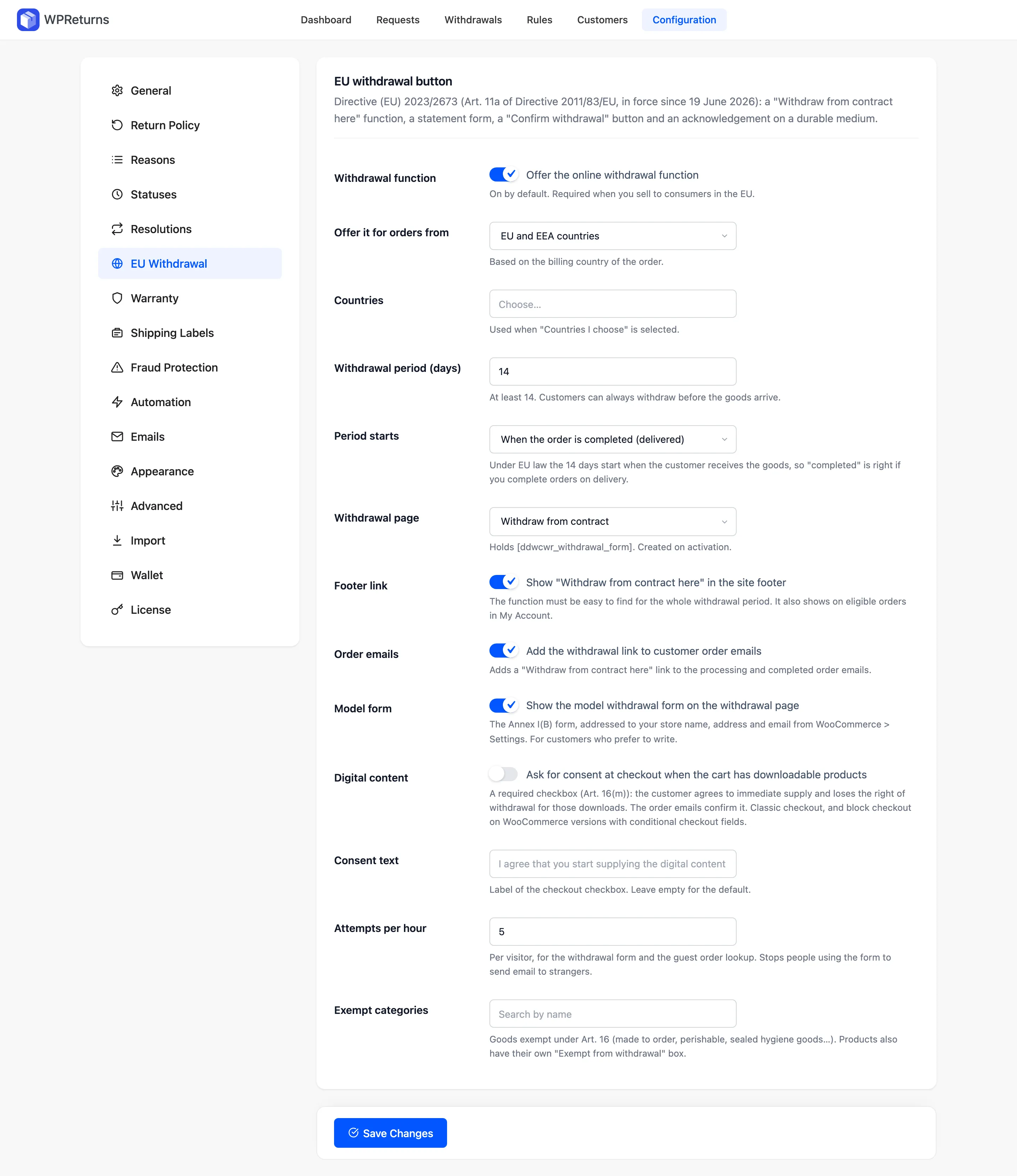
The EU Withdrawal tab configures the online withdrawal function that Directive (EU) 2023/2673 requires from June 19, 2026. Customers click “Withdraw from contract here”, fill in a statement, press “Confirm withdrawal” and get a dated acknowledgement email. This tab sets who sees the button, for how long and which goods are exempt.
Available in: Free and Pro
Where to find it
Section titled “Where to find it”DevDiggers Plugins > WPReturns > Configuration > EU Withdrawal
How the withdrawal flow works
Section titled “How the withdrawal flow works”The flow follows Article 11a of Directive 2011/83/EU. Directive (EU) 2023/2673 added that article.
-
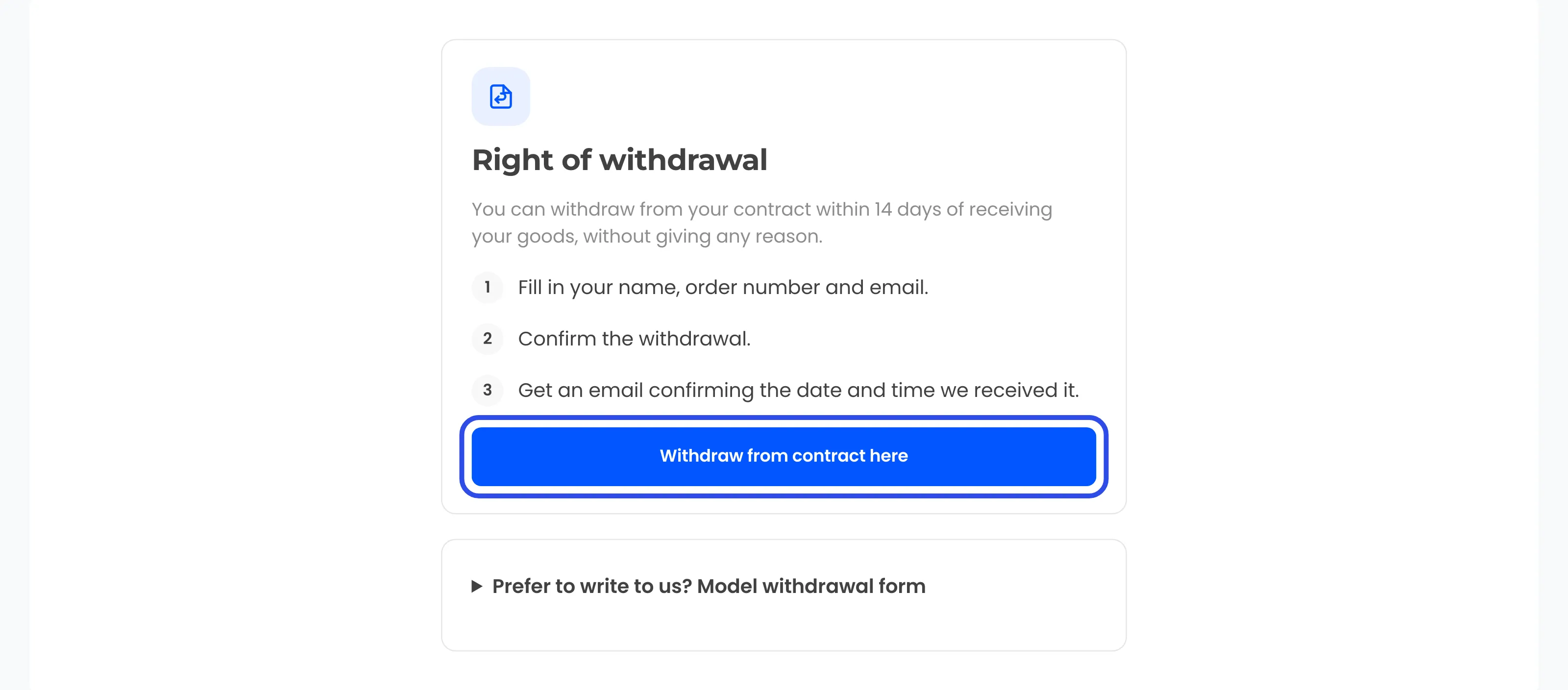
In step 1 the customer clicks “Withdraw from contract here” in the footer, on an order in My Account or in an order email. The link opens the withdrawal page.

-
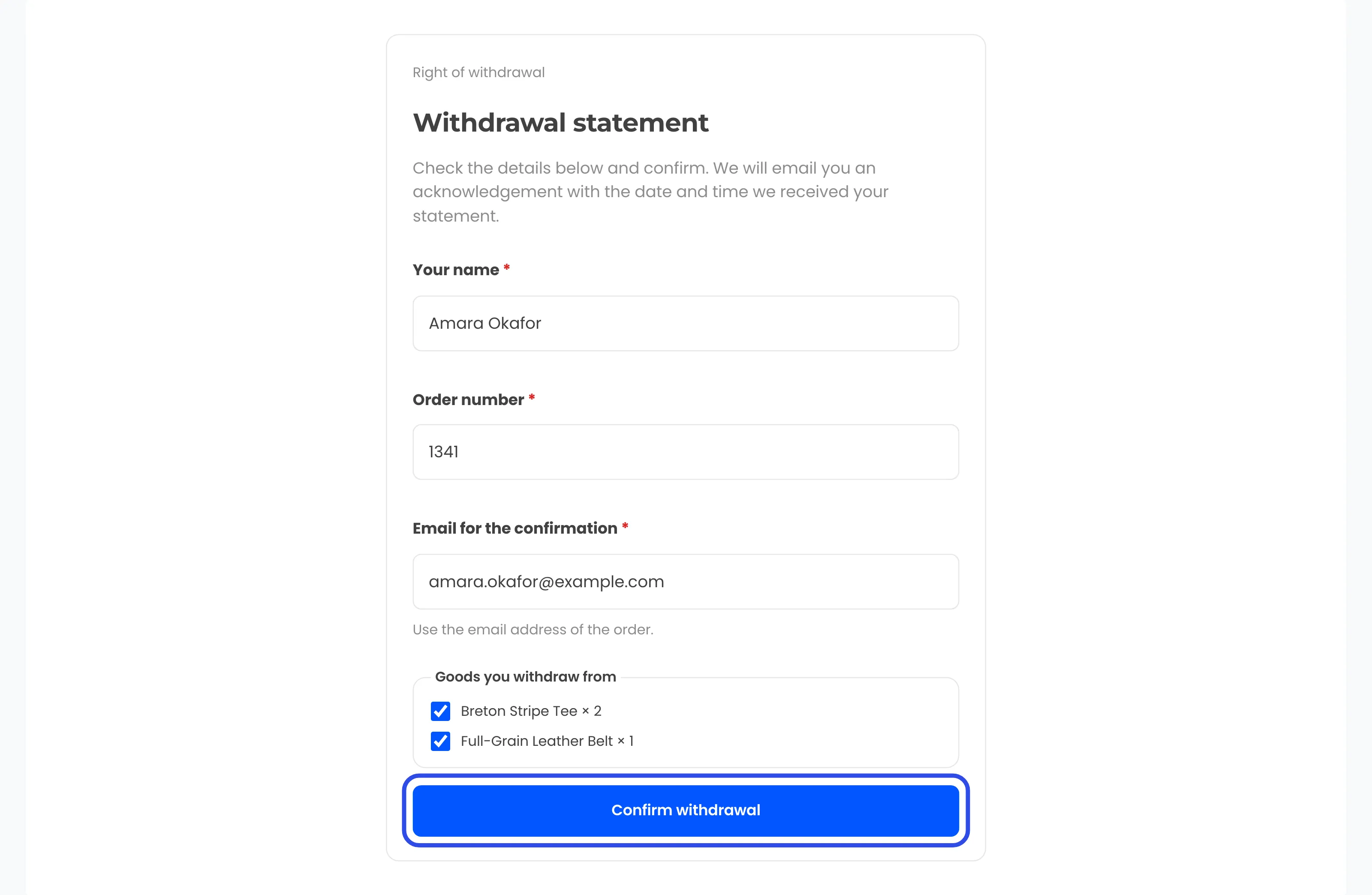
The customer fills in the statement with their name, the order number and the email for the confirmation. They tick the goods they withdraw from. Logged-in customers find these filled in already, and no reason is asked.
-
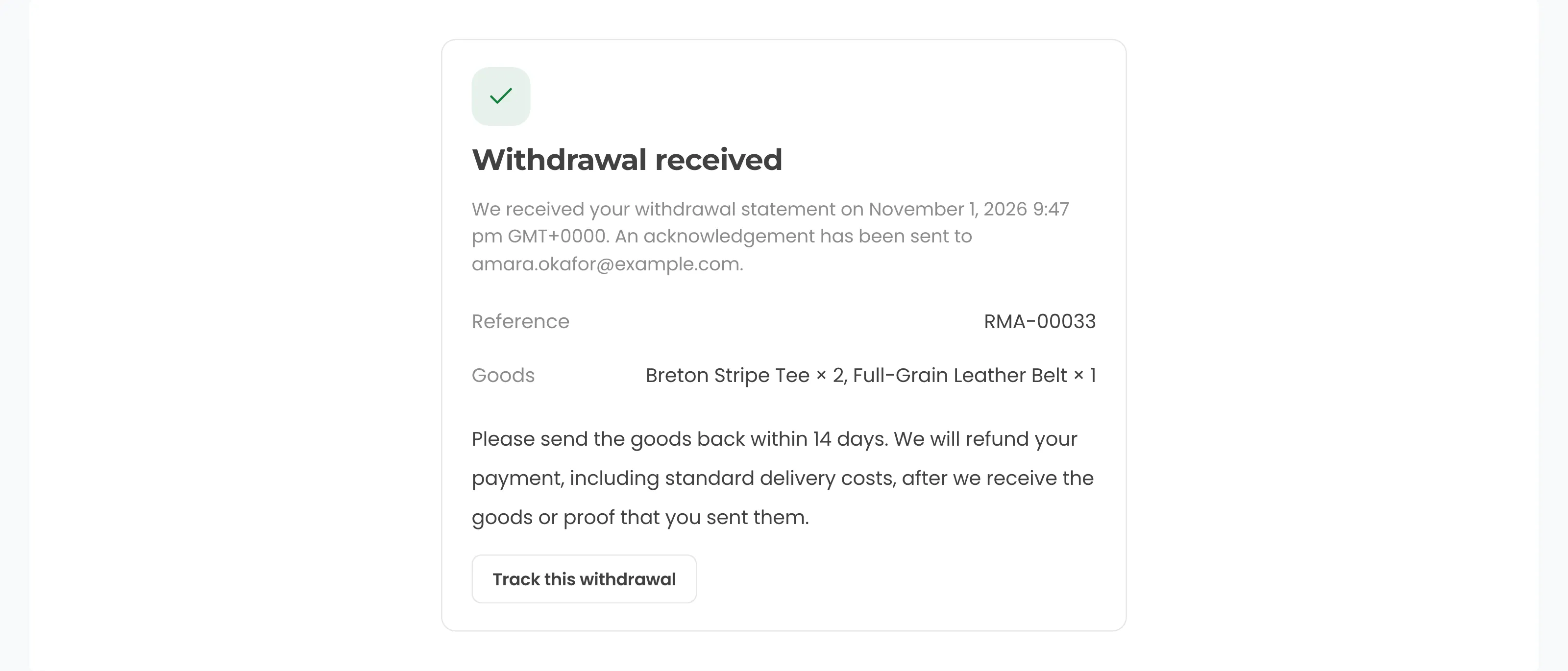
In step 2 the customer presses “Confirm withdrawal”. WPReturns records the statement with the time it was received in UTC. The page then shows “Withdrawal received” with the date, time, reference and goods.
-
The customer gets the “Withdrawal acknowledgement” email at once. It goes to the email typed in the statement and holds its content with the date and time it was sent. Email counts as a durable medium.
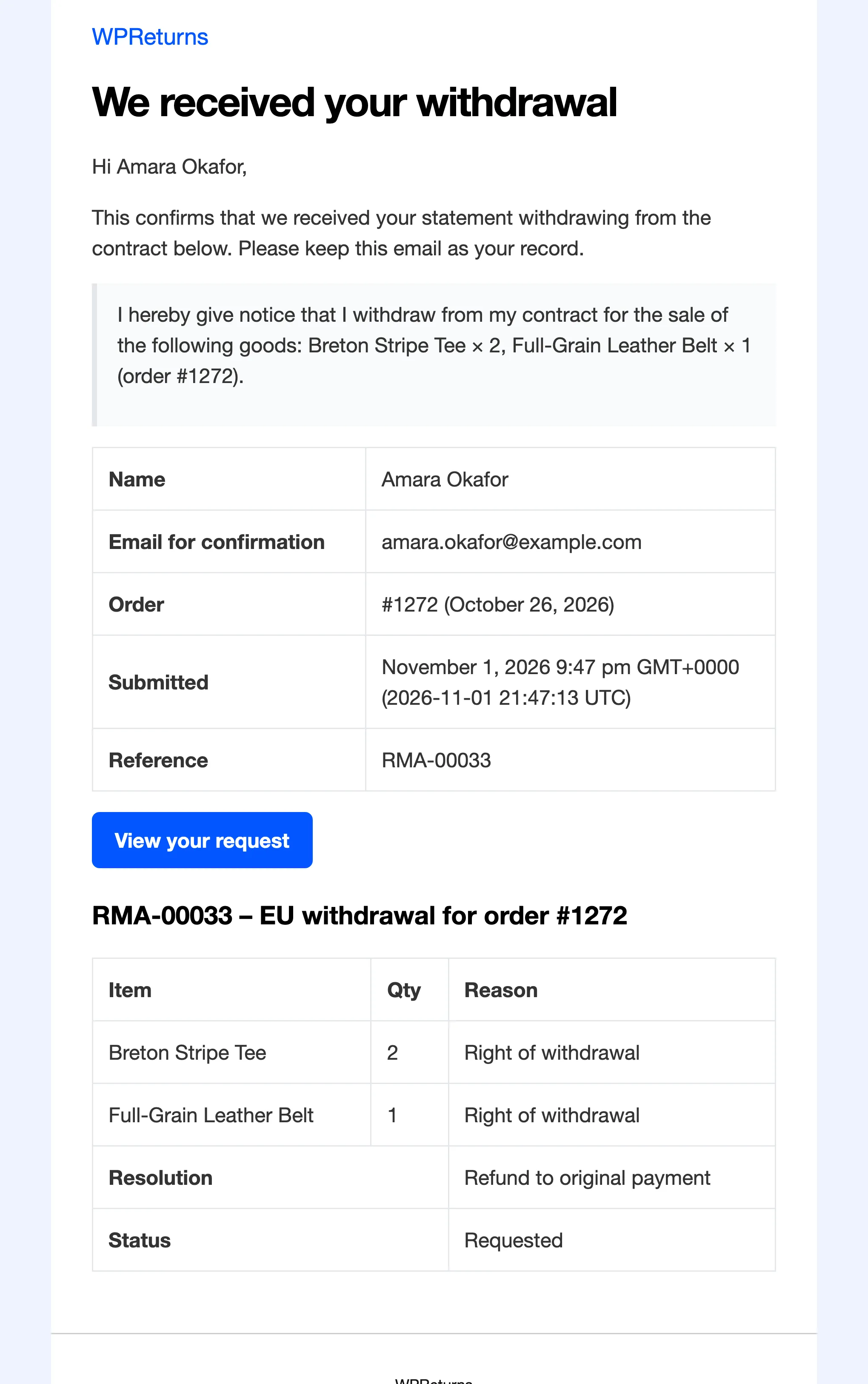
Each withdrawal becomes a request of the type EU withdrawal. It appears on the Withdrawals screen, which you can export to CSV.
Settings
Section titled “Settings”| Field | What it does | Default |
|---|---|---|
| Withdrawal function | “Offer the online withdrawal function”. Required when you sell to consumers in the EU. | On |
| Offer it for orders from | “EU and EEA countries”, “All countries” or “Countries I choose”. Based on the billing country of the order. | EU and EEA countries |
| Countries | The countries used when “Countries I choose” is selected. | None |
| Withdrawal period (days) | At least 14. Customers can always withdraw before the goods arrive. | 14 |
| Period starts | “When the order is completed (delivered)” or “When the order is placed”. | When the order is completed (delivered) |
| Withdrawal page | The page that holds [ddwcwr_withdrawal_form]. Created on activation. | The page created on activation |
| Footer link | Shows “Withdraw from contract here” in the site footer. The function must be easy to find for the whole withdrawal period. It also shows on orders in My Account that can still be withdrawn from. | On |
| Order emails | “Add the withdrawal link to customer order emails”. Adds a “Withdraw from contract here” link to the processing and completed order emails. The link is left out once the withdrawal period of that order is over. | On |
| Model form | “Show the model withdrawal form on the withdrawal page”. This is the Annex I(B) form for customers who prefer to write. It is addressed to your store name, address and email from WooCommerce > Settings. | On |
| Digital content | “Ask for consent at checkout when the cart has downloadable products”. A required checkbox under Article 16(m). | Off |
| Consent text | The label of the checkout checkbox. Leave empty for the default. | Empty (default text) |
| Attempts per hour | Per visitor, for the withdrawal form and the guest order lookup. | 5 |
| Exempt categories | Goods exempt under Article 16, such as made-to-order, perishable or sealed hygiene goods. | None |
Scope and period
Section titled “Scope and period”Under Article 9 of Directive 2011/83/EU, the consumer has 14 days to withdraw without giving a reason. For goods, the period starts when the consumer receives them. Keep Period starts on “completed” if you complete orders on delivery.
You can set a longer period than 14 days. The field does not accept less. Before an order is completed, customers can withdraw at any time.
If you sell outside the EU and want one flow for everyone, pick “All countries”. To add the UK or Switzerland only, pick “Countries I choose” and list the countries you need.
Article 16 exemptions
Section titled “Article 16 exemptions”Some goods have no right of withdrawal under Article 16. Examples are goods made to the customer’s specifications, goods that spoil quickly and sealed hygiene goods that were unsealed.
- Pick whole categories in Exempt categories.
- Tick Exempt from withdrawal on a single product. The box is on the General tab of the product editor.
Exempt items cannot be selected in the withdrawal statement. The customer sees “This item is exempt from the right of withdrawal.”
Digital content consent (Article 16(m))
Section titled “Digital content consent (Article 16(m))”Under Article 16(m), the right of withdrawal ends for digital content once the customer agrees to immediate supply. Turn on Digital content to ask for that consent.
When the cart holds downloadable products and the billing country is in scope, checkout shows a required checkbox. The default text is:
I agree that you start supplying the digital content before the withdrawal period ends. I understand that I lose my right of withdrawal once the supply has started.The order cannot be placed without the tick. The time of consent is saved on the order and confirmed in the order emails. Those downloads then leave the withdrawal flow.
This works in the classic checkout. In the block checkout it needs a WooCommerce version with conditional checkout fields. Older versions show the checkbox in the classic checkout only.
Spam protection and order matching
Section titled “Spam protection and order matching”The withdrawal form is public. WPReturns guards it in three ways.
- A honeypot adds a hidden field that people never fill. Bots that fill it are ignored.
- A rate limit caps how often one visitor can submit the form or look up an order. Set it in Attempts per hour.
- The order number must match the order’s billing email. A logged-in customer can also confirm one of their own orders to a different email.
The rate limit stops people using the form to send email to strangers.
Unmatched statements
Section titled “Unmatched statements”If the order number and email do not match, WPReturns sends no email. It still keeps the statement so a valid withdrawal is not lost. The customer sees a message that the team will contact them.
Unmatched statements show under the Unmatched view on the Withdrawals screen. The log keeps the latest 200. Check it often and contact those customers yourself.
How withdrawals differ from returns
Section titled “How withdrawals differ from returns”- Return shipping fees and restocking fees never apply.
- Fraud checks can flag a withdrawal. They never refuse it.
- Automation never closes a withdrawal on its own.
- The Customer requests switch on the General tab does not turn withdrawals off.
WooCommerce’s own withdrawal form
Section titled “WooCommerce’s own withdrawal form”WooCommerce 11.1 added an optional Order withdrawal feature with its own form. Keep only one withdrawal form on your store. Customers should never see two.
When both are on, WPReturns shows a warning in wp-admin: “Customers would see two withdrawal forms. Keep one of them.” It links to WooCommerce > Settings > Advanced > Features, where you turn the WooCommerce form off, and to this tab.
Legal sources
Section titled “Legal sources”- Directive (EU) 2023/2673 (adds Article 11a) on EUR-Lex
- Articles 9 to 16 of Directive 2011/83/EU on EUR-Lex