EasyPost return labels
WPReturns can buy prepaid return labels from your own EasyPost account with your own API key. Buy return label on a request buys the cheapest rate for the customer’s address and emails the label to the customer. Automatic labels buys them on approval instead.
Available in: Pro. You need your own EasyPost account and API key. WPReturns does not resell labels or charge per label.
Set up EasyPost
Section titled “Set up EasyPost”- Sign in to your EasyPost account and copy an API key from easypost.com > Account > API keys. Use the test key to try it out.
- In WordPress, go to DevDiggers Plugins > WPReturns > Configuration > Shipping Labels.
- Set Label provider to EasyPost.
- Paste the key into EasyPost API key.
- Under Return address and package, fill in Recipient name and Phone. Packages go to your store address from WooCommerce > Settings > General.
- Set the default box: Default weight (oz), Length (in), Width (in) and Height (in).
- Select Save Changes.
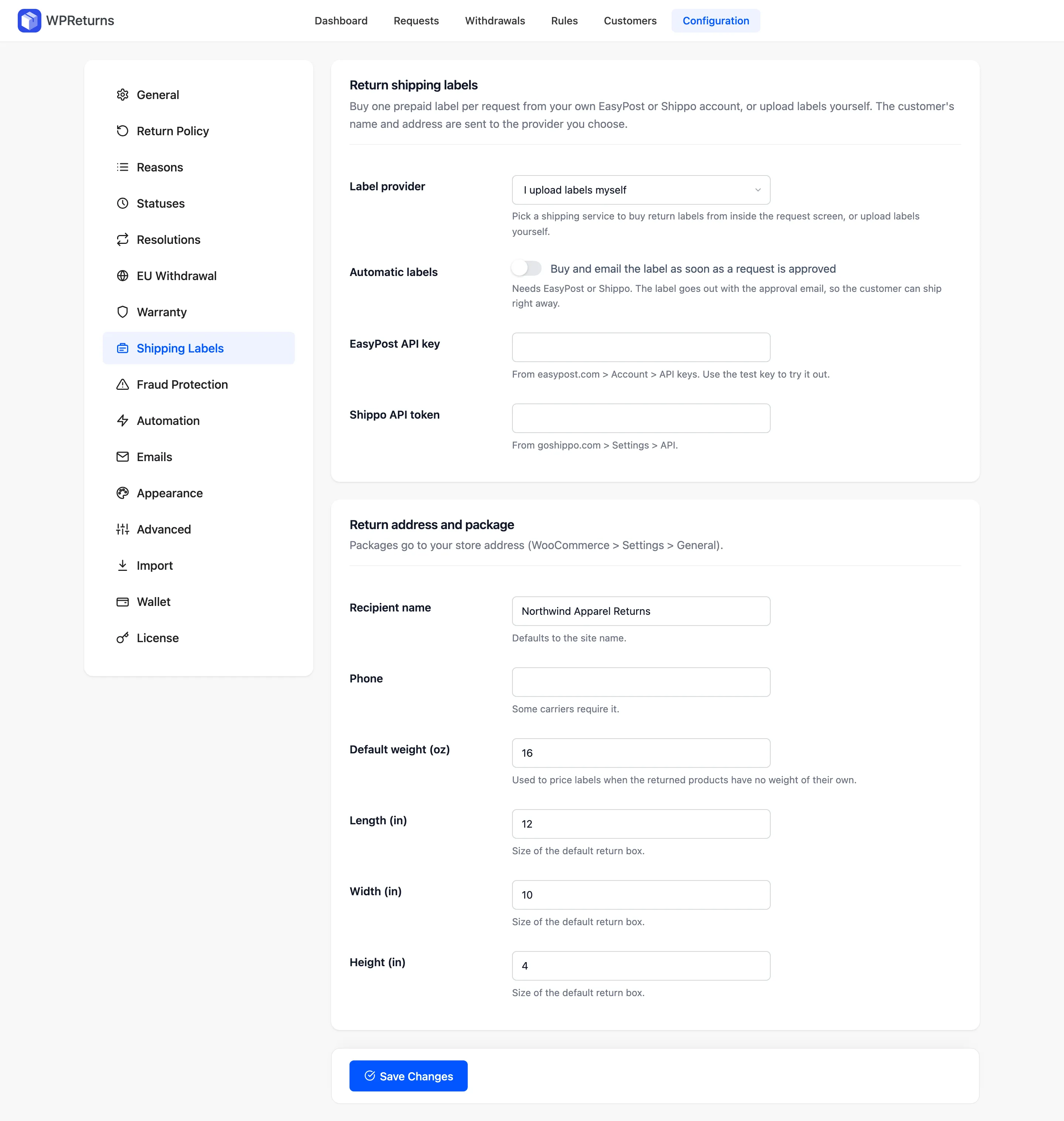
The screen above shows the tab before setup, with I upload labels myself selected. The EasyPost API key field shows on the tab whichever provider is picked.
To send labels without any clicks, turn on Automatic labels: “Buy and email the label as soon as a request is approved”. If a purchase fails, the request gets an internal note starting “Automatic label failed:”. See Shipping labels settings.
Buy a label for a request
Section titled “Buy a label for a request”- Open the request and approve it.
- In the sidebar under Return shipping, select Buy return label.
- WPReturns buys one label that covers every item in the request.
The request moves to Awaiting return. The customer gets the Return label ready email and a Download return label button on their request page. The tracking number and carrier fill in on their own.
The sidebar shows the label cost, for example “Label cost: $7.40”. Use Buy a new label if the first one is lost.
How the label is bought
Section titled “How the label is bought”| Step | Detail |
|---|---|
| Shipment | WPReturns creates a shipment at api.easypost.com marked as a return (is_return) |
| Rate | It picks the lowest rate EasyPost returns |
| Purchase | It buys that rate |
| Storage | It downloads the label file and stores it in the private uploads folder. Provider links can expire. |
Each call times out after 30 seconds. EasyPost errors show on the request screen, for example “EasyPost returned no rates for this address.”
Data sent to EasyPost
Section titled “Data sent to EasyPost”EasyPost receives this data only when a label is bought, by hand or on approval.
| Data | Source |
|---|---|
| Customer name, address, phone and email | The order’s shipping address, or billing address when there is no shipping address |
| Your return address | Store name, address, the return phone and the store email |
| Package size and weight | The defaults on the Shipping Labels tab |
Nothing goes to EasyPost while the provider is set to “I upload labels myself”. Mention EasyPost in your privacy policy if you use it. See the EasyPost terms and privacy policy.
Change the package for some requests
Section titled “Change the package for some requests”Developers can change the package per request with the ddwcwr_label_parcel filter. Sizes are in inches and weight in ounces. See Hooks.