
The Consumer Contracts Regulations give UK shoppers 14 days to cancel most online purchases without giving a reason. If you sell to UK customers from a WooCommerce store, this is the rule behind your returns policy. The clock, the refund and the exceptions are all set in law.
The regulations are statutory instrument 3134 of 2013 (legislation.gov.uk). This guide explains the cooling-off period for sellers. It covers when the clock starts, what you refund, who pays for the return and which goods are exempt.
It ends with a WooCommerce setup in WPReturns, which we make. We read the government’s implementing guidance (December 2013) and the WPReturns docs in November 2026. This is not legal advice.
What Are the Consumer Contracts Regulations?
The Consumer Contracts Regulations are the UK rules on what a trader must tell a consumer before a sale. They also set how a consumer can cancel afterward. For online stores the best-known part is the 14 day cancellation right.
They cover online, phone and doorstep sales. The government’s guidance (GOV.UK, December 2013) lists what they set out. It includes the information a trader must give, the right to change your mind, delivery times and a ban on default extra payments.
The regulations apply to traders selling goods, services or digital content to consumers. A business buying from you is not covered. Our return policy template shows where the cancellation wording goes in your policy.
How Does the 14 Day Cooling Off Period Work?
The 14 day cooling off period lets a customer cancel a distance sale for any reason, or none. For goods it starts the day after the customer receives them. The customer then has to tell you that they want to cancel.
The guidance and the GOV.UK distance selling page agree on the 14 days. The guidance says the customer need not give a reason. It also says the cancellation need not be in writing, as long as the statement is clear.
Three points trip up stores in practice:
- The clock starts at delivery and not at payment.
- The customer should return the goods within 14 days of canceling.
- The burden of proof for canceling in time sits with the customer.
That last point protects you only when you keep records. A dated message or form entry is your proof of when the customer canceled.
The cooling-off period for one online order
- 01Order placedCustomer can cancel from now onDay 0
- 02Goods deliveredClock starts the next dayDelivery
- 03Customer cancelsClear statement within 14 daysDay 14 at most
- 04Goods backCustomer returns within 14 days of cancelingReturn
- 05RefundYou refund within 14 days of receipt or proofRefund
How Long Is the Cooling Off Period for Online Purchases in the UK?
The cooling off period for online purchases in the UK is 14 days. For goods the first day is the day after delivery. If one order arrives in several parcels, the period runs from the day after the last item arrives.
Services work differently. The guidance says the 14 days for a service start the day after the contract was entered into. For a mixed order of goods and a service, the goods rule applies.
Say a customer orders three items and they arrive on Monday, Tuesday and Friday. The 14 days start the day after Friday. A customer who cancels the whole order on day 13 is inside the period.
Tip: Store your delivery date on the order. WPReturns can start the period from the completed date, so complete orders when they are delivered.
Does the Cooling Off Period Apply to Sale Items?
Yes, the cooling off period applies to sale items. The regulations look at how the customer bought the goods and not at the price paid. A marked-down item has the same 14 days as a full-price one, whatever the discount.
A “no returns on sale items” line in your policy does not remove that right. It can still stop returns under your own policy when the buyer is not canceling under the law. Our final sale guide explains the difference.
A mark-down also affects the refund amount. You refund what the customer paid. The original price does not matter.
Which Purchases Have No Cooling Off Period?
Some online purchases have no cooling off period. The guidance lists custom goods, goods that deteriorate or expire fast, sealed hygiene goods once opened, and sealed audio, video and software once opened. A customer cannot cancel these just because they changed their mind.
The guidance gives the full list of exempt contracts. The ones a typical store meets are:
- Custom and personalized goods.
- Goods that will deteriorate or expire rapidly.
- Goods received sealed for health protection or hygiene reasons once unsealed.
- Sealed audio, video and software products once unsealed.
- Goods inseparably mixed with other items after delivery.
- Single newspapers and magazines.
The guidance adds a test for custom goods. An item picked from your usual range is not custom. If you source a special finish outside the range you normally offer, that item is likely custom.
Note: Mark exempt products in your shop before the sale. Telling the customer afterward does not remove the right.
What Must You Refund and When?
You must refund all money received, including the standard outbound delivery cost, within 14 days of getting the goods back. If the customer sends proof of return first, the 14 days run from that proof. You may hold the refund until then.
You only owe the standard delivery price you offered. The guidance says that when the customer chose a dearer option, you refund only the cost of the standard one.
You may also reduce the refund if the customer handled the goods more than needed to check them. The guidance gives the example of opening sealed packets inside a box.
Here is one example. A customer pays £60 for a jacket, £4 for standard delivery and £10 for express. They return it in the box with a £6 label they paid for.
| What the customer gets back after canceling inside 14 days | Paidat checkout | Refundedby you |
|---|---|---|
| Jacket | £60 | £60 |
| Standard delivery | £4 | £4 |
| Express upgrade | £6 | £0 |
| Return label (customer paid) | £6 | £0 |
| Total | £76 | £64 |
In the example the customer paid £10 for express, which is the £4 standard rate plus a £6 upgrade. You refund the £4. The £6 upgrade stays with you.
WPReturns > Configuration > Resolutions
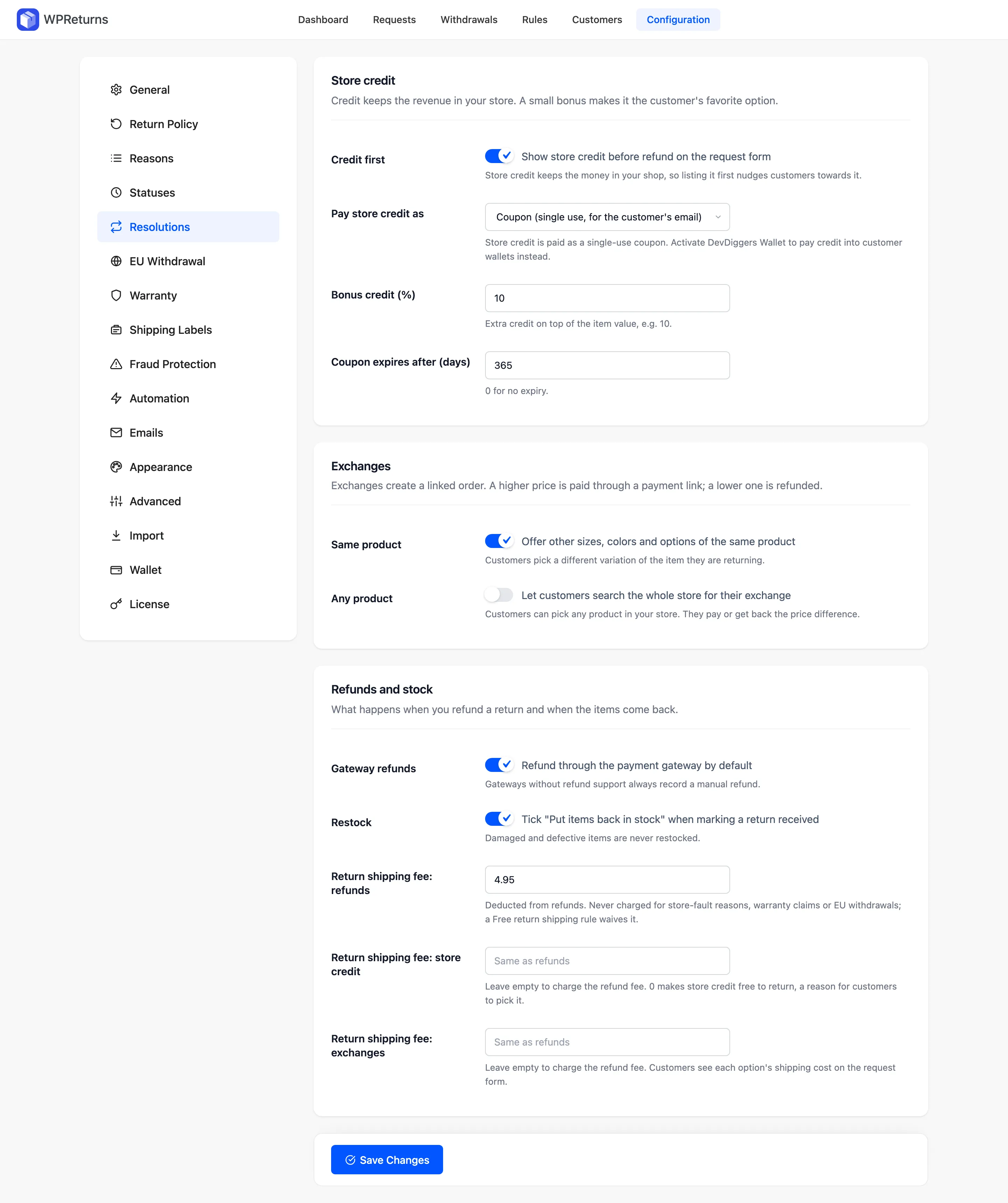
The Resolutions tab holds the return shipping fee for each way of resolving a request. The resolutions docs show how a refund is recorded on the request.
Who Pays for the Return Shipping?
The customer pays for return shipping unless you offered to pay it or you did not tell them it would be their cost. The guidance says the refund need not include the return delivery in those cases. Tell customers before the sale to protect the rule.
The guidance says you must make clear that the consumer pays for returns, unless you are willing to cover them. Put it in your policy and at checkout.
Bulky goods are the exception that costs sellers money. If an item cannot normally go back by post, such as furniture, you must say roughly what the return costs.
WooCommerce checkout
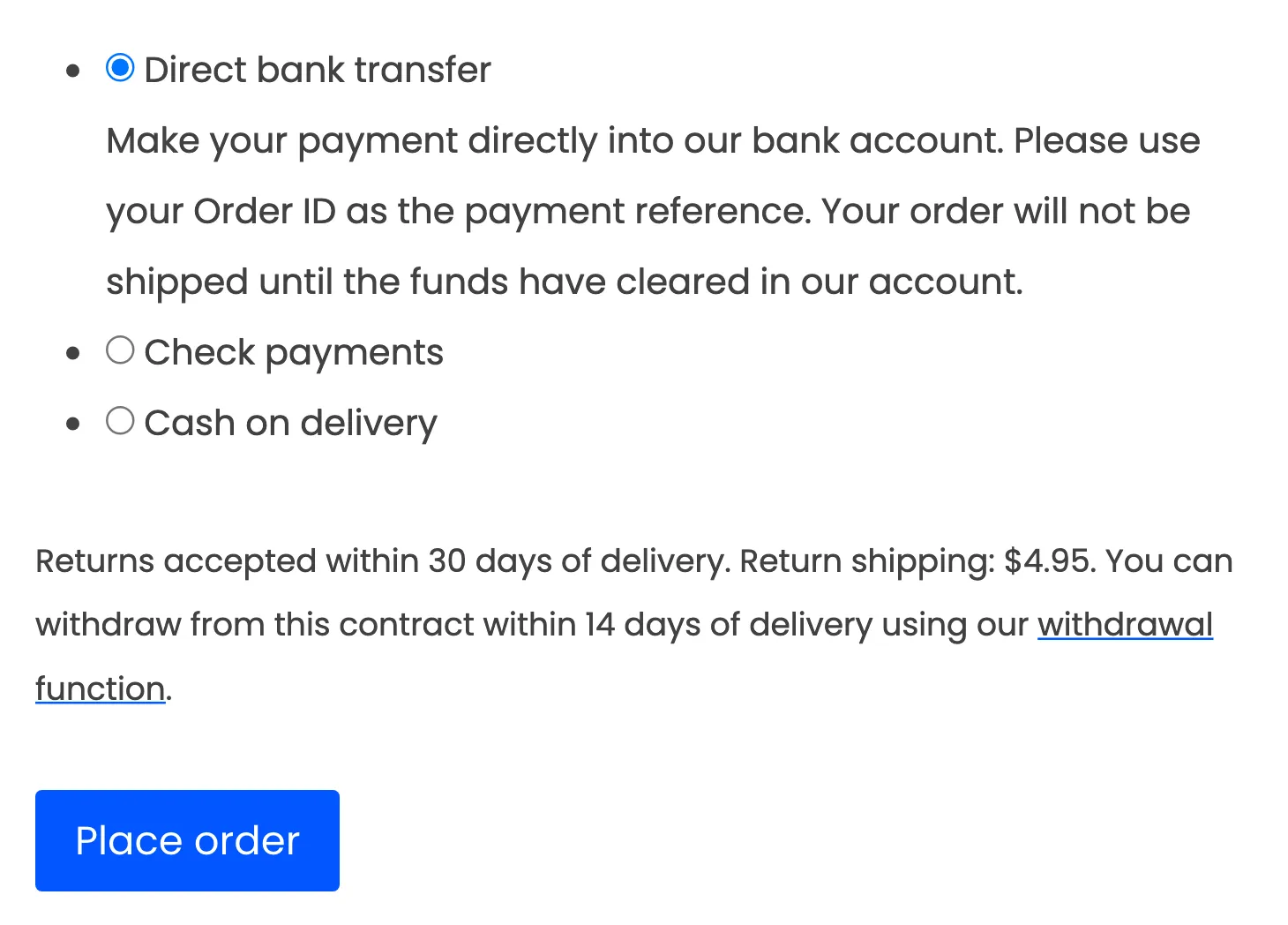
WPReturns adds a policy notice above the Place order button. If you want to cover return shipping on bigger orders, our free returns guide shows how to cap that cost.
WPReturns > Configuration > Return Policy
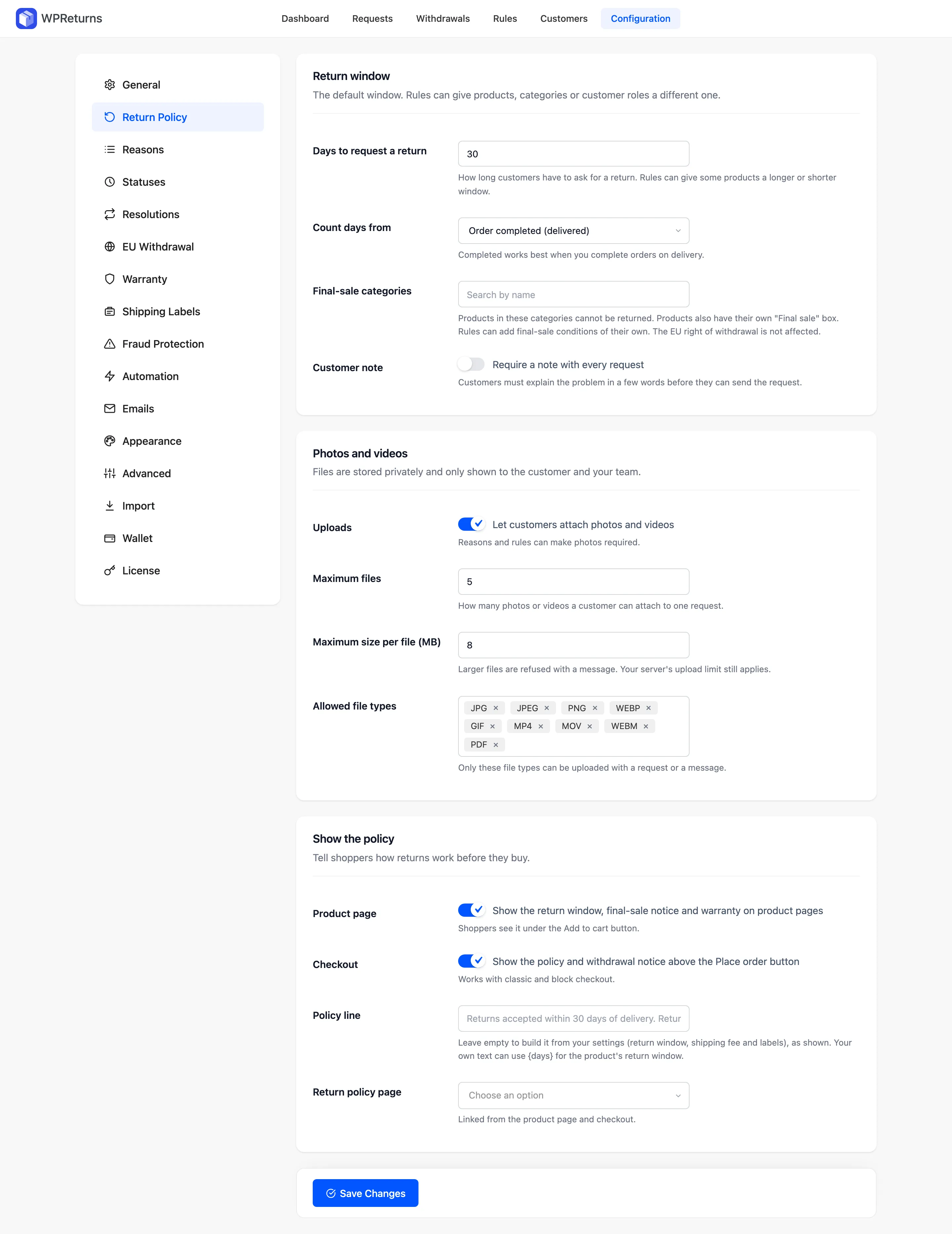
Do You Need a Cancellation Form?
You do not need your customer to use a cancellation form, but you must offer one. The government’s guidance tells traders to make a model cancellation form available before the sale. The customer can use it or cancel in any other clear way.
The model form is set out in the regulations. It is a short statement with the order details and the customer’s name. The guidance repeats that a clear statement is enough.
If you only accept the form, you risk refusing a valid cancellation. Accept an email and a message through your site as well.
WPReturns > My Account > Request cancellation
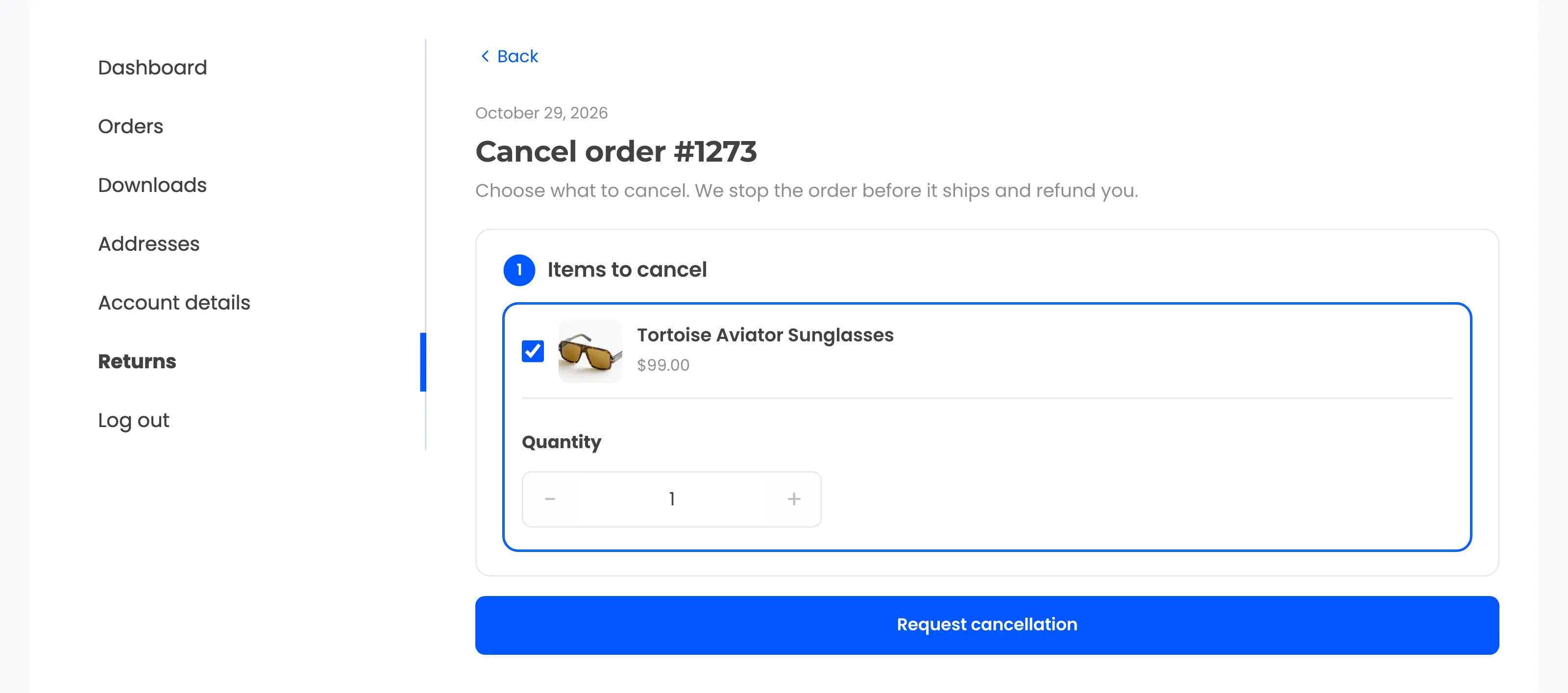
WPReturns has a cancellation form for orders that have not shipped. It is a separate flow from a return, and the order cancellations feature page describes it.
Are the Distance Selling Regulations Still in Force?
The Distance Selling Regulations 2000 are no longer in force. The Consumer Contracts Regulations replaced them for contracts concluded on or after 13 June 2014. Articles that still cite seven working days describe the old rule and are out of date.
The guidance says that on that date the 2000 regulations and the 2008 off-premises regulations were revoked. It also says the cancellation period grew from 7 days to 14 calendar days.
That is why advice from before 2014 can mislead you. The old rule counted working days, and the new one counts calendar days.
Does the EU Withdrawal Button Apply to UK Stores?
No, the EU withdrawal button does not apply to a UK-only store. It comes from an EU directive for EU consumers, and UK law has no button rule. If you also sell to EU customers it applies to those orders.
Our EU withdrawal button guide covers the EU rule and its June 19, 2026 start date. Our WooCommerce setup tutorial walks through adding it.
A UK store can still choose the same flow because one clear place to cancel makes your policy easy to follow. WPReturns lets you pick the countries it covers. You can turn it on for UK orders.
How to Run the Cooling Off Period in WooCommerce
WooCommerce core has no cooling-off setting and leaves every cancellation to you. In WPReturns you set the countries, the period and the start of the clock once, and each cancellation is logged. Setup takes four steps in the free plugin.
The withdrawal function was built for the EU rule. Its labels read “Withdraw from contract here”. That wording fits a UK store as a plain cancel link, though UK law does not require it.
Step 1: Choose the UK as an Offer Country
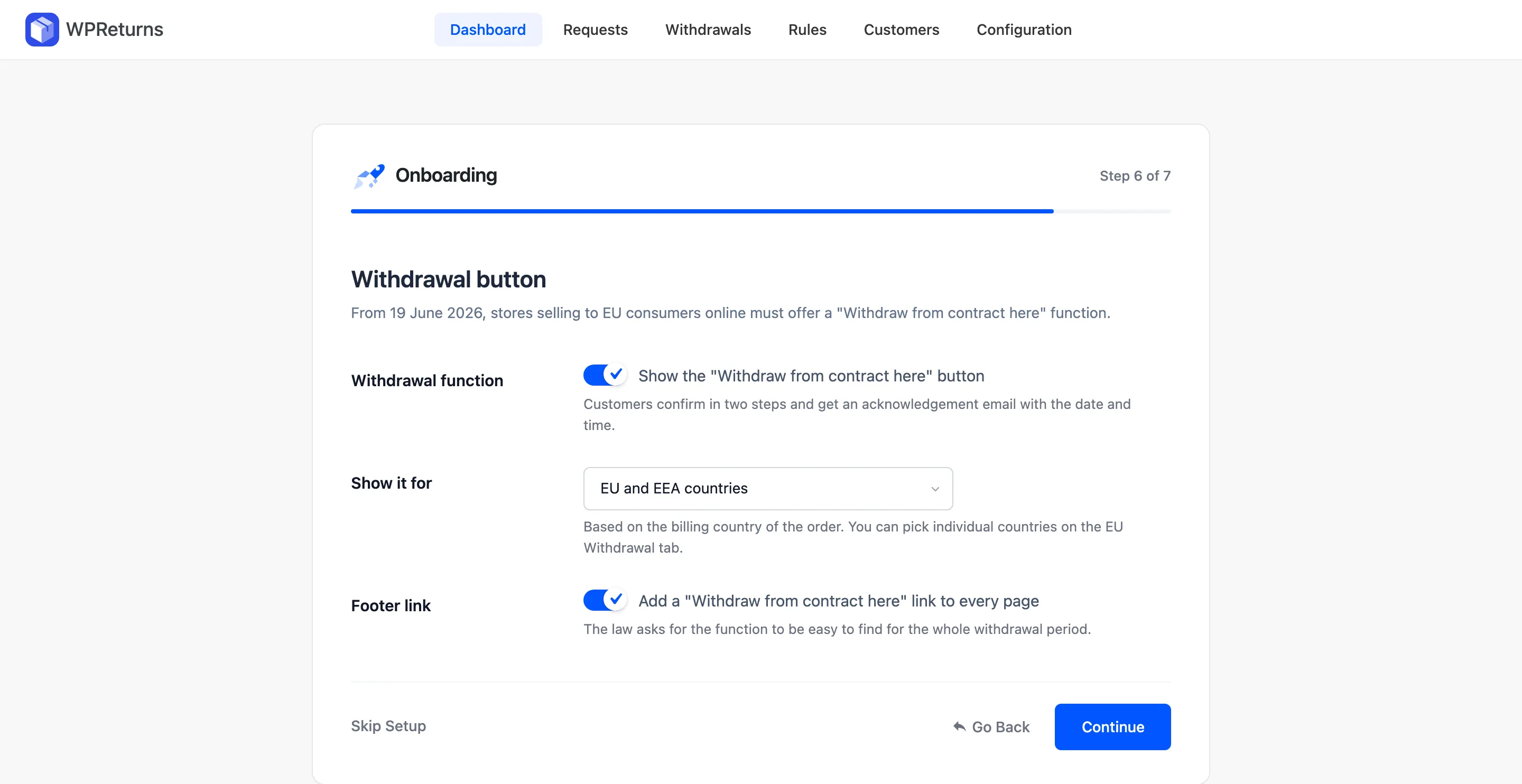
Go to DevDiggers Plugins > WPReturns > Configuration > EU Withdrawal. Set Offer it for orders from to “Countries I choose”. Add the United Kingdom to the Countries field.
The choice uses the billing country of the order. Pick “All countries” if you want one flow for every customer.
1WPReturns > Configuration > EU Withdrawal
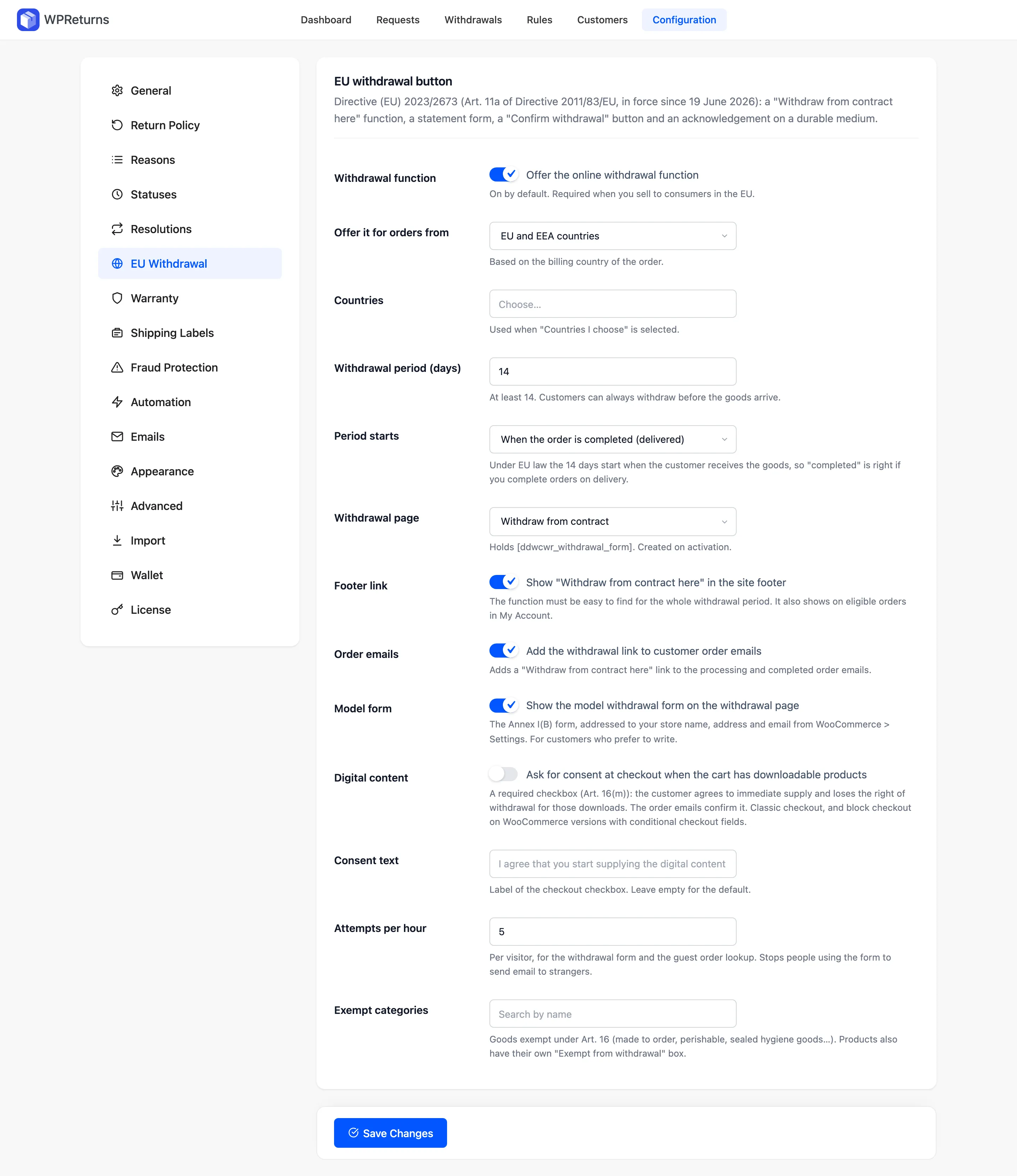
Step 2: Set the Period and When It Starts
Leave Withdrawal period (days) at 14. The field does not accept fewer. Keep Period starts on “When the order is completed (delivered)” so the clock matches the law.
You can set a longer period if your policy is kinder than the law. The setup wizard shows the same choice in its Withdrawal step.
2WPReturns > Setup wizard > Withdrawal
Step 3: Check What the Customer Sees
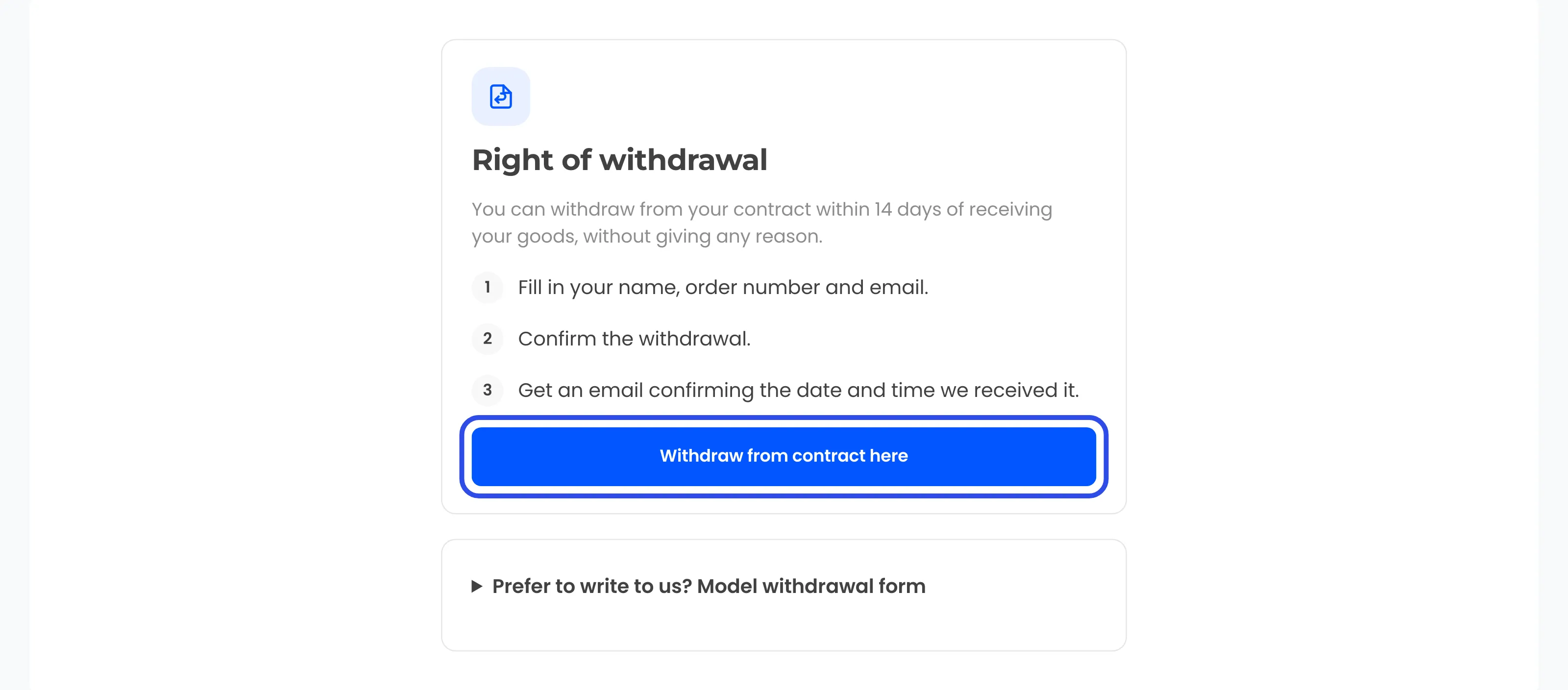
Open your site as a customer and find the Withdraw from contract here link in the footer. It leads to a page that explains the right and starts the statement. Exempt goods cannot be picked there.
Mark exempt products first. Tick Exempt from withdrawal on the General tab of the product, or pick whole categories under Exempt categories in the settings. Our docs list every field.
3Customer withdrawal page
Step 4: Keep the Record
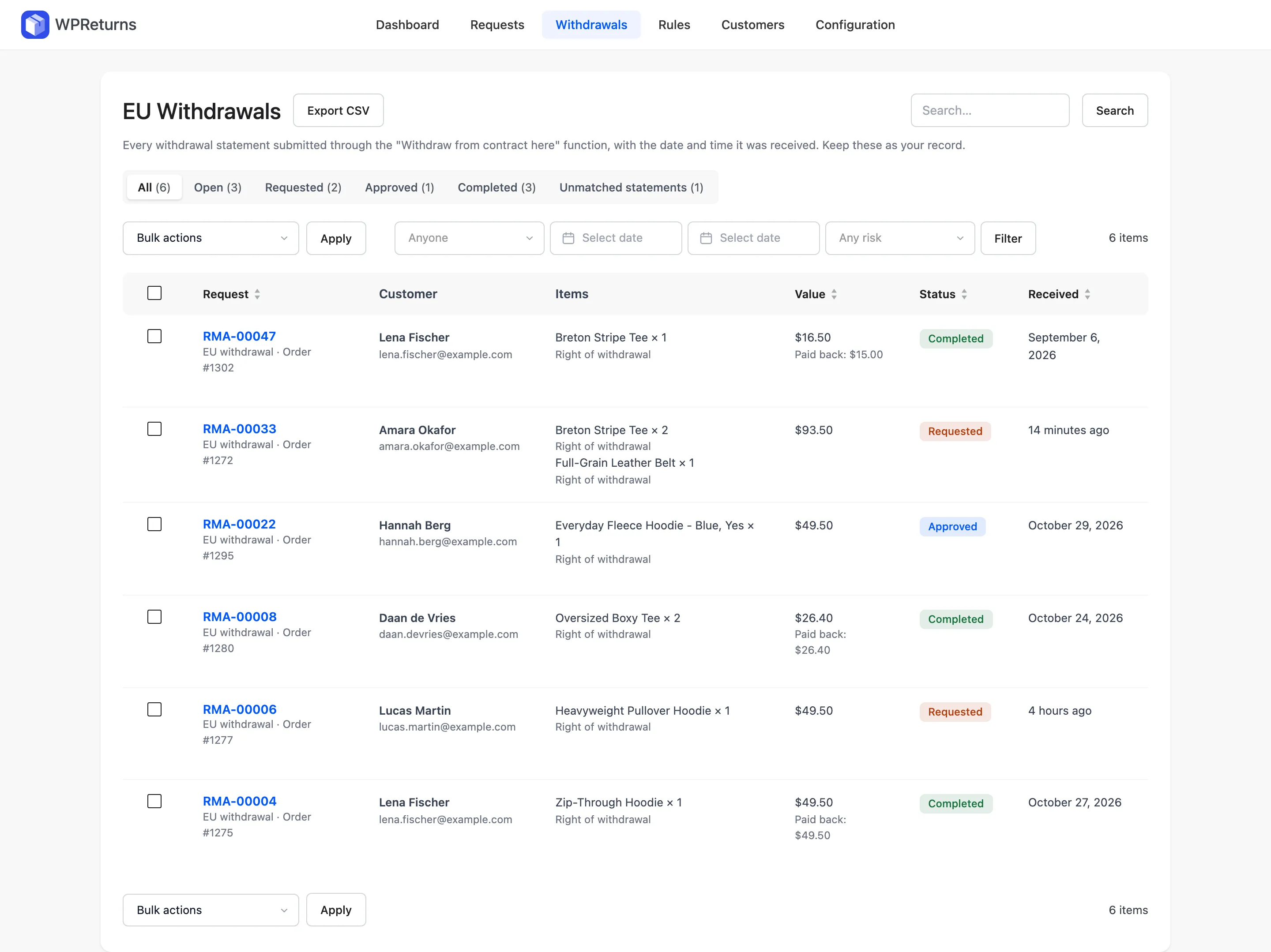
Every statement lands in DevDiggers Plugins > WPReturns > Withdrawals with the date and time it arrived. That log is your proof of when a customer canceled. You can export it to CSV.
Staff cannot create a statement for a customer, because the words must come from the customer. Our EU withdrawal feature page describes the log.
4WPReturns > Withdrawals
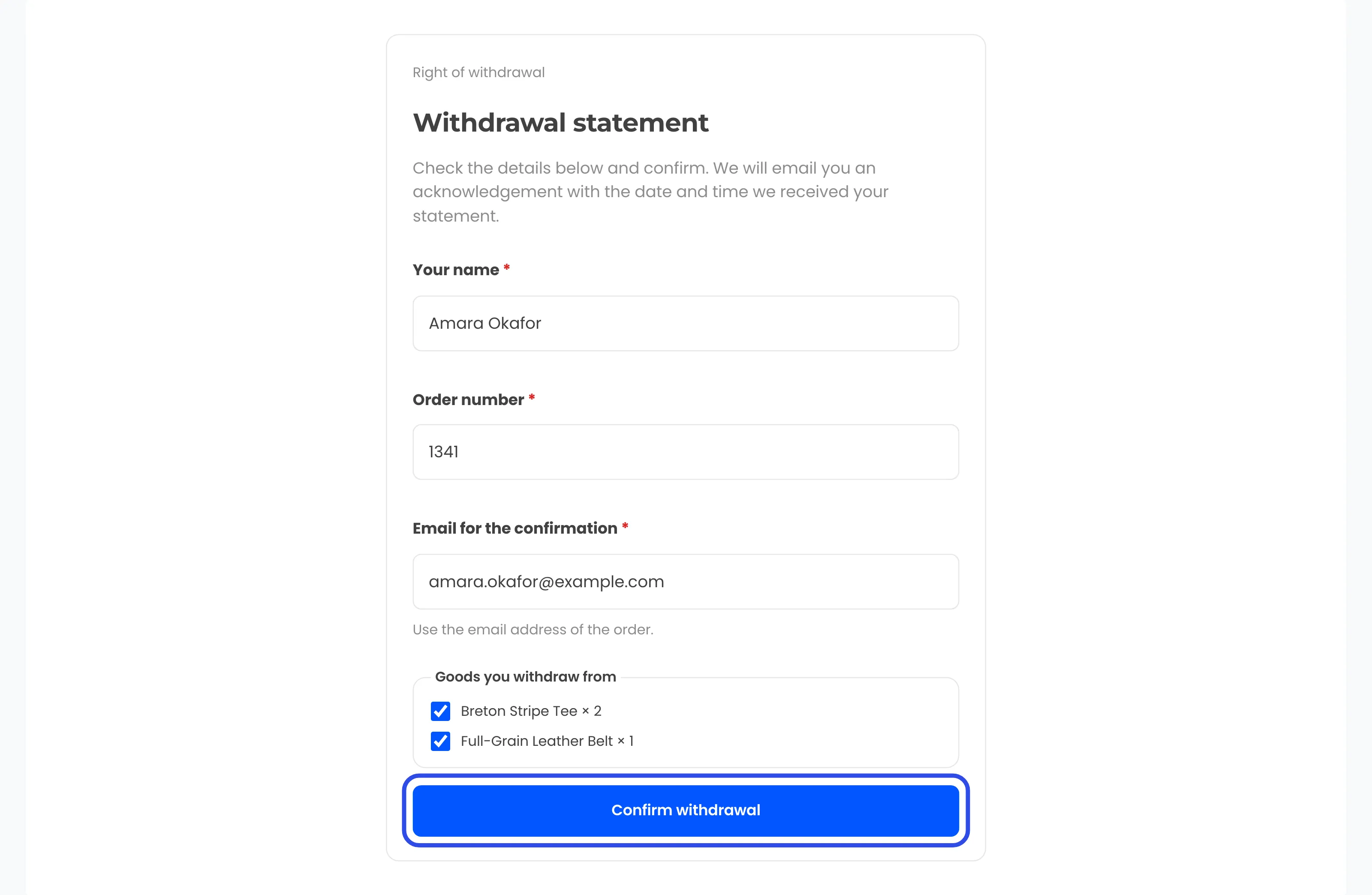
The customer sees a short form with their name, order number and email. They tick the goods and confirm.
Customer withdrawal statement
Conclusion
The Consumer Contracts Regulations give your UK customers 14 days from delivery to cancel online orders. You refund within 14 days of getting the goods back, and the customer usually pays the return unless you said otherwise. Exceptions are narrow and listed.
Check your policy against this list. Name the return cost, offer a cancellation form and mark your exempt products.
Then set the countries and the period once in WPReturns, and every cancellation is logged. See the pricing page if you want Pro features such as return rules.