
What is a restocking fee? It is an amount a store keeps from a refund to pay for getting a returned item back on the shelf. The store sets it as a percentage or a flat sum, and it stands only if the customer saw it before buying.
The rules differ by country. The EU and the UK allow a deduction only for lost value, and California requires a posted policy. We read each law page in November 2026 and tested the WooCommerce setup on WPReturns Pro 1.0.0, our own plugin.
This guide covers what the fee is and when you can charge it. You will also see how much to charge, how to set it up in WooCommerce and when to skip it.
What Is a Restocking Fee?
What is a restocking fee in a store’s returns policy? It is an amount the store keeps from a refund when a customer returns a product. The fee pays for inspecting the item, repacking it and putting it back into stock.
Stores charge it as a percentage of the item price or as a flat amount. Google’s return policy markup describes the same idea with a restockingFee property for a fee charged to the consumer when returning a product. A number sets a percentage of the price paid and a monetary amount sets a fixed fee (Google Search Central).
Handling costs are real. Someone opens the box, checks the product, tests it if needed and repacks it. Each step takes paid time, and a returned item can sell below full price.
When Can a Store Charge a Restocking Fee?
A store can charge a restocking fee when its policy states the fee before the sale. The customer must also return the item for a reason that is not the store’s fault. Opened or used items are the usual case, and a defective or wrong item should never carry one.
Three conditions keep a fee fair and easy to defend:
- The fee is written in your return policy and shown before checkout.
- The customer chose to return the item, for example after a change of mind or a wrong size pick.
- The item came back in a condition that costs you money to resell.
The reason matters more than the product. A shirt returned as “changed my mind” fits a fee. The same shirt returned because it arrived torn does not.
Tip: Sort your return reasons into two groups before you write any fee. Customer choices can carry a fee. Your own mistakes never should.
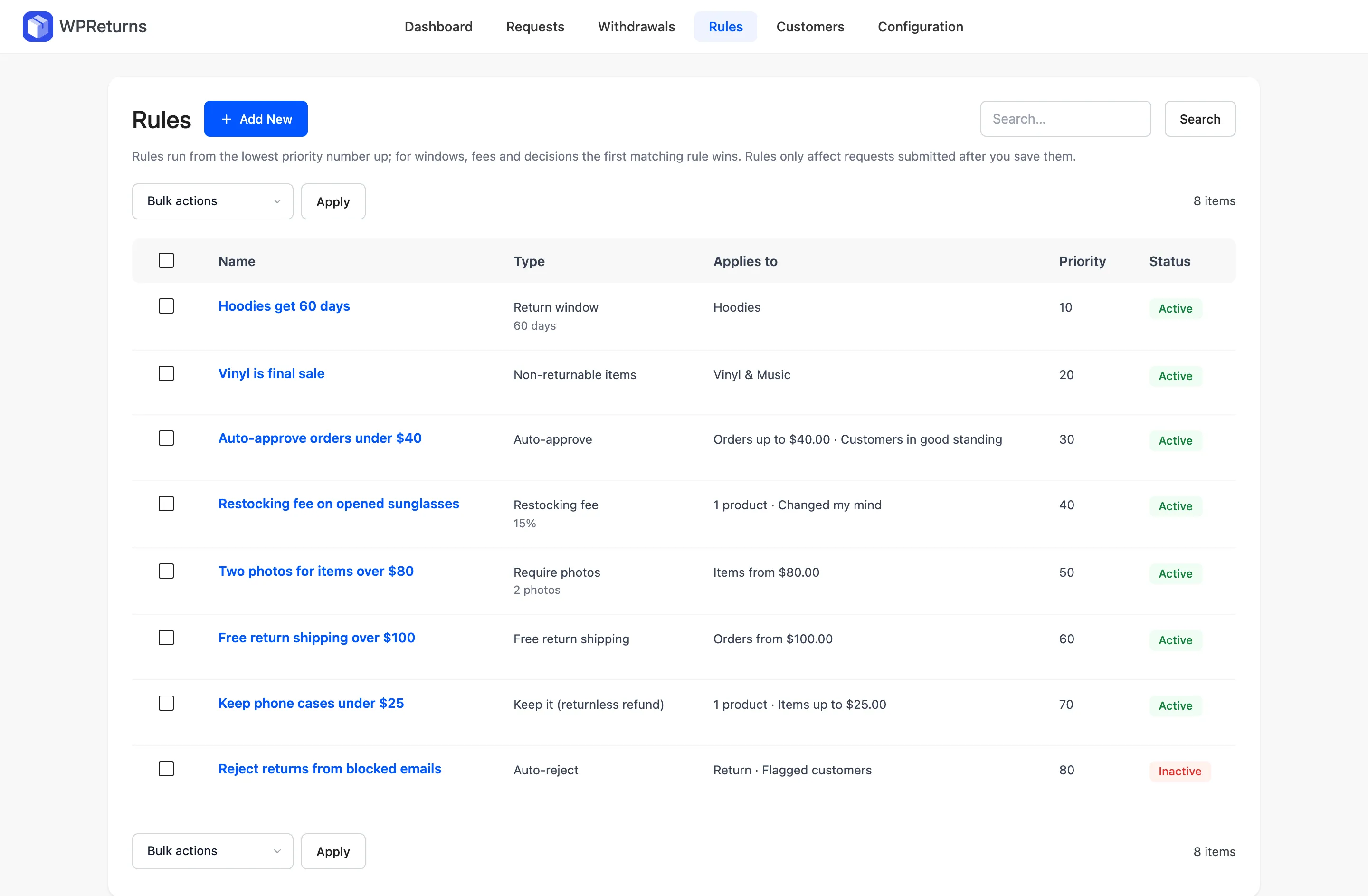
WPReturns > Rules
Is a Restocking Fee Legal?
Yes, a store may charge a restocking fee on a return the law does not force it to accept. Distance sales to EU and UK consumers carry a 14 day right to withdraw, and the deduction there is limited to lost value. California adds a posting rule for stores that limit refunds.
California’s Civil Code section 1723, explained by the California Attorney General, is the clearest US example we checked. A store that will not give a full refund, credit or equal exchange within seven days must post that policy. Without a posted policy, the customer can return the item with proof of purchase for a full refund within 30 days.
Check your own state’s rules before you set a fee. Whatever the state, a fee the customer saw before paying is much easier to defend than one added at return time.
In the UK, regulation 34 of the Consumer Contracts Regulations 2013 covers goods returned within the cancellation period. The trader may recover only value lost to extra handling, up to the contract price.
Article 14(2) of Directive 2011/83/EU makes an EU consumer liable only for value lost to handling beyond a basic check. Article 14(5) rules out any other liability. A flat restocking fee on an EU withdrawal therefore has no legal footing, and our EU withdrawal button guide covers the full rule.
Returns you offer beyond any legal right follow your own policy. Write the fee into it and show it before checkout.
Worth checking: Diminished value claims depend on national law and the facts of each case. Get local legal advice before you deduct anything from a withdrawal refund.
How Much Should a Restocking Fee Be?
A restocking fee should cover your real handling cost and stay low enough that customers still buy. The pages we checked give no standard rate, and neither Google nor WooCommerce sets a default. Use a percentage for pricey items and a flat amount for cheap ones.
Three of the guides we read quote 10 to 25 percent as the common range, and none cites data for it. Treat that as a starting point.
Your own cost per return is the better number. Add the labor minutes, the packaging and the share of returns that cannot sell at full price. Then choose a restocking fee percentage that recovers that cost and no more.
Use a percentage when your items vary widely in price. Use a flat amount when handling costs the same for every item. The table shows both on example returns, before any return shipping fee.
| What is a restocking fee in dollars: three examples | 15 percent fee$120 jacket | Flat $10 fee$120 jacket | Flat $10 fee$6 item |
|---|---|---|---|
| Item value | $120.00 | $120.00 | $6.00 |
| Fee setting | 15% of item | $10 per item line | $10 per item line |
| Restocking fee | -$18.00 | -$10.00 | -$6.00 |
| Refund | $102.00 | $110.00 | $0.00 |
Note: The flat fee on the $6 item is capped at the item value. The refund is $0 and never negative. A cap like that keeps a fee from turning a refund into a bill.
Review the fee after a quarter. Count the fees you charged, the customers who wrote in about them and the returns that dropped. Lower the fee if the complaints outweigh the savings.
Restocking Fee vs Return Shipping Fee
A restocking fee pays for handling an item after it comes back to your warehouse. A return shipping fee pays for the label or postage that brings the item back. They are separate lines on a refund, and a store can charge one, both or neither.
In WPReturns the two are separate lines on the request. A Free return shipping rule waives only the shipping line.
A store-fault reason waives both lines. An EU withdrawal waives both too.
How to Set a Restocking Fee in WooCommerce
WooCommerce core has no restocking fee field. You type a lower refund amount by hand, or a rules plugin takes the fee off for you. In WPReturns Pro you mark store-fault reasons, add a Restocking fee rule and check what customers see before they submit.
The Restock refunded items box on the WooCommerce refund screen puts products back into inventory. It holds back no money.
To charge a fee by hand, type the item price minus your fee as the refund amount. Note the fee in the refund reason field.
That works for a few returns a week. It breaks down when the customer never saw the fee, because nothing shows it before they send the request.
We make WPReturns. Read the rest as a walkthrough of one tool.
The fee is a Pro rule, and the free vs Pro table lists what the free plugin keeps. The return rules feature has the full rule list.
How WPReturns Pro works out the fee on each item
- 01Request typeOnly returns and exchanges can carry a feeCheck 1
- 02ReasonStore-fault reasons never pay a feeCheck 2
- 03Rule matchThe lowest priority number winsCheck 3
- 04AmountA percent of the line or a fixed sum capped at the line valueCheck 4
- 05RefundThe fee comes off the refund and shows on the requestResult
Step 1: Mark the Reasons That Are Your Fault
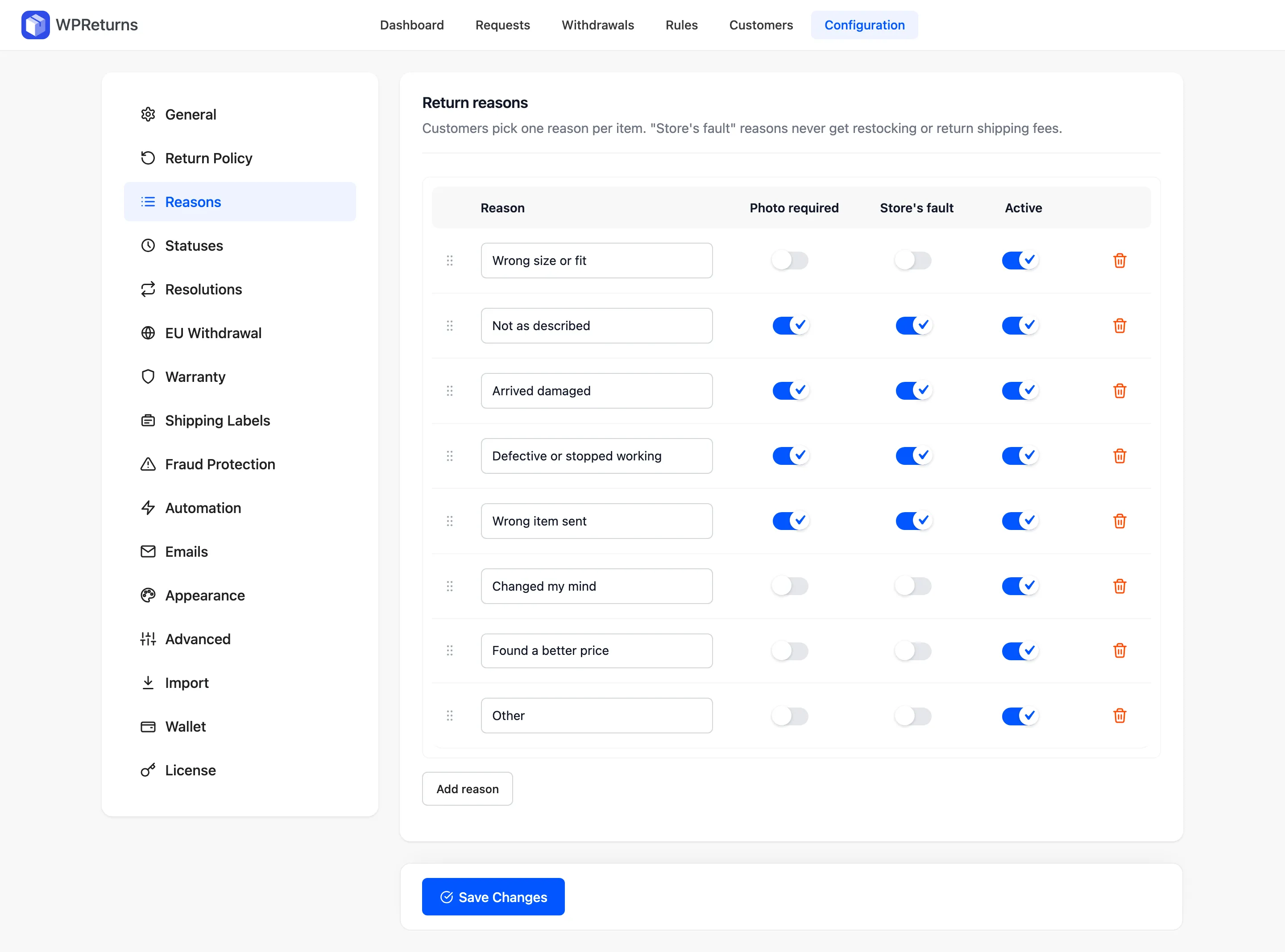
Go to WPReturns > Configuration > Reasons and read the Store’s fault column. In our demo store it is on for Not as described, Arrived damaged, Defective or stopped working and Wrong item sent. It is off for Wrong size or fit, Changed my mind and Found a better price.
WPReturns never charges a restocking fee or a return shipping fee on a reason with that switch on. Our reasons settings guide explains each column.
1WPReturns > Configuration > Reasons
Step 2: Add a Restocking Fee Rule
Go to WPReturns > Rules and select Add New. Set What it does to Restocking fee, pick a Fee type and enter the Fee. The types are Percent of the item value and Fixed amount per item line.
Narrow the rule under Applies to with products, categories, reasons, order total or item price. Our example charges 15 percent on one pair of sunglasses when the reason is Changed my mind. The field text says customers see the fee before they send the request.
2WPReturns > Rules > Edit rule
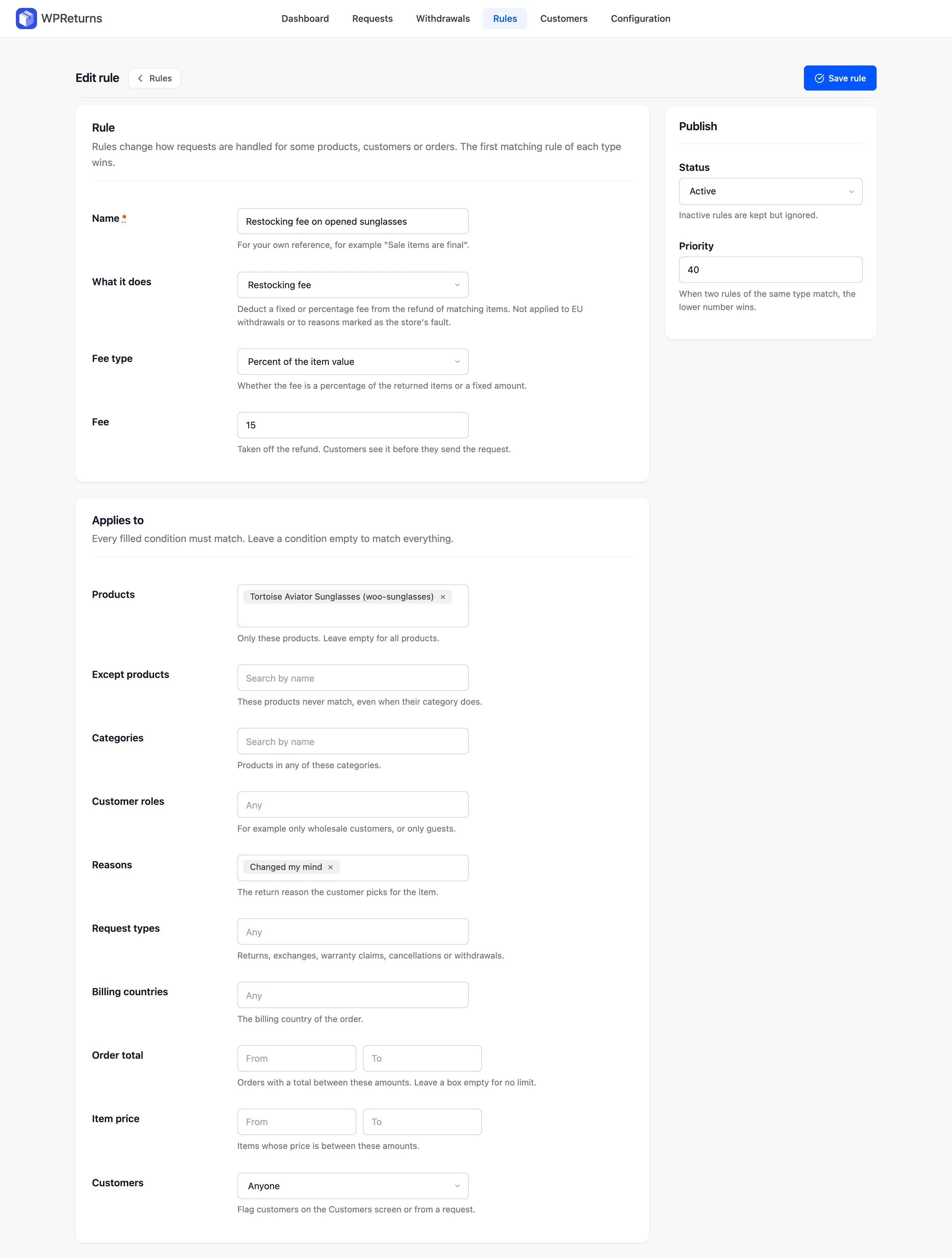
When two fee rules match, the lower priority number wins and the other rule is ignored.
A rule only affects requests submitted after you save it. Open requests keep their old totals. Our return rules guide lists every condition and rule type.
Step 3: Check What the Customer Sees
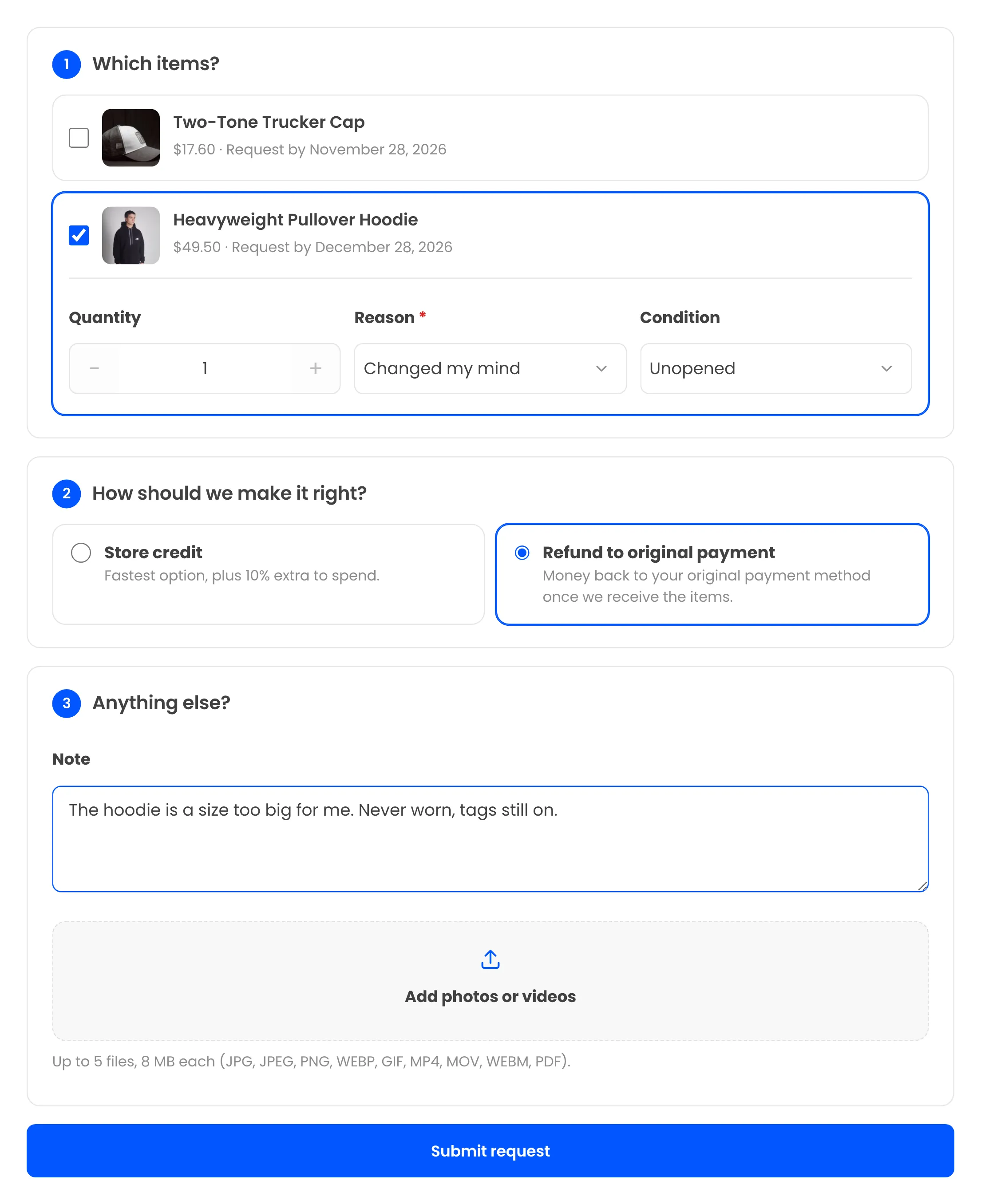
Place a test order and start a return as the customer. Pick the item, choose Changed my mind as the reason and read the totals before you press Submit request. The fee shows on the request form and again on the request page before anything is resolved.
WPReturns records the item condition the customer picks, such as Unopened, but a rule cannot match on it in version 1.0.0. Judge the condition when the parcel arrives.
3My Account > Returns > Request a return
What Happens to the Fee on the Refund
The restocking fee comes off the refund before any money moves. The customer gets the item value minus the fee and any return shipping fee. Each deduction appears as its own line on the request page, next to the total the customer will get.
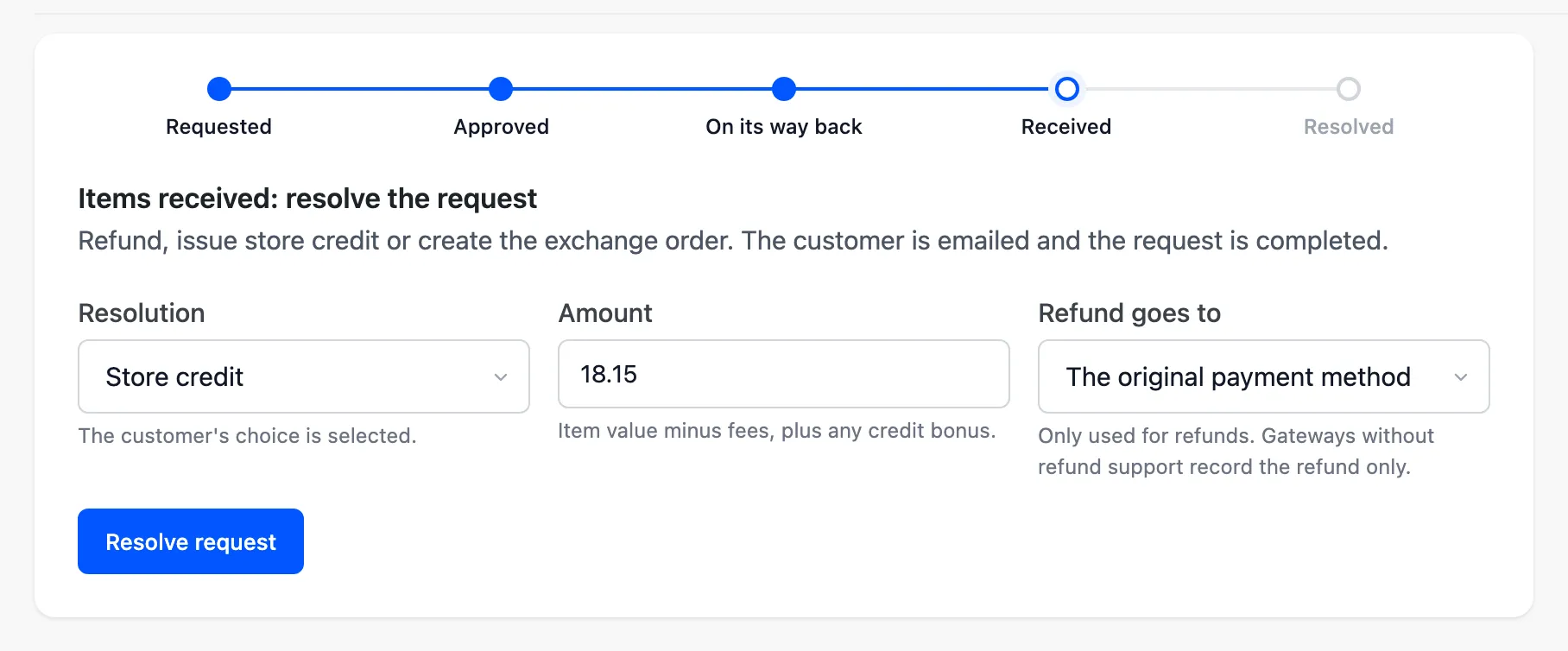
Store credit works from the same number. WPReturns works the credit bonus out on the return value after fees.
Say a $120 return carries an $18 fee and the store offers a 10 percent bonus. The customer has $102 of value and receives a $112.20 credit.
Restocking the item is a separate step from charging the fee. When you mark the parcel received, a Restock switch puts the items back into WooCommerce stock and logs each one. The switch starts on when Restock is on in the Resolutions tab.
WPReturns > Requests > Resolve request
How to Write a Restocking Fee Policy
A restocking fee policy is one plain sentence in your return policy, with the rate and the cases it covers. Show the same sentence on the product page and at checkout. A fee the customer meets for the first time on the return form is the one that draws complaints.
A policy line can look like this:
Items returned opened or used for a change of mind carry a 15% restocking fee.No restocking fee applies to defective items or items we sent by mistake.If you run Google Shopping, add the same fee to your return policy settings so listings match your page. Google accepts a percentage or a fixed amount, and the feed takes one type per policy (Google Search Central). Keep the wording on your site the same as the number you submit.
When to Skip a Restocking Fee
Skip the fee when the item is defective, the wrong item was sent or the return is an EU withdrawal. Also skip it where the fee costs more goodwill than it earns, such as a $6 item. A cheap item rarely repays the work of arguing over a fee.
Four cases usually cost more goodwill than the fee earns:
- A defective item, a wrong item or any other mistake on your side.
- An EU withdrawal inside the 14 day right.
- A cheap item where the fee is smaller than the time spent explaining it.
- A first order from a customer you want back.
You have other levers. A returnless refund lets the customer keep a cheap item, and store credit keeps the sale in your shop. Our guide to store credit vs refund shows when each fits.
An exchange keeps the order too. The exchange price difference guide walks through the money.
In WPReturns Pro a Keep it rule resolves the request without asking for the item back. Auto-approve pairs with it for small orders. The keep-it rule type sits next to the restocking fee in the same Rules screen.
Conclusion
What is a restocking fee worth to your store? It pays for the work of a return, and it stays fair only when the customer saw it first and the return was their choice.
Charge it on opened or changed-mind returns, never on your own mistakes, and never on an EU withdrawal. Write the rate in your policy and test the checkout wording.
WPReturns Pro handles the rule and the exemptions for you. See the return rules feature or the pricing page when you want it on your store.